
Accessing lifecycle surveys
Navigate to Survey > Pulse and eNPS Surveys and scroll down to the Life Cycle Surveys card. Here you’ll see all available lifecycle survey templates. Click Get Started on any template to open it, then click Run Survey at the top-right to configure and launch it.Available lifecycle survey types
Onboarding / new hire feedback survey
Onboarding / new hire feedback survey
When it runs: Shortly after an employee joins — typically in their first one to two weeks.What it measures: The quality of the recruitment experience, the offer and onboarding process, initial impressions of the team and culture, and whether the employee has the tools and information they need to get started.Why it matters: Early dissatisfaction often goes unvoiced until it’s too late to address. Catching friction in the onboarding process early helps HR improve the experience for future hires and increases the likelihood that new employees stay.Typical questions:
- How smooth was your recruitment and offer experience?
- Did you have the resources and access you needed from day one?
- How welcoming did your team make you feel?
Onboarding day-30 survey
Onboarding day-30 survey
When it runs: 30 days after the employee’s start date.What it measures: Whether the first month met expectations, clarity around the role, manager and peer relationships, and confidence in the organization’s culture.Why it matters: The 30-day mark is a critical inflection point. Employees who feel unclear about their role or disconnected from their team are at higher risk of early departure. A day-30 survey identifies these issues while there’s still time to intervene.Typical questions:
- Do you have a clear understanding of what’s expected in your role?
- Has your manager provided enough guidance and support?
- Do you feel your skills are being used effectively?
Training feedback survey
Training feedback survey
When it runs: After the completion of a training program, course, or learning initiative.What it measures: The relevance, quality, and effectiveness of the training; whether employees feel more capable as a result; and whether the learning format worked for them.Why it matters: L&D programs are a significant investment. Training feedback surveys reveal whether the investment is delivering value and what needs to change.Typical questions:
- Was the training content relevant to your day-to-day work?
- Was the training delivered effectively?
- Do you feel more confident in your role after the training?
Performance review feedback survey
Performance review feedback survey
When it runs: Following a performance review cycle.What it measures: Employee satisfaction with the appraisal process — fairness, clarity of feedback received, goal-setting quality, and career conversation quality.Why it matters: How employees experience the appraisal process directly affects their motivation, trust in leadership, and engagement. Negative perceptions of performance reviews are a key driver of disengagement.Typical questions:
- Did you feel your performance was evaluated fairly?
- Did the review help you understand your strengths and development areas?
- Did you and your manager agree on clear goals for the next period?
Exit survey
Exit survey
When it runs: When an employee submits their resignation or is offboarded.What it measures: The primary reason for leaving, satisfaction with management and culture, feedback on compensation and career growth, and whether the organization could have done anything to retain the employee.Why it matters: Exit feedback is some of the most honest feedback you’ll receive. It identifies systemic issues — management problems, compensation gaps, culture concerns — that current employees may be reluctant to voice.Typical questions:
- What is the primary reason for your decision to leave?
- How would you describe your experience working here?
- Would you consider returning to this organization in the future?
DEI survey
DEI survey
When it runs: Periodically, typically once or twice per year, or following a significant organizational change.What it measures: Employee perceptions of diversity, equity, and inclusion in the workplace — including hiring and promotion fairness, representation, psychological safety for underrepresented groups, and whether DEI commitments are felt in practice.Why it matters: DEI surveys provide data-driven insight into whether your organization’s inclusion initiatives are having a real impact on employee experience, and where gaps remain.
Leadership effectiveness / manager effectiveness survey
Leadership effectiveness / manager effectiveness survey
When it runs: Periodically, or following changes in leadership structure.What it measures: How effectively managers communicate, support their team’s development, provide feedback, handle conflict, and create a positive team environment.Why it matters: Leadership quality is one of the most significant drivers of employee engagement and retention. Identifying management gaps early allows organizations to provide targeted coaching and development.Typical questions:
- Does your manager give you clear expectations and direction?
- Does your manager recognize your contributions?
- Do you feel comfortable raising concerns with your manager?
Feedback from peers / direct reports
Feedback from peers / direct reports
When it runs: As needed, often as part of 360-degree feedback cycles.What it measures: Peer-to-peer and upward feedback on collaboration, communication, and contribution.Why it matters: Multi-directional feedback gives employees and managers a fuller picture of how they are perceived, enabling more balanced development conversations.
Running a lifecycle survey
1
Navigate to lifecycle surveys
Go to Survey > Pulse and eNPS Survey and scroll to the Life Cycle Surveys card.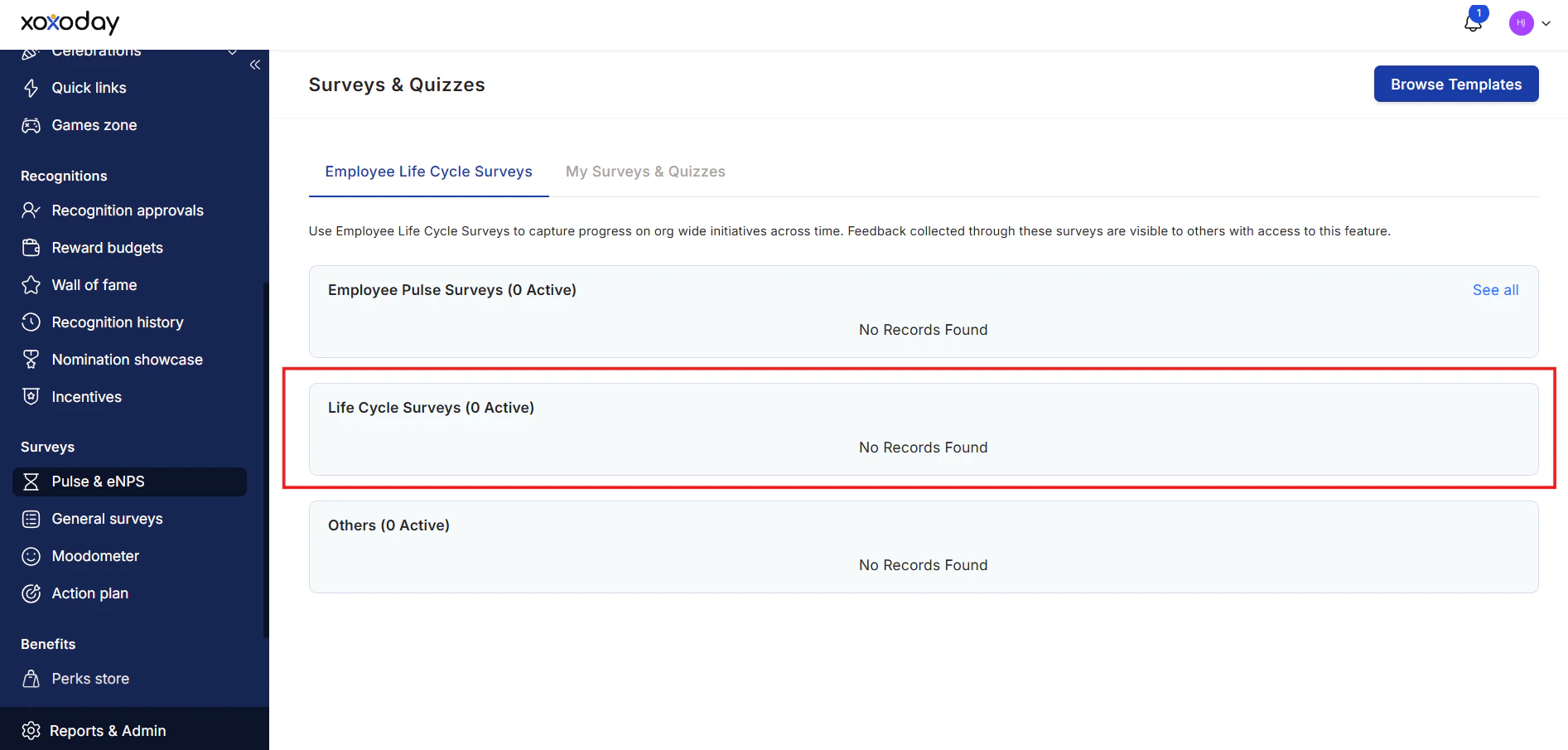
2
Select a template
Find the survey type you want to run and click Get Started to open the template.
3
Run the survey
Click Run Survey at the top-right. Use the calendar to adjust the survey period if needed.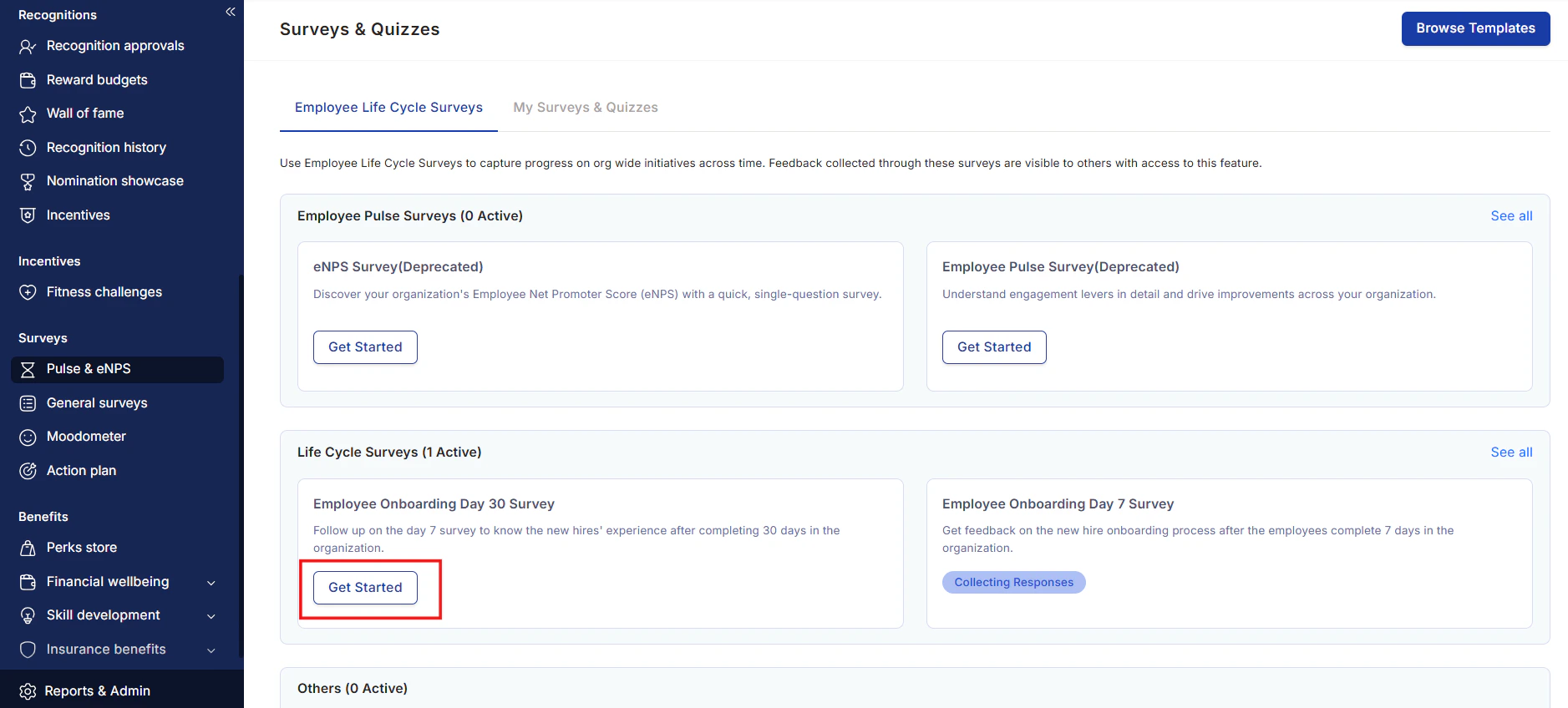
4
Review survey settings
Confirm the survey participants, questions, and invite time are correct.
5
Launch
Click Run Survey to send the invites. Respondents receive an email with a link to complete the survey.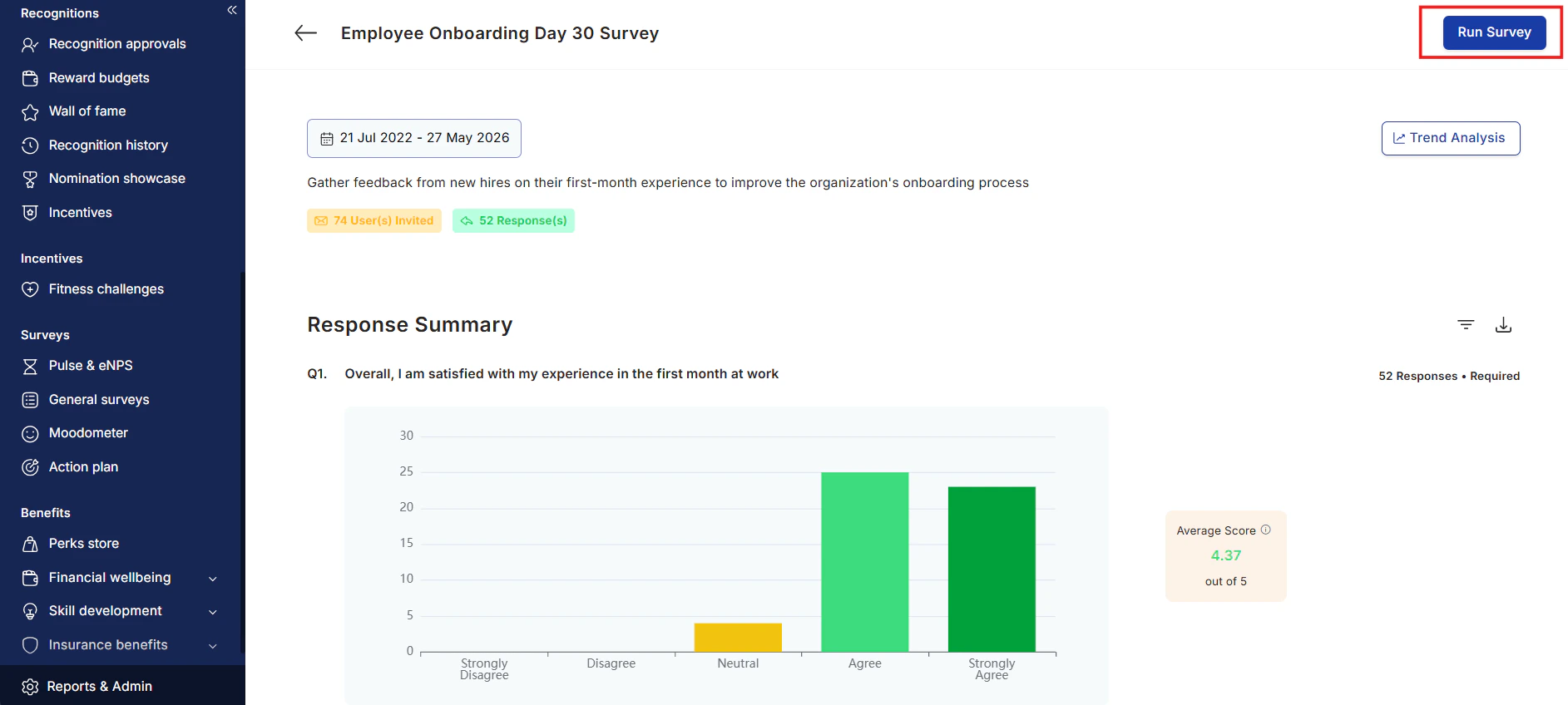
Customizing lifecycle survey templates
All lifecycle survey templates can be customized before you launch them. You can:- Add questions from the question bank
- Write your own custom questions using the available question types (NPS, Likert Scale, Text Response, Short Text, Multiple Choice)
- Remove questions that aren’t relevant to your organization
Template list
Empuls includes ready-to-use templates for the following surveys (accessible via Browse Templates):- Feedback From Manager Survey
- Feedback From Direct Reports Survey
- Feedback From Peers Survey
- New Hire Feedback Survey
- Onboarding Day 30 Survey
- Training Feedback Survey
- Performance Review Feedback Survey
- Manager Effectiveness Survey
- Exit Survey
- DEI Survey
- Reward and Recognition Satisfaction Survey
FAQs
Can I automate lifecycle surveys based on employee events?
Can I automate lifecycle surveys based on employee events?
Lifecycle surveys can be configured to run based on employee milestones such as date of joining. When creating or editing a survey, select Custom Selection for respondents and add a condition based on the employee’s date of joining to automatically target new hires at the right interval.
Can lifecycle surveys be anonymous?
Can lifecycle surveys be anonymous?
Yes. You control the anonymity setting for each survey individually. For exit surveys, anonymity is strongly recommended to encourage candid responses.
What if I want to create a lifecycle survey not in the default templates?
What if I want to create a lifecycle survey not in the default templates?
Use Browse Templates > Create from Scratch > Create Your Own Survey to build a fully custom survey. See Create surveys for detailed instructions.
Where can I view lifecycle survey results?
Where can I view lifecycle survey results?
Open the survey from the survey dashboard and click into its analytics view. See Survey analytics for instructions on interpreting results.
Related
Create surveys
Step-by-step guide to building any survey type, including question types and scheduling.
Survey analytics
View and interpret results, compare segments, and take action on feedback.
eNPS and pulse surveys
Learn how eNPS and engagement driver scores are calculated and interpreted.