
Custom reports let admins create tailored views using filters and metrics specific to their organisational needs. Reports can be saved for recurring use, shared with colleagues, scheduled for email delivery, or edited and deleted as needed.
To access: Navigate to Admin Hub → Reports → Custom Report.
The report listing has two tabs:
- Saved reports: All reports you have created, with options to share, schedule, edit, or delete each one.
- Scheduled reports: All report schedules, with options to edit, enable, or disable each schedule.
Search and manage custom reports
1
You can search for a custom report
You can search for a custom report by its name or description. Alternatively, filter reports by adding an email ID.
2
You can share, schedule, edit, or delete a report
You can share, schedule, edit, or delete a report. Use the share icon and enter the details of the person you want to send it to. Click on the three-dot menu to schedule, edit, or delete the report. If a report is already scheduled, the menu shows View schedule instead of Schedule report.
Viewing capabilities
Empuls lets admins, HRBPs, managers, and leaders view reports from different perspectives. This ensures every stakeholder sees insights relevant to their responsibilities.View as (any employee profile)
You can switch the report view to any employee profile. This helps you understand how reports and data appear from their point of view. Use cases:- Verify whether a user has correct visibility.
- Troubleshoot access or data issues.
- Validate manager or HRBP report experience.
Role-based viewing
Available roles typically include:- Super Admin — Full visibility across all teams, budgets, awards, and recognition activity.
- Manager — Sees recognition given and received within their reporting tree. Insights include team performance, participation, and gaps.
- HRBP — Sees data for employees mapped to their business unit or function. Useful for programme oversight, adoption tracking, and department-level insights.
- Cost center head — Sees recognition budgets, award usage, and adoption patterns for their cost center.
- Understand how different leaders see recognition and budget reports.
- Validate governance and ensure the right data is shown to the right role.
- Enable HRBPs and managers to make data-driven decisions without exposing global data.
- Improves governance: Ensures sensitive data is only seen by authorised roles.
- Builds transparency: Managers and HRBPs get insights specific to their teams.
- Supports accurate decision-making: Each role sees the metrics they need most.
- Simplifies troubleshooting: Admins can switch views to replicate what others see.
Creating a custom report
1
Click Create Custom Report
Click Create Custom Report.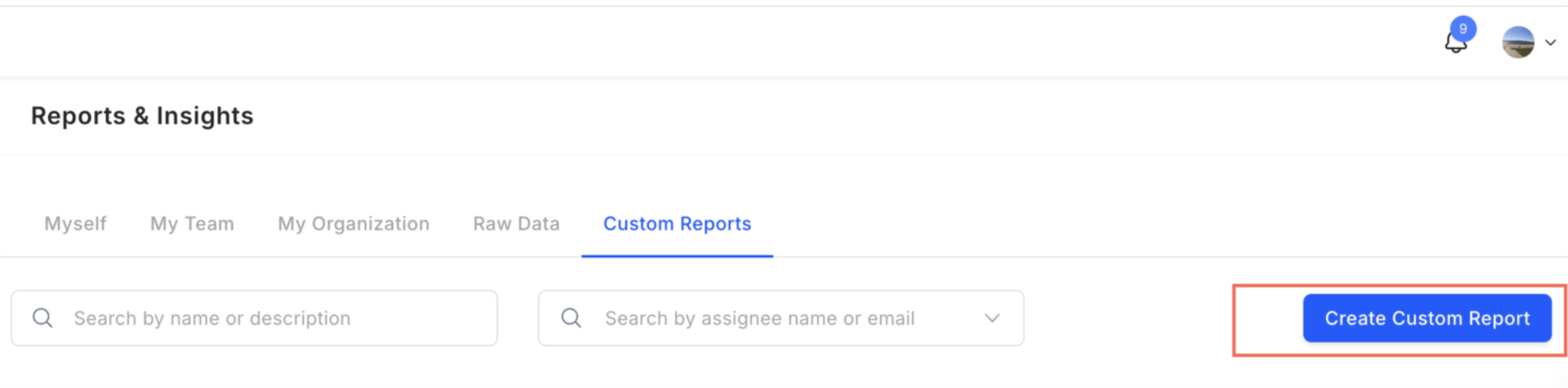
2
Choose the report type
Choose the report type and click Continue:
- Data report: Build a report from a source report with your own filters and columns. The steps below cover this flow.
- Summary report: Select a pre-built summary report and schedule it for email delivery. See Schedule a summary report.
3
Select a source report from the drop-down menu
Select a source report from the drop-down menu. Available options: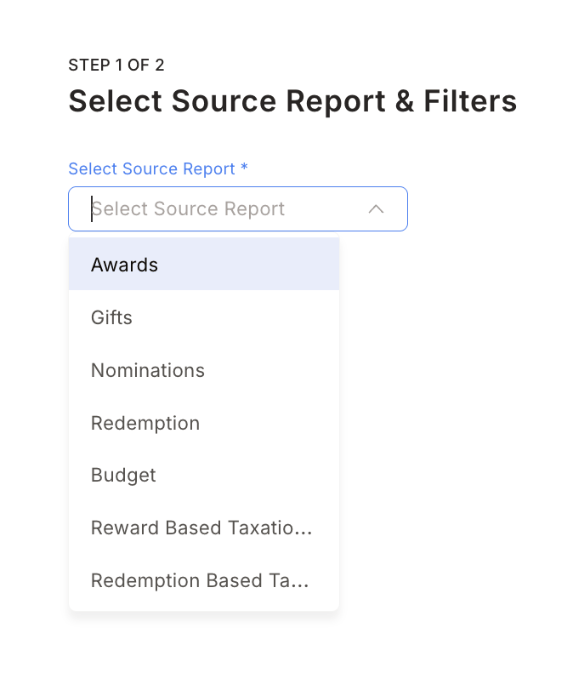
- Awards
- Gifts
- Nominations
- Budget
- Redemption
- Reward based taxation
- Redemption based taxation
4
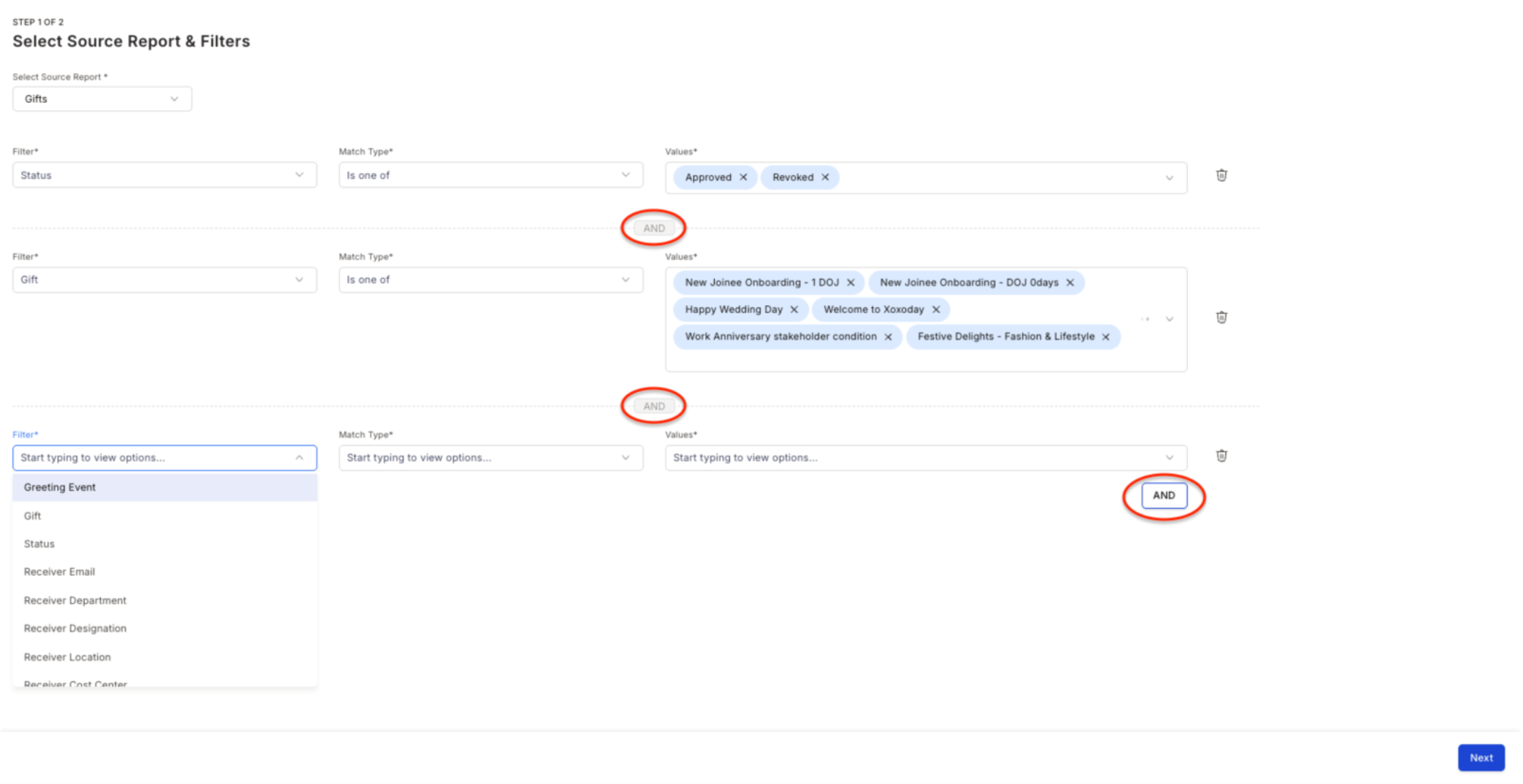
Use the filters and add details
Use the filters and add details. You can apply multiple filters to customise the report. Click Next.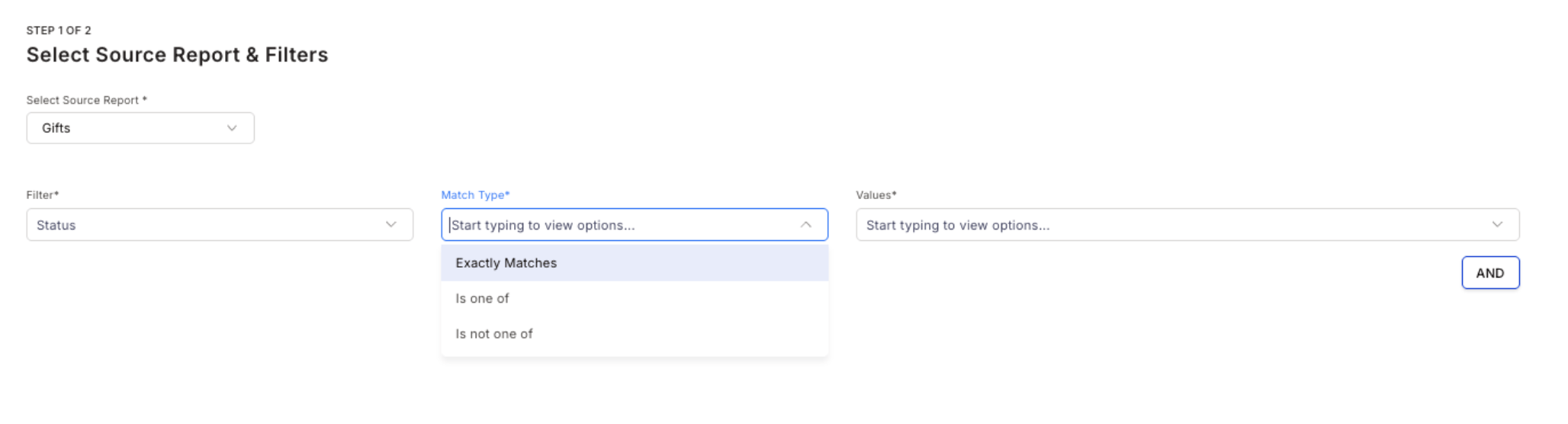
5
Add a custom name and description
Add a custom name and description for the report. Click Create Report. Empuls confirms the report was created and offers to Schedule it or View report.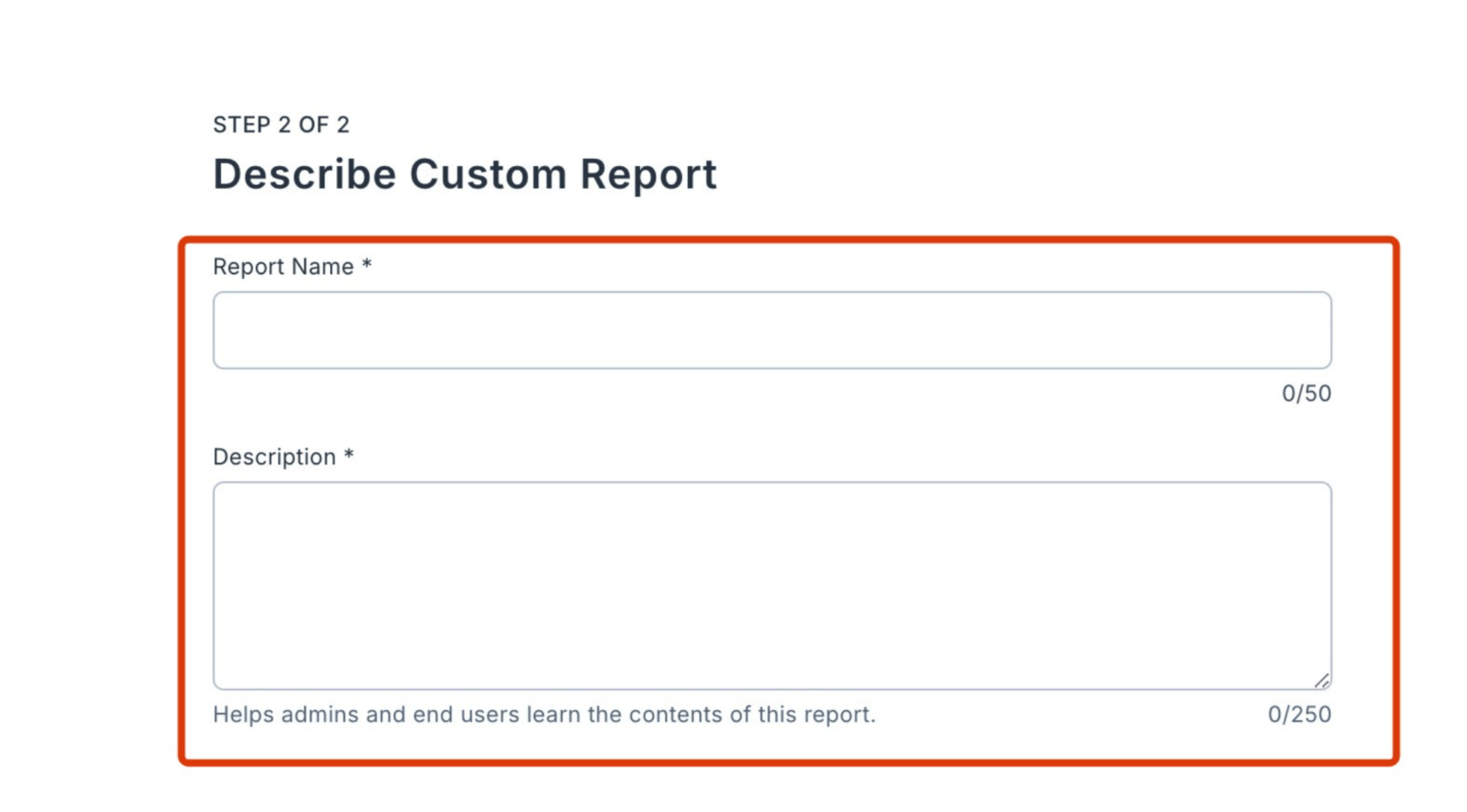
6
Click on the report to expand it
Click on the report to expand it. Add a custom date range by selecting a start and end date. Apply the filter to view the report.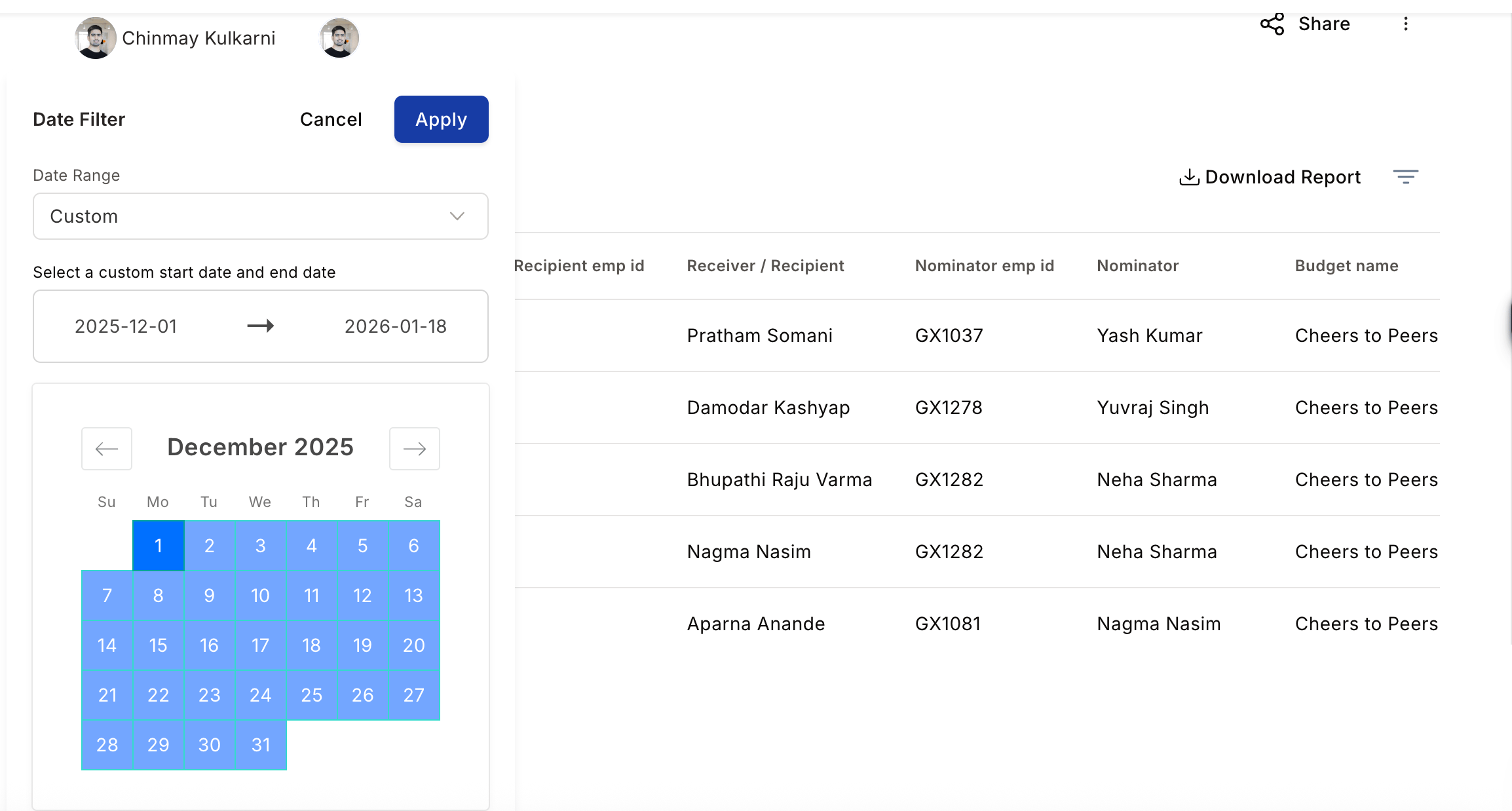
Scheduling reports
Schedule a report to have Empuls email it to recipients automatically at a set frequency. You can schedule data reports and summary reports.Schedule a data report
Data reports are the custom reports you build with your own filters and columns.1
Open the schedule dialog
On the Saved reports tab, click the three-dot menu next to a report and select Schedule report. You can also click Schedule in the confirmation dialog right after creating a report.
2
Select a frequency
Select a frequency: daily, weekly, biweekly, monthly, quarterly, or yearly. Monthly is selected by default.
3
Add recipients
Search for employees by email and add them as recipients.
4
Save the schedule
Click Schedule report. Empuls emails the report to all recipients at the selected frequency.
Schedule a summary report
Summary reports are pre-built reports, such as reward based taxation, that Empuls sends to recipients based on their role.1
Select the summary report
Click Create Custom Report, choose Summary report, and select a report from the drop-down menu. Click Schedule.
2
Select a frequency
Select a frequency: weekly, biweekly, monthly, quarterly, or yearly. Monthly is selected by default.
3
Review recipients
Recipients are populated automatically based on the report, such as super admins, managers, business unit heads, department heads, HR representatives, or cost center heads. To leave out specific users, click Add exclusion and search for the users to exclude.
4
Save the schedule
Click Schedule report.
Manage scheduled reports
The Scheduled reports tab lists every schedule with its name, report type, frequency, and status. Use the search bar to find a schedule by name. From the three-dot menu on a schedule you can:- Edit: Change the frequency, recipients, or exclusions.
- Disable or Enable: Pause email delivery without deleting the schedule, and resume it later.
FAQs
Does the platform include a report builder for custom or ad-hoc reports?
Does the platform include a report builder for custom or ad-hoc reports?
Yes. The platform includes a flexible report builder for creating custom or ad-hoc reports. Admins can define filters, select metrics, and customise data views. Reports can be saved for recurring use or exported for offline analysis, helping organisations track dynamic metrics like campaign participation or department-specific reward utilisation.
Can I schedule a custom report to be emailed automatically?
Can I schedule a custom report to be emailed automatically?
Yes. On the Saved reports tab, click the three-dot menu next to a report and select Schedule report. Choose a frequency and add recipients. Manage all schedules from the Scheduled reports tab, where you can edit, disable, or enable each schedule.
What source reports can I build a custom report from?
What source reports can I build a custom report from?
Custom reports can be built from the following sources: Awards, Gifts, Nominations, Budget, Redemption, Reward based taxation, Redemption based taxation, and Unpublished awards.
Related
Reports
Overview of all report types available in Empuls.
Raw data report
Export raw logs that feed custom report source data.
Access control
Control which roles can create and view custom reports.
Budget report
Pre-built budget analytics for quick insights.