
Navigation and customisation
- Filter view: Use the global drop-down menu to switch between different organisational views or reporting levels.
- Report options: Tailor the data by pivoting by User, Department, Cost Center and more.
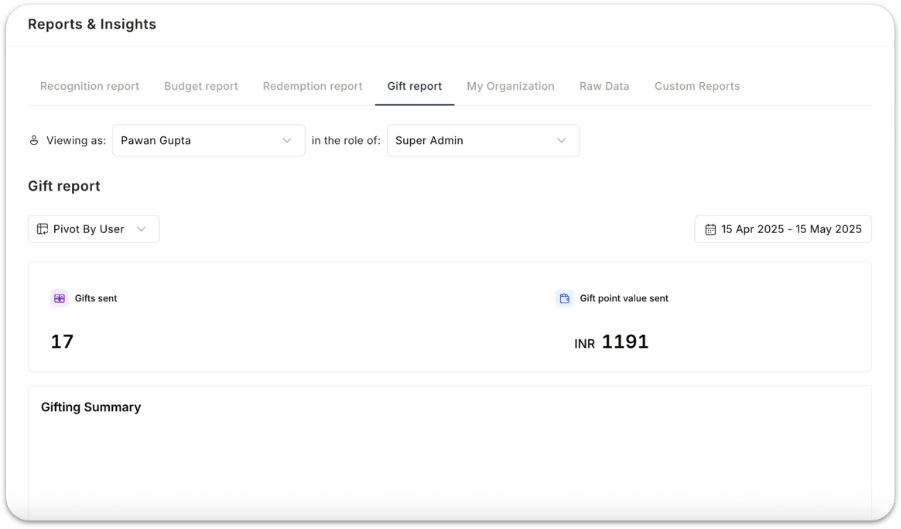
Key metrics
At the top of the report, admins see high-level insights:- Total gifts sent — Number of automated and manual gifts delivered in the selected period.
- Gift point value sent — Total monetary value of all points sent through gifting programmes.
Gifting summary
This section displays a detailed summary of all gift types delivered to each employee:- Birthday gift points received and value
- Service anniversary gift points received and value
- Onboarding gift points received and value
- Other gift points received and value
- HR can confirm that everyone received their milestone gifts.
- Managers can review team-level gifting fairness.
- Finance can validate budget utilisation and taxation implications.
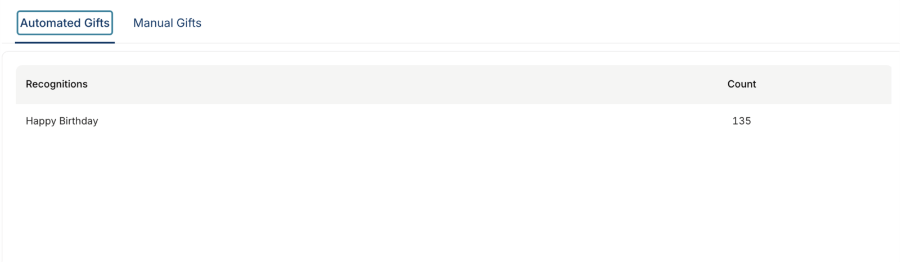
Automated gifts report
A breakdown of all gifts triggered by automation rules (LSA, birthdays, onboarding, custom automations). Displays:- Recognition type / gift category
- Count of instances triggered
- Birthday gifts → 40 triggers
- Mandatory module completion gift → 8 triggers
- 3-year work anniversary gift → 6 triggers
- 5-year work anniversary gift → 3 triggers
- 10-year work anniversary gift → 1 trigger
- Verify automations are functioning correctly.
- Identify patterns across tenure and events.
- Measure the reach of non-monetary and monetary milestone programmes.
Manual gifts report
Shows all manually delivered gifts by HR or managers, including:- Contest rewards
- Special appreciation gifts
- Festival gifts
- Any ad-hoc celebration gifting
- Track manual gift usage and ensure governance.
- Validate spend for department-owned gifting programmes.
- Monitor engagement during culture events or celebrations.
Why the gift report matters
- Ensures every employee receives birthdays, onboarding, and milestone celebrations.
- Eliminates manual tracking through real-time gifting visibility.
- Helps audit gifting spend and avoid oversights.
- Strengthens employee experience programmes with measurable insights.
- Supports transparency in automated and manual gifting processes.
FAQs
What is the difference between automated and manual gifts?
What is the difference between automated and manual gifts?
Automated gifts are triggered by rules you configure in Empuls — birthdays, work anniversaries, onboarding completions, and similar milestones fire automatically without HR intervention. Manual gifts are sent directly by HR or managers for ad-hoc occasions like contests, festivals, or special appreciations.
Can I verify whether a specific employee received their birthday or anniversary gift?
Can I verify whether a specific employee received their birthday or anniversary gift?
Yes. Use the gifting summary table and filter by employee name. The table shows each gift type (birthday, service anniversary, onboarding, and other), the points value sent, and delivery status. You can also use the automated gifts report to confirm how many times each automation rule fired.
Related
Reports
Overview of all report types available in Empuls.
Automate gifts
Set up the automation rules that appear in this report.
Gifts
Manage milestone and manual gifting programmes.
Budget report
See how gifting spend tracks against overall budget.