
What Empuls stores about you
Your organization’s privacy policy describes the legal basis for processing each category.
Export your data
You can request a complete export of everything Empuls holds about you:1
Open data-privacy controls
From your profile menu, click Privacy → My Data, or open the URL directly.
2
Open data-privacy controls
From your profile menu, click Privacy → My Data, or open the URL directly.
3
Open data-privacy controls
From your profile menu, click Privacy → My Data, or open the URL directly.
4
Open data-privacy controls
From your profile menu, click Privacy → My Data, or open the URL directly.
5
Open data-privacy controls
From your profile menu, click Privacy → My Data, or open the URL directly.
6
Open data-privacy controls
From your profile menu, click Privacy → My Data, or open the URL directly.
7
Click Export my data
Empuls schedules an export job. You’ll get an email when the export is ready, typically within 24 hours.
8
Click Export my data
Empuls schedules an export job. You’ll get an email when the export is ready, typically within 24 hours.
9
Download the export
The export is a ZIP containing JSON files (one per data category) and any media you’ve uploaded. The download link expires after 7 days for security.
10
Download the export
The export is a ZIP containing JSON files (one per data category) and any media you’ve uploaded. The download link expires after 7 days for security.
Right to be Forgotten
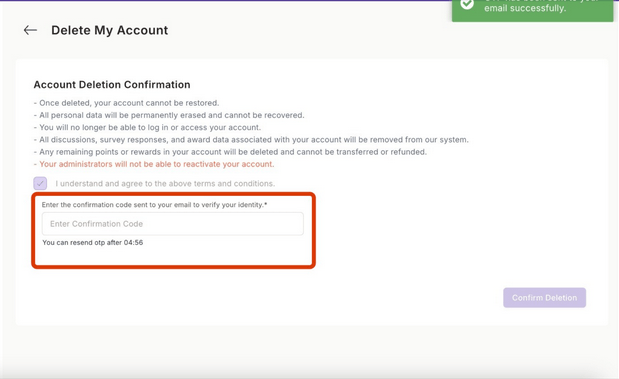
If you’re leaving the organization or want your data removed, you can request deletion of your entire Empuls account:1
Open the Right to be Forgotten page
2
Read the impact summary
Empuls shows exactly what will be deleted, what will be anonymized (recognitions you gave to others — those stay on the recipient’s record but show as “Anonymous”), and what is retained for legal or audit reasons (typically transaction records for the regulatory retention period).
3
Read the impact summary
Empuls shows exactly what will be deleted, what will be anonymized (recognitions you gave to others — those stay on the recipient’s record but show as “Anonymous”), and what is retained for legal or audit reasons (typically transaction records for the regulatory retention period).
4
Confirm by re-entering your password
Empuls requires you to re-authenticate before processing this request.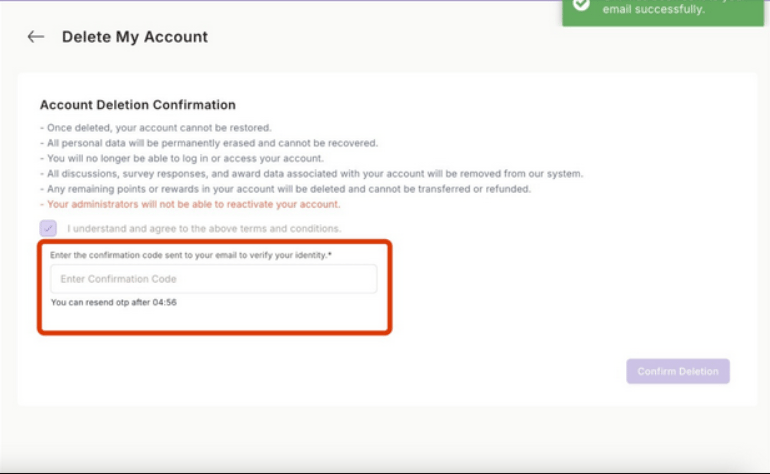
5
Wait for processing
Deletion runs as a background job. You’ll receive a confirmation email when complete — typically within 30 days, depending on your tenant’s data-residency rules.
What gets deleted vs anonymized
Survey responses you submitted anonymously stay anonymous. Identified survey responses are deleted with your account.
Regional considerations
- GDPR (EU/UK) — Right to access, portability, rectification, and erasure all supported.
- CCPA (California) — Right to know, delete, and opt out supported.
- PIPL (China), PDPA (Singapore), LGPD (Brazil) — Equivalent rights supported.
Limits and gotchas
- Deletion is irreversible. Once the job completes, you cannot recover your account or data.
- Some data lives on systems Empuls integrates with (your HR system, identity provider). Deletion in Empuls does not propagate there — request deletion from those owners separately.
- If you’re a Super Admin, you cannot delete your own account while it’s the only Super Admin on the tenant. Reassign Super Admin to a colleague first.
Related
Privacy policy
Legal terms governing data processing.
Information security
Technical safeguards Empuls applies.
Profile
Where you can edit your profile data directly.