> ## Documentation Index
> Fetch the complete documentation index at: https://help-empuls.xoxoday.com/llms.txt
> Use this file to discover all available pages before exploring further.
# Product Updates - November 2025
> Catch up on everything Empuls shipped in November 2025, from new features to fixes. No coding required for most teams.
We’re excited to bring you the latest updates from Xoxoday Empuls, designed to enrich your experience and drive better engagement across your organization.
**Here's what's new:**
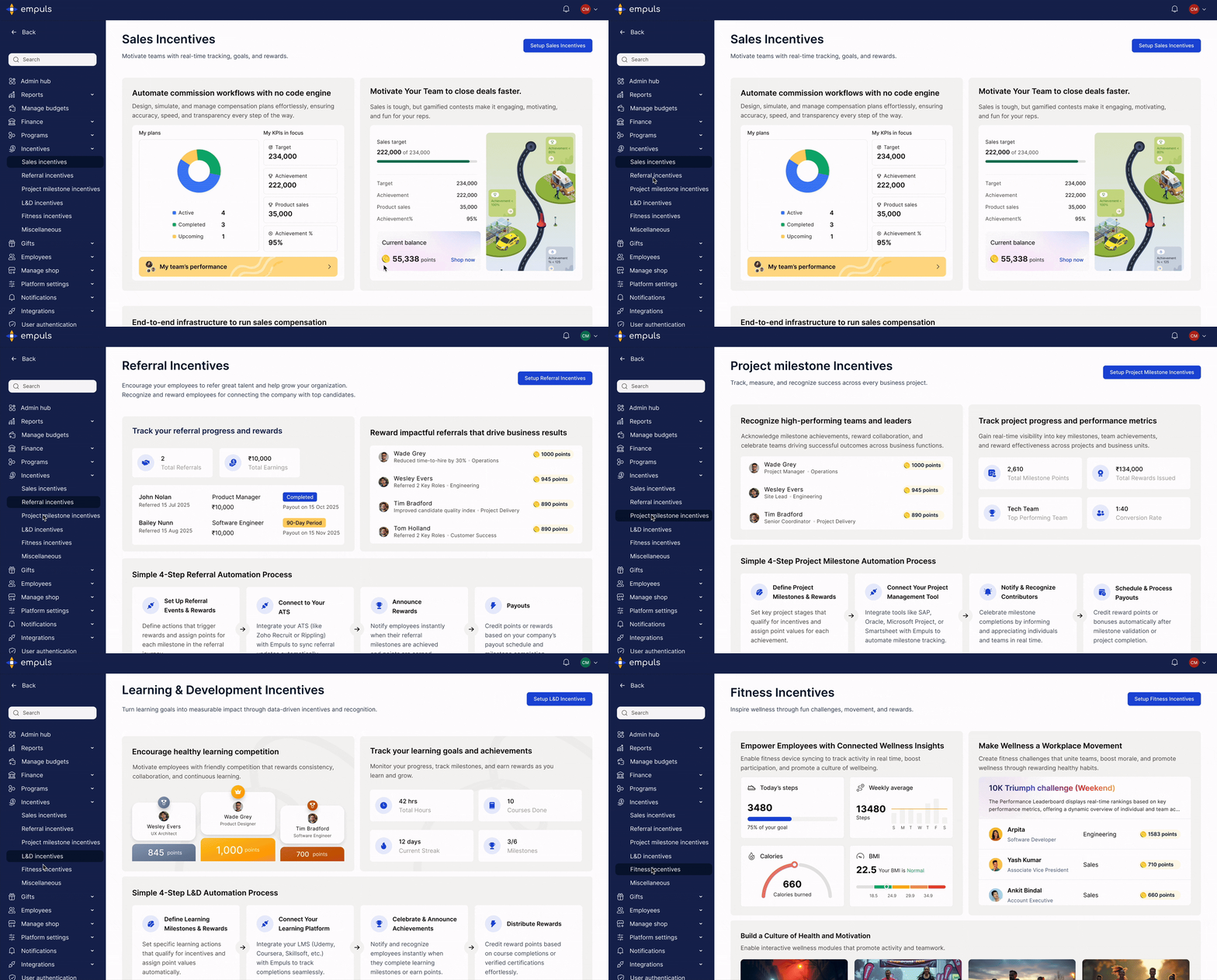
**1.** **Sales Incentive Management**
Empuls leaders can now drive performance and revenue growth with the new Sales Incentive Management module within Empuls.
* Align goals with business targets: Build incentive plans that focus teams on key priorities.
* Track performance: Monitor milestones, achievements, and earnings across teams and geographies.
* Engage & motivate teams: Leaderboards, gamified challenges, and mobile dashboards keep employees competitive.
* Integrate systems & gain insights: Connect CRM, ERP, and payroll for seamless data, with dashboards and reports for transparency.
* Accessible anytime: Enabled on demand for sales teams via web or mobile.
 **2. Simpler Employee Gifting**
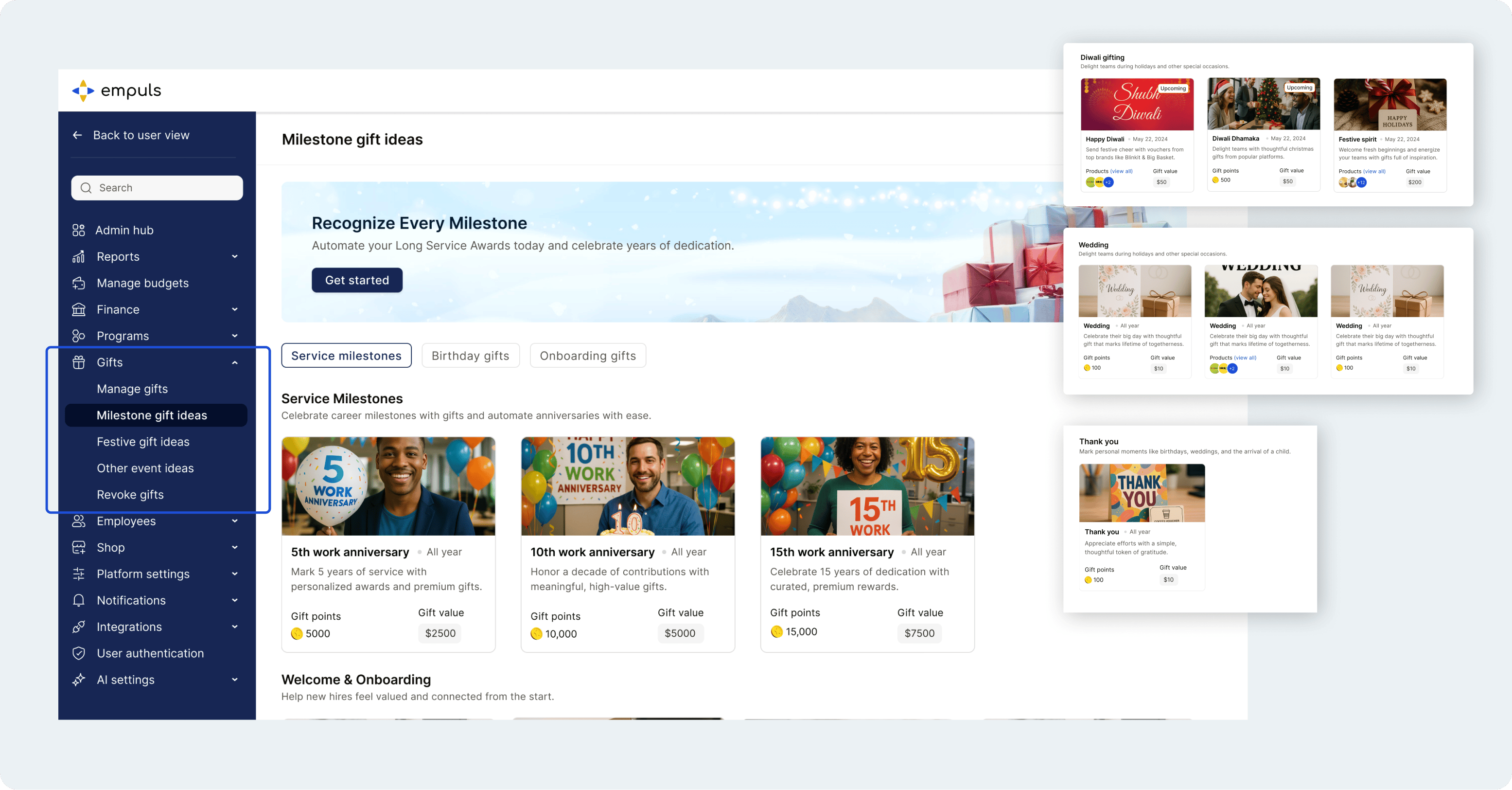
The gifting experience has been redesigned to save you time and delight your teams. Now you can:
* View all upcoming occasions in one place, birthdays, work anniversaries, baby arrivals, and more.
* Choose from ready-made gift collections: points, gift cards, merchandise, or a mix.
* Send gifts instantly, schedule them, or automate recurring events.
* Track gifts sent via links or collections, including redeemed, expired, and pending statuses.
* Access detailed reports with recipient info, points, and delivery or redemption status.
**2. Simpler Employee Gifting**
The gifting experience has been redesigned to save you time and delight your teams. Now you can:
* View all upcoming occasions in one place, birthdays, work anniversaries, baby arrivals, and more.
* Choose from ready-made gift collections: points, gift cards, merchandise, or a mix.
* Send gifts instantly, schedule them, or automate recurring events.
* Track gifts sent via links or collections, including redeemed, expired, and pending statuses.
* Access detailed reports with recipient info, points, and delivery or redemption status.
 **3. Smarter Reports & Insights**
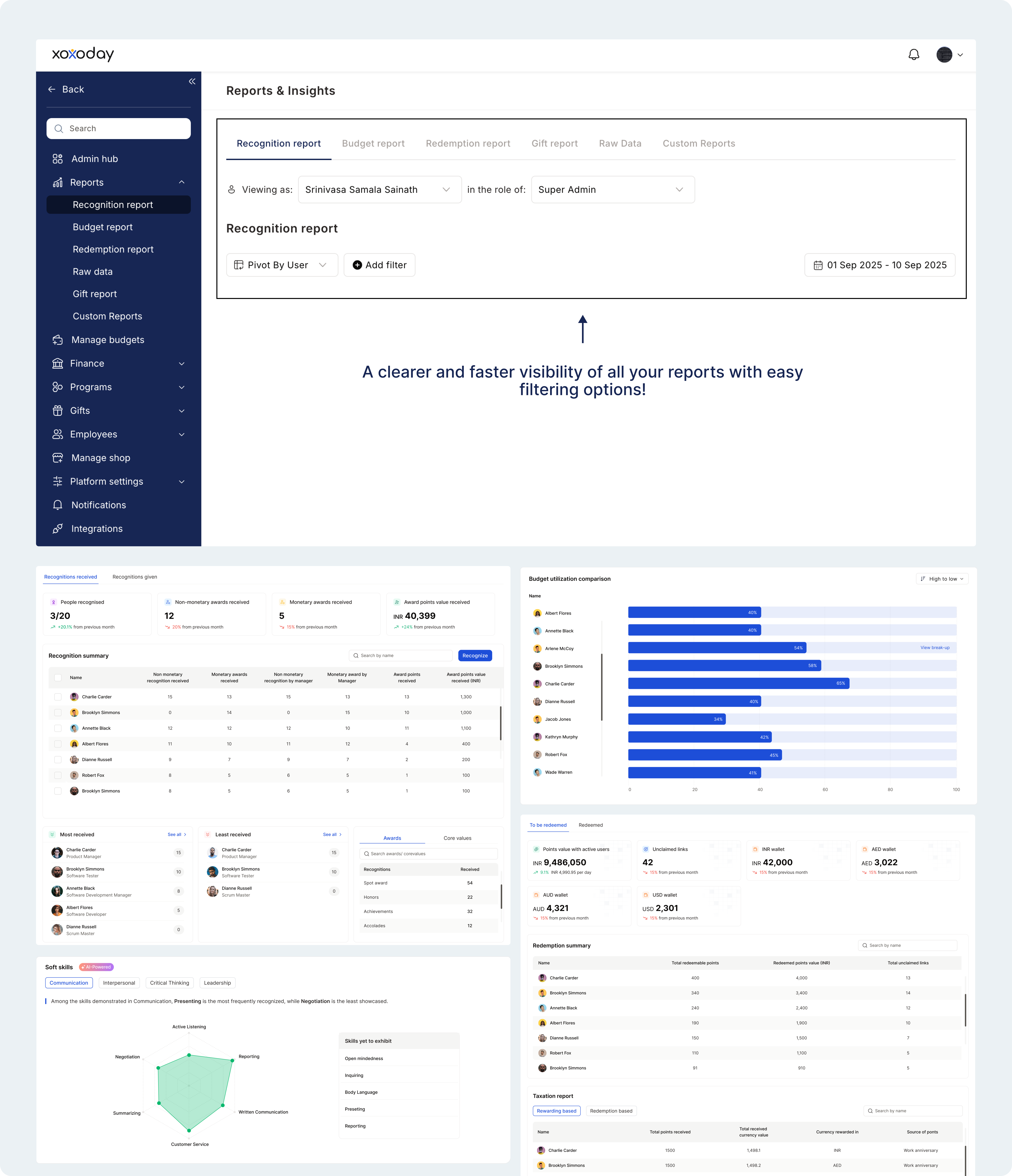
The Reports & Insights dashboard has been refreshed for clearer, faster visibility. You now have four new sections — Recognition, Budget, Gift, and Redemption to:
* Track who’s being recognized
* Monitor reward budgets and gift delivery
* See redemption trends and overall program performance
**3. Smarter Reports & Insights**
The Reports & Insights dashboard has been refreshed for clearer, faster visibility. You now have four new sections — Recognition, Budget, Gift, and Redemption to:
* Track who’s being recognized
* Monitor reward budgets and gift delivery
* See redemption trends and overall program performance
 **4. Collapsible Navigation Menu**
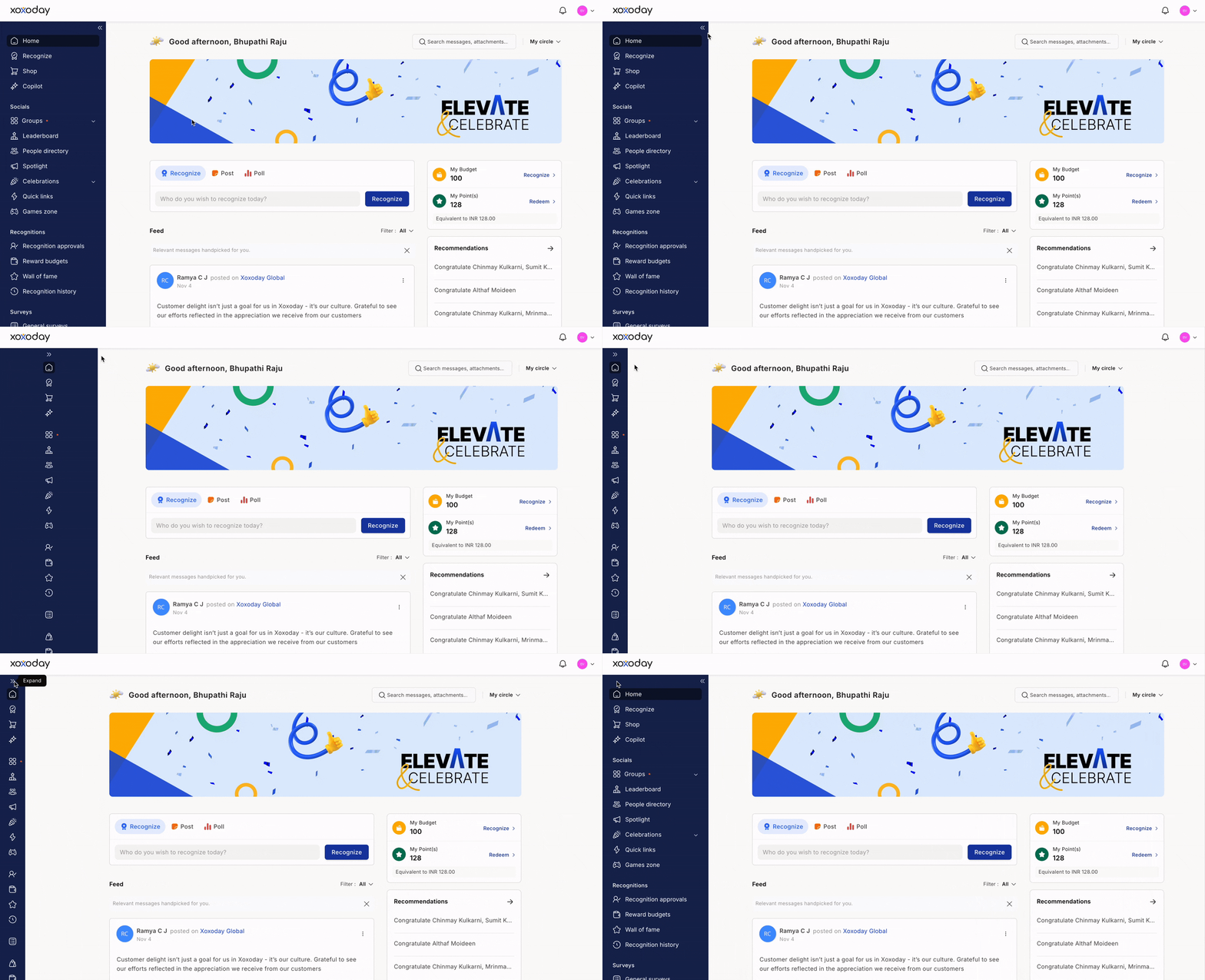
We’ve added a collapsible menu to the left navigation give you more workspace, reduce clutter, and improve focus, especially on mobile screens. Key icons remain accessible for quick navigation.
**4. Collapsible Navigation Menu**
We’ve added a collapsible menu to the left navigation give you more workspace, reduce clutter, and improve focus, especially on mobile screens. Key icons remain accessible for quick navigation.
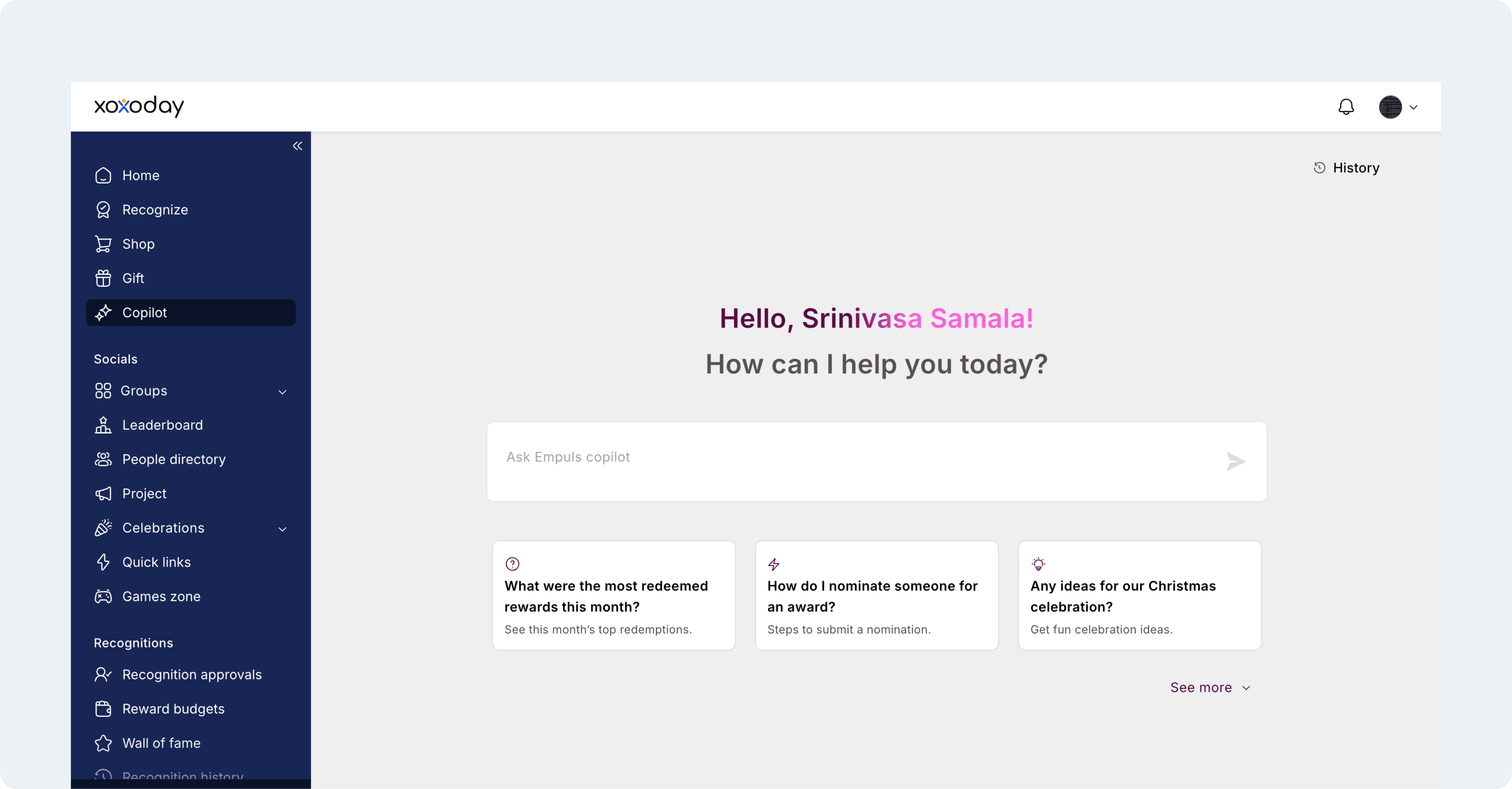
 **5. Improved Agent Home Screen**
Inspired by modern AI interfaces, the agent home screen now offers better discoverability, smoother navigation, and a cleaner layout to help agents work more efficiently.
**5. Improved Agent Home Screen**
Inspired by modern AI interfaces, the agent home screen now offers better discoverability, smoother navigation, and a cleaner layout to help agents work more efficiently.
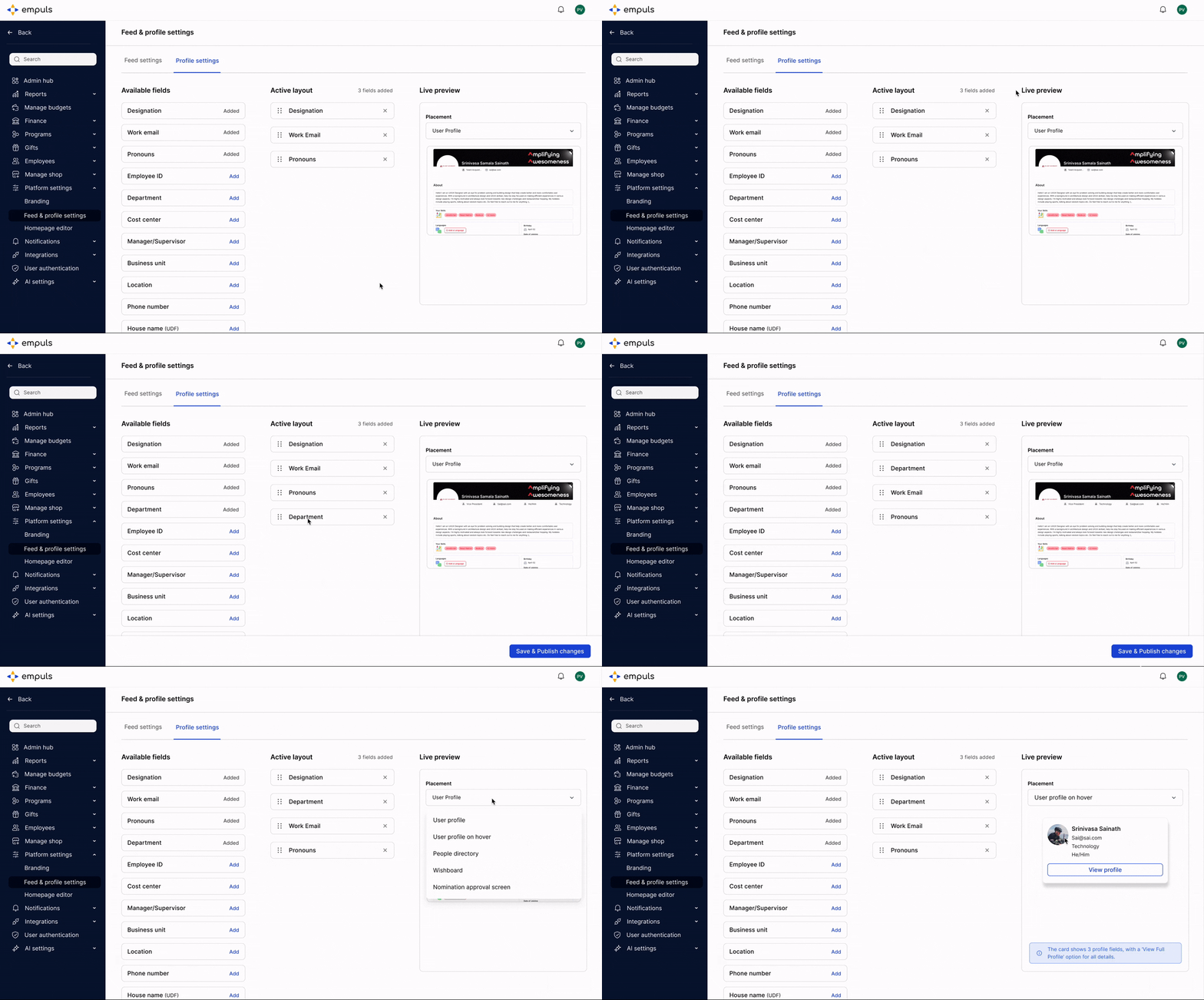
 **6. Custom Field Display in Employee Profiles**Admins can now choose which aspects of an employee’s profile which are visible to others. This enhancement gives greater control over what information — such as designation, department, or other custom fields — is disclosed publicly.
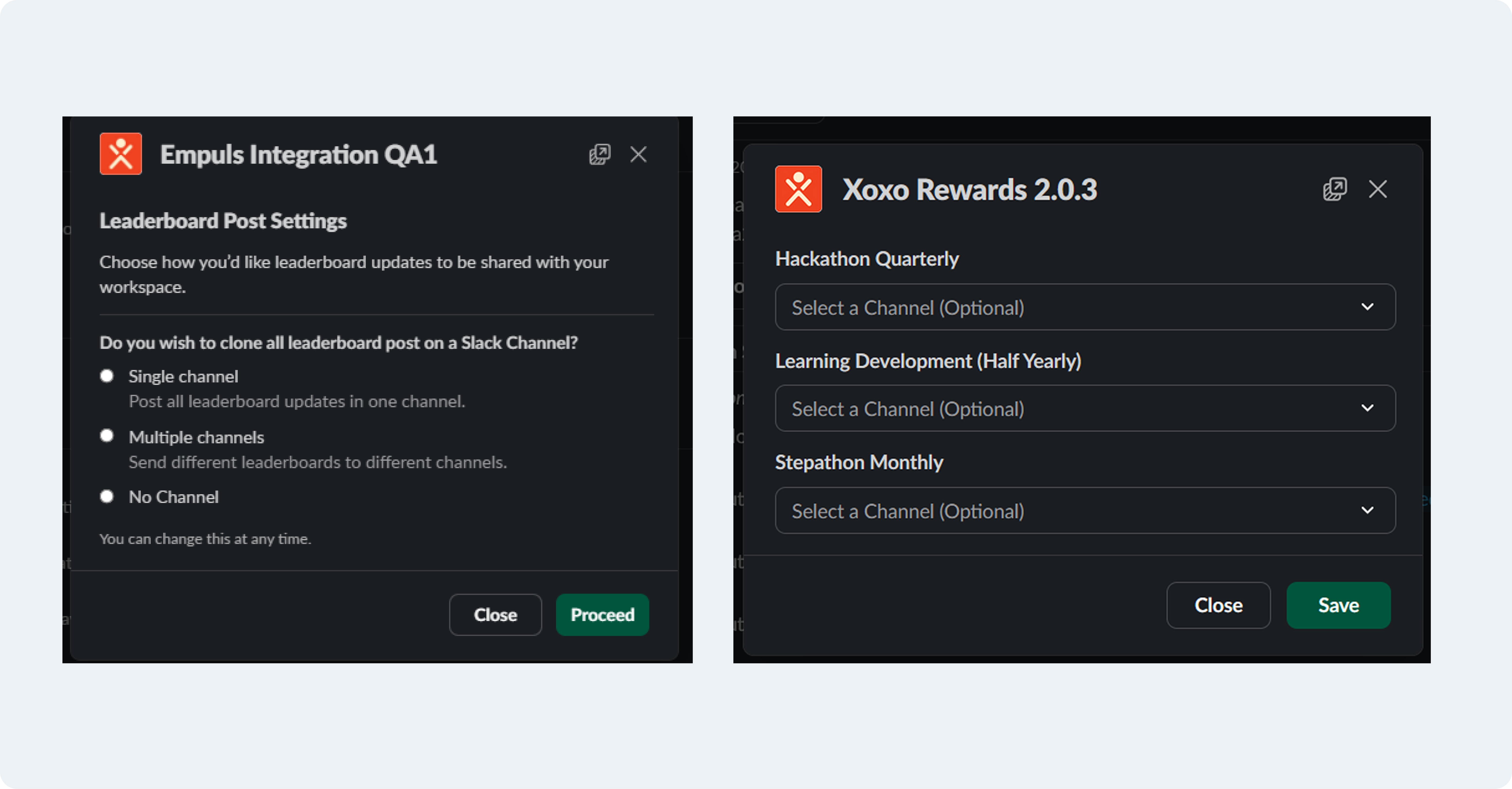
 \*\*7. Custom Slack Channels for Leaderboards
\*\*Admins can now choose specific Slack channels for each leaderboard, ensuring recognition posts reach the right teams instead of one common channel.
\*\*7. Custom Slack Channels for Leaderboards
\*\*Admins can now choose specific Slack channels for each leaderboard, ensuring recognition posts reach the right teams instead of one common channel.
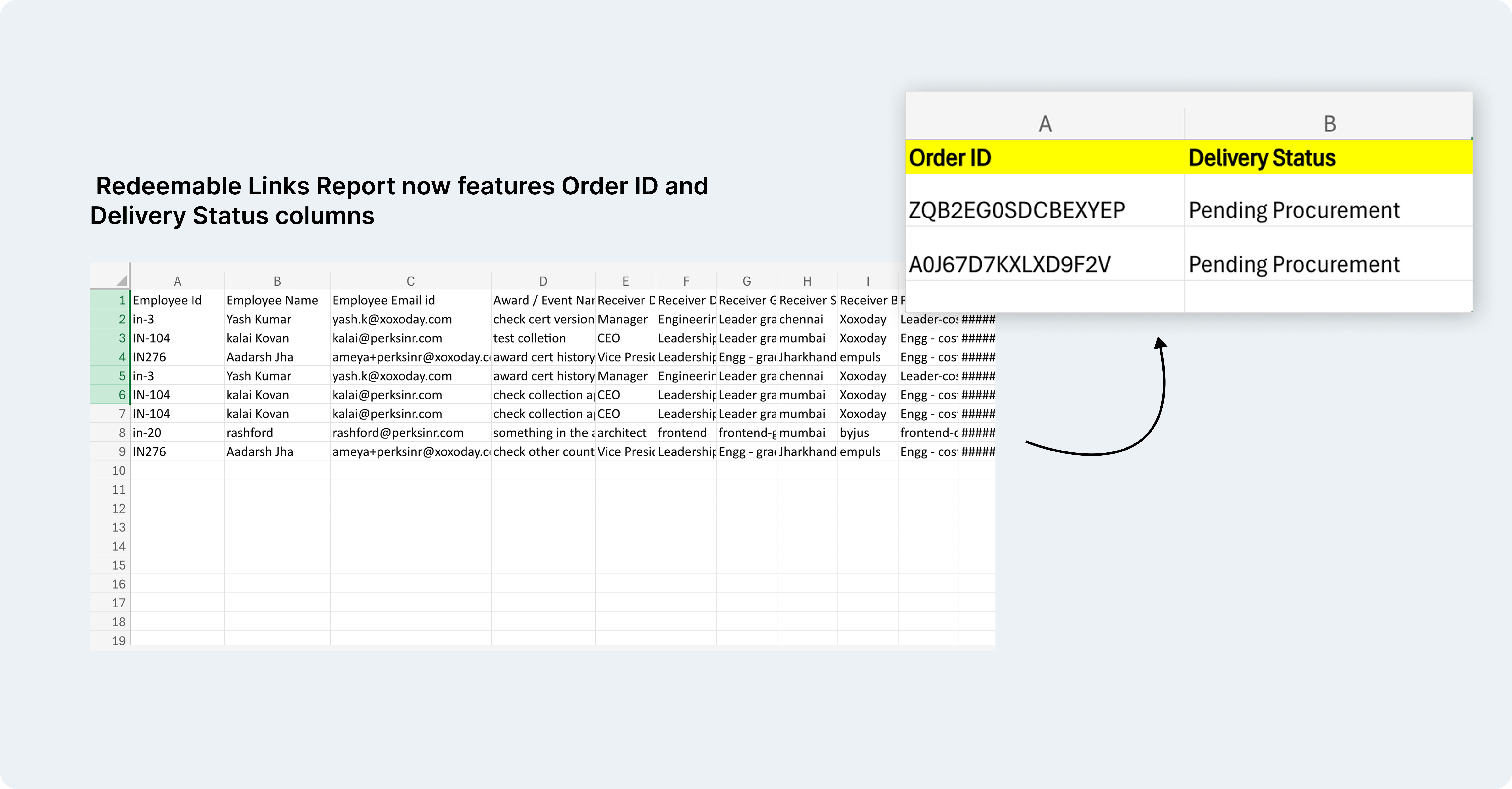
 **8. Redeemable Links Report Enhancements**
Stay on top of your gift deliveries! The Redeemable Links Report now features Order ID and Delivery Status columns to help you track every gift — delivered or pending — in one quick view.
**8. Redeemable Links Report Enhancements**
Stay on top of your gift deliveries! The Redeemable Links Report now features Order ID and Delivery Status columns to help you track every gift — delivered or pending — in one quick view.
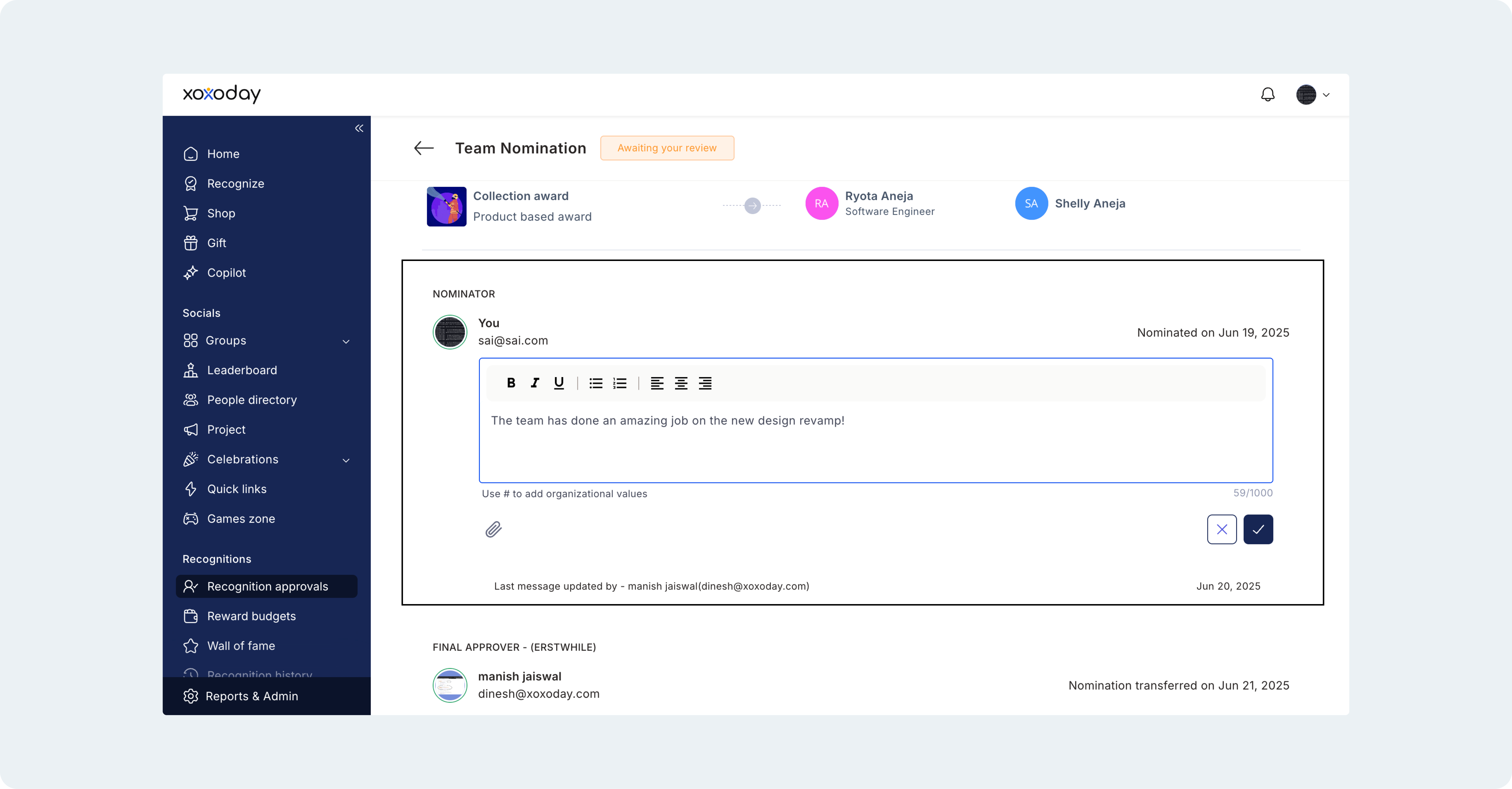
 **9. Approvers Can Edit Custom Question Answers**
Approvers can now edit responses to all types of custom questions — including free text, multiple choice, and citation fields. This helps ensure nominations are accurate and well-formatted before publishing. Edits are synced across web, mobile, Slack, and MS Teams, with a *“Last updated by”* note indicating who made the changes and when.
**9. Approvers Can Edit Custom Question Answers**
Approvers can now edit responses to all types of custom questions — including free text, multiple choice, and citation fields. This helps ensure nominations are accurate and well-formatted before publishing. Edits are synced across web, mobile, Slack, and MS Teams, with a *“Last updated by”* note indicating who made the changes and when.
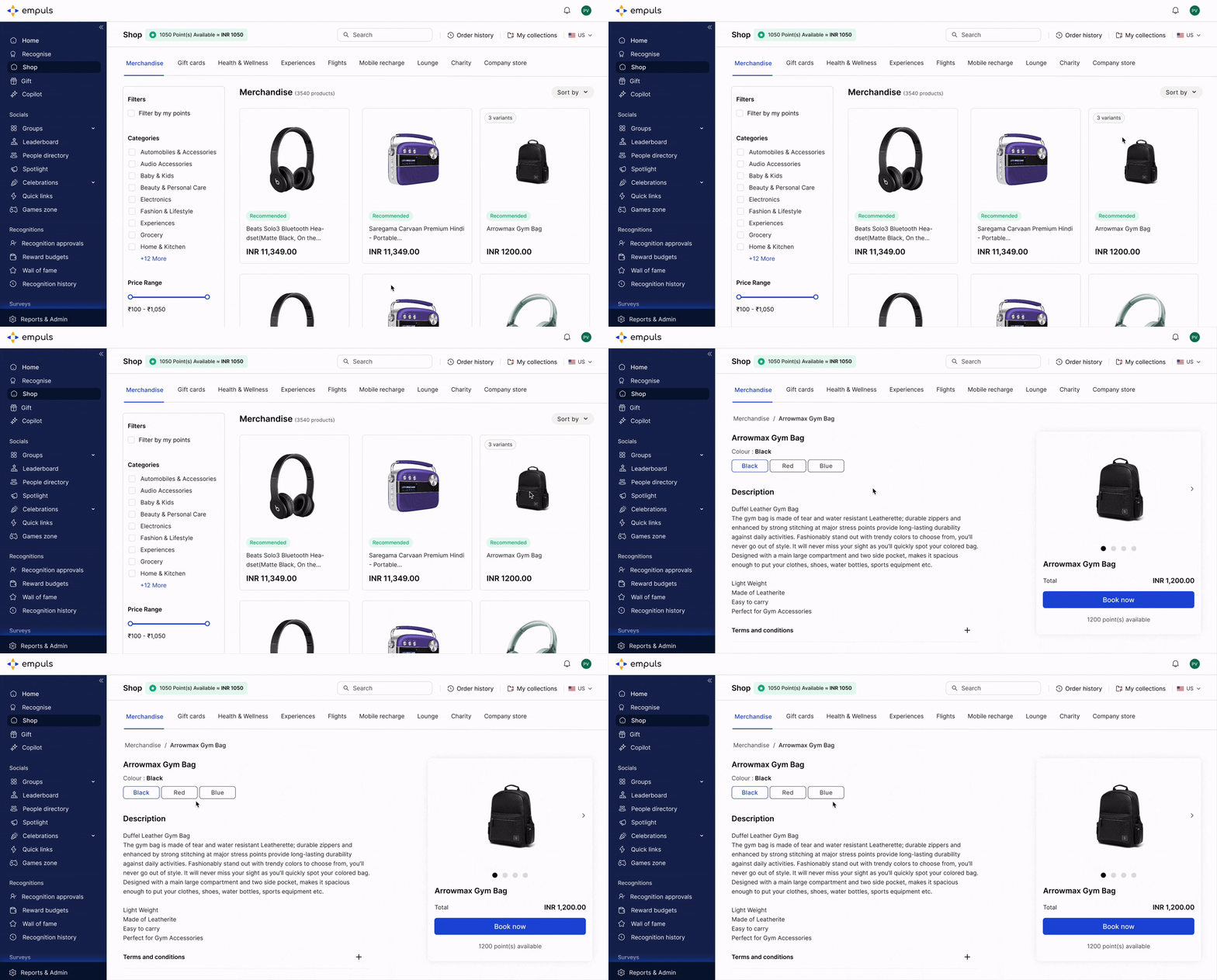
 **10. Variants Now Visible in Reward & Swag Store**
Shopping just got simpler! You can now see product variants right in the Reward & Swag Store — no need to click through each item. Find and choose your favorite option at a glance.
**10. Variants Now Visible in Reward & Swag Store**
Shopping just got simpler! You can now see product variants right in the Reward & Swag Store — no need to click through each item. Find and choose your favorite option at a glance.
 ## Upcoming features
⭐\*\*Multi-Wallet Functionality:\*\*Create multiple reward wallets tailored to different business units, cost centers, or use cases, enabling better reward management and allocation.
\*\*⭐ Fitness Challenges:\*\*Launch engaging wellness challenges to motivate employees, track progress, and boost participation in health initiatives.
\*\*⭐ Single modal interface for recognizing –\*\*We’re introducing a single, all-in-one modal for recognition, letting you select recipients, choose awards, add citations, preview, and post.
Need help? Reach out to your support team or \[[cs@xoxoday.com](mailto:cs@xoxoday.com)]\(mailto:[cs@xoxoday.com](mailto:cs@xoxoday.com)).
Related Articles[Product Updates - January 2025](https://intercom.help/empuls/en/articles/10449043-product-updates-january-2025)[Product Updates - July/August 2025](https://intercom.help/empuls/en/articles/12065269-product-updates-july-august-2025)[Product Updates - October 2025](https://intercom.help/empuls/en/articles/12537882-product-updates-october-2025)[Product Updates - December 2025](https://intercom.help/empuls/en/articles/13271184-product-updates-december-2025)[Product Updates - January 2026](https://intercom.help/empuls/en/articles/13543003-product-updates-january-2026)
## Upcoming features
⭐\*\*Multi-Wallet Functionality:\*\*Create multiple reward wallets tailored to different business units, cost centers, or use cases, enabling better reward management and allocation.
\*\*⭐ Fitness Challenges:\*\*Launch engaging wellness challenges to motivate employees, track progress, and boost participation in health initiatives.
\*\*⭐ Single modal interface for recognizing –\*\*We’re introducing a single, all-in-one modal for recognition, letting you select recipients, choose awards, add citations, preview, and post.
Need help? Reach out to your support team or \[[cs@xoxoday.com](mailto:cs@xoxoday.com)]\(mailto:[cs@xoxoday.com](mailto:cs@xoxoday.com)).
Related Articles[Product Updates - January 2025](https://intercom.help/empuls/en/articles/10449043-product-updates-january-2025)[Product Updates - July/August 2025](https://intercom.help/empuls/en/articles/12065269-product-updates-july-august-2025)[Product Updates - October 2025](https://intercom.help/empuls/en/articles/12537882-product-updates-october-2025)[Product Updates - December 2025](https://intercom.help/empuls/en/articles/13271184-product-updates-december-2025)[Product Updates - January 2026](https://intercom.help/empuls/en/articles/13543003-product-updates-january-2026)