> ## Documentation Index
> Fetch the complete documentation index at: https://help-empuls.xoxoday.com/llms.txt
> Use this file to discover all available pages before exploring further.
# Product Updates - June 2026
> See what's new in Empuls for June 2026: feature releases, improvements, and fixes. It’s part of Empuls’s broader admin toolkit.
We're excited to bring you the latest updates from Xoxoday Empuls, designed to enrich your experience and drive better engagement across your organization.
**Here's what's new:**
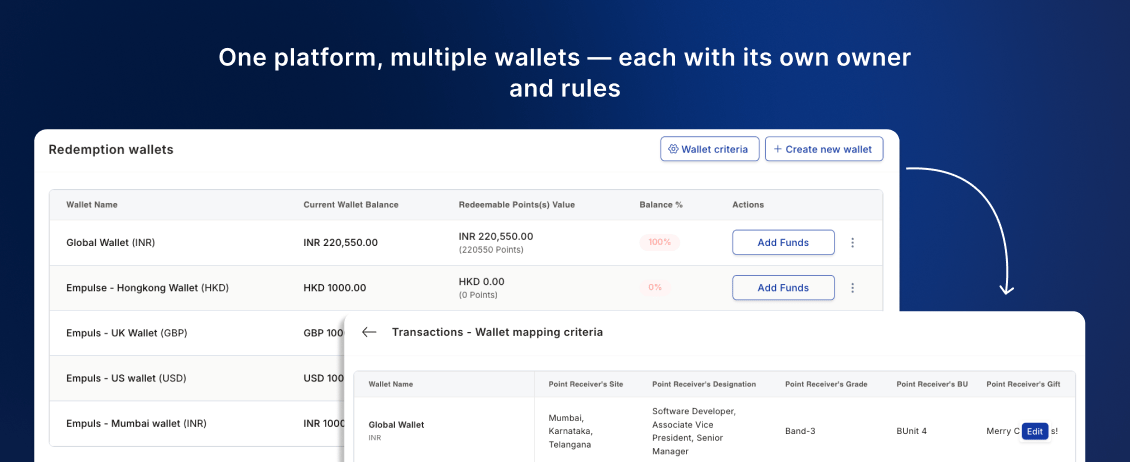
**1. Multi-wallet: give every team their own budget, owner, and controls**
Admins can now create multiple wallets for different teams, each with its own owner, balance, and spending rules — no more manual tracking of departmental spend.
* **Decentralised ownership:** Assign wallets to HRBPs or team leads, with automated low-balance alerts so budgets never run dry.
* **Granular controls:** Restrict each wallet to specific award types, teams, or cost centres.
📹 [Watch walkthrough](https://app.trupeer.ai/view/AYPD5SAKD/managing-multiple-wallets-in-empuls)
 ***
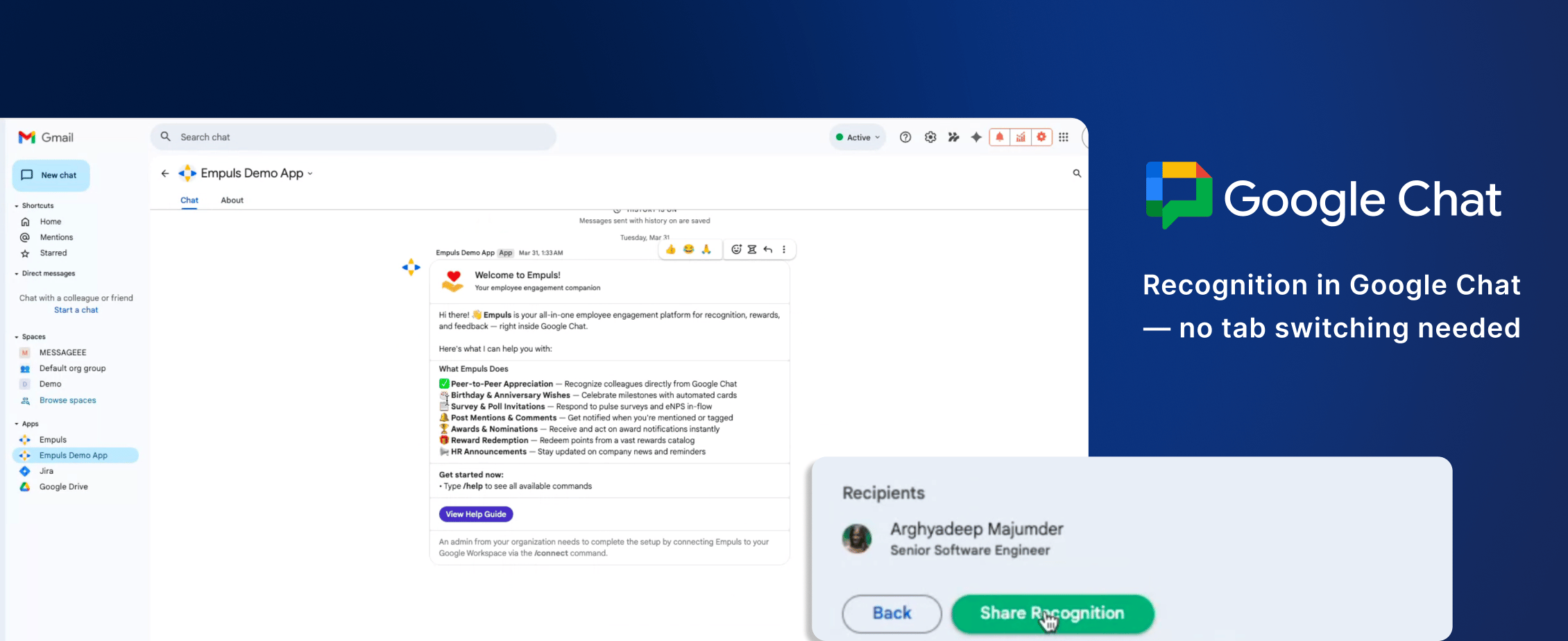
**2. Bring recognition and milestones into Google Workspace**
Empuls is now accessible directly in Google Chat — recognition and milestone alerts without switching tabs.
* **Recognition notifications:** Get alerts for appreciations, peer nominations, and point redemptions in Chat.
* **Milestone alerts:** Birthdays and work anniversaries surface directly in your Google workspace.
📹 [Watch walkthrough](https://app.trupeer.ai/view/lJM6rBlza/using-empuls-google-chat-app-for-employee-recognition)
***
**2. Bring recognition and milestones into Google Workspace**
Empuls is now accessible directly in Google Chat — recognition and milestone alerts without switching tabs.
* **Recognition notifications:** Get alerts for appreciations, peer nominations, and point redemptions in Chat.
* **Milestone alerts:** Birthdays and work anniversaries surface directly in your Google workspace.
📹 [Watch walkthrough](https://app.trupeer.ai/view/lJM6rBlza/using-empuls-google-chat-app-for-employee-recognition)
 ***
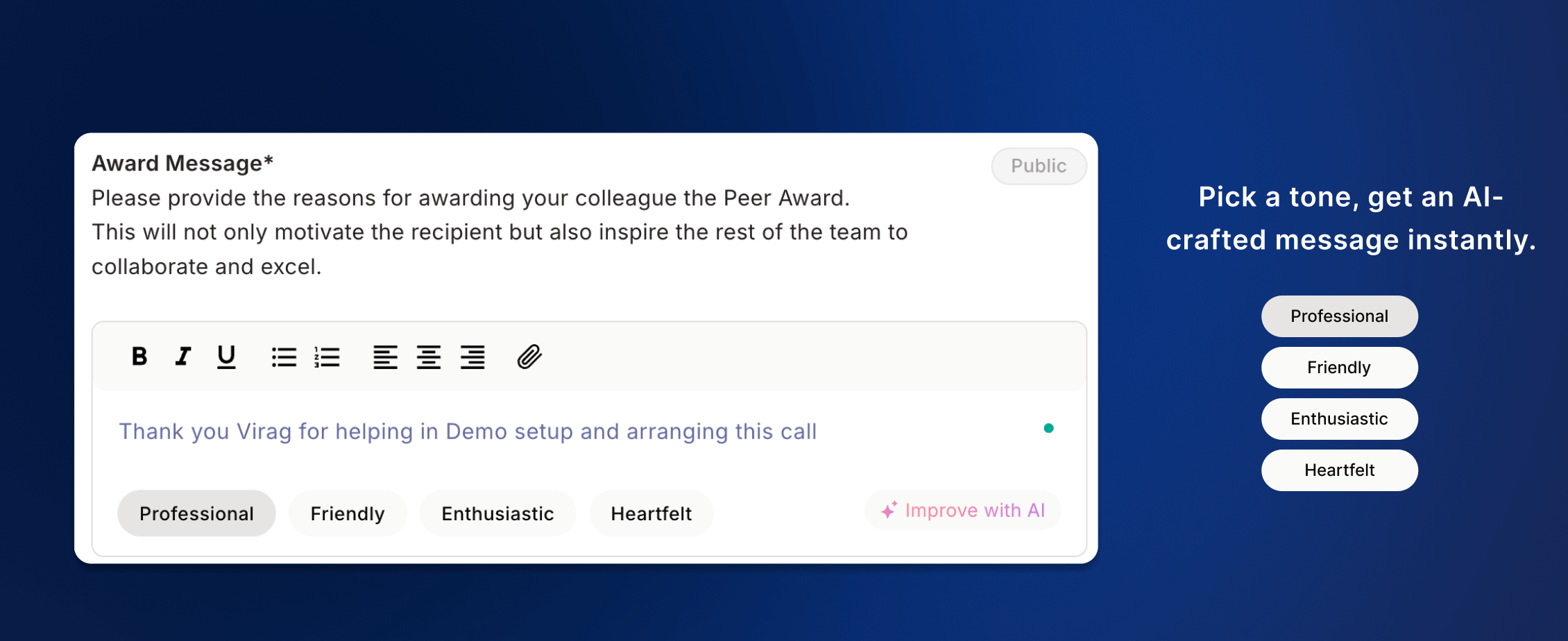
**3. Choose your tone, let AI write the perfect appreciation**
Employees can now pick a tone — Professional, Friendly, Enthusiastic, or Heartfelt — and get an AI-generated award message instantly. No blank page, no guessing what to write.
* **Tone-first approach:** Four distinct tones ensure every message fits the moment — whether it's a formal award or a casual birthday shoutout.
* **More recognitions sent:** Removing the writing barrier drives higher recognition frequency, especially among first-time recognisers.
📹 [Watch walkthrough](https://app.trupeer.ai/view/rjVQqEc2I/empuls-smarter-recognition-with-ai)
***
**3. Choose your tone, let AI write the perfect appreciation**
Employees can now pick a tone — Professional, Friendly, Enthusiastic, or Heartfelt — and get an AI-generated award message instantly. No blank page, no guessing what to write.
* **Tone-first approach:** Four distinct tones ensure every message fits the moment — whether it's a formal award or a casual birthday shoutout.
* **More recognitions sent:** Removing the writing barrier drives higher recognition frequency, especially among first-time recognisers.
📹 [Watch walkthrough](https://app.trupeer.ai/view/rjVQqEc2I/empuls-smarter-recognition-with-ai)
 ***
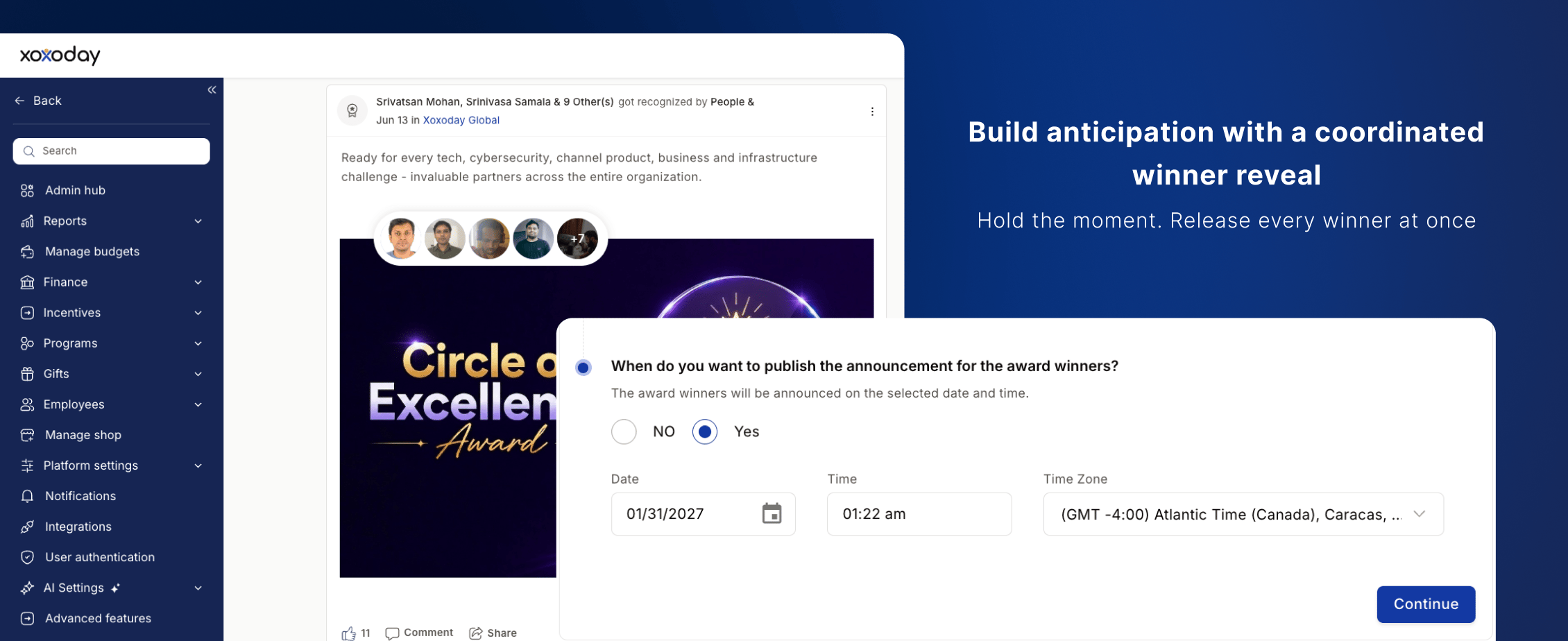
**4. Build anticipation with a coordinated winner reveal**
Admins can now hold all award posts and point releases and reveal them together at a scheduled date and time.
* **Simultaneous release:** All winners announced at once — a company-wide moment, not a trickle of notifications.
* **Full scheduling control:** Set the exact reveal time; the platform handles distribution automatically.
📹 [Watch walkthrough](https://app.trupeer.ai/view/GI4AYTuZA/survey-skip-logic-show-only-questions-that-matter-to-each)
***
**4. Build anticipation with a coordinated winner reveal**
Admins can now hold all award posts and point releases and reveal them together at a scheduled date and time.
* **Simultaneous release:** All winners announced at once — a company-wide moment, not a trickle of notifications.
* **Full scheduling control:** Set the exact reveal time; the platform handles distribution automatically.
📹 [Watch walkthrough](https://app.trupeer.ai/view/GI4AYTuZA/survey-skip-logic-show-only-questions-that-matter-to-each)
 ***
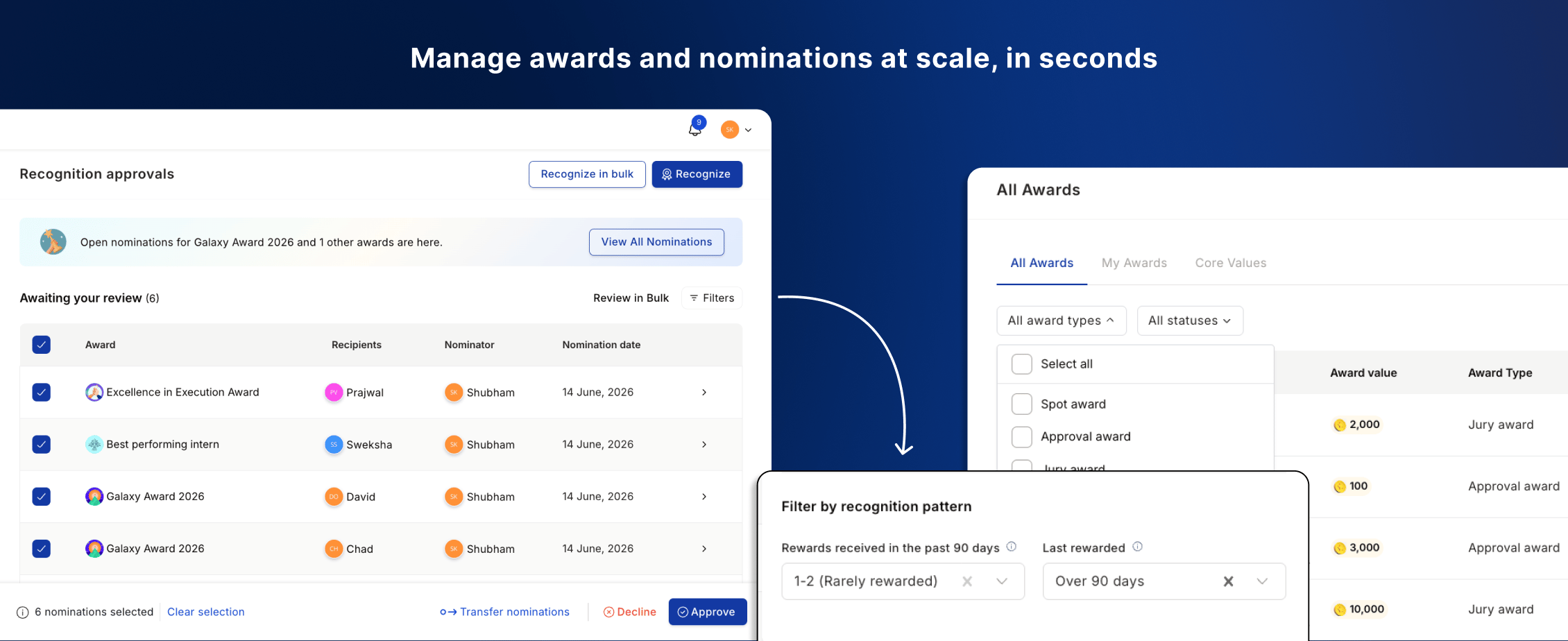
**5. Manage awards and nominations at scale, in seconds**
Enable, disable, delete awards, and approve or transfer nominations — all in bulk, in seconds.
* **Awards:** Bulk enable, disable, or delete with optional auto-disable scheduling so award windows close on their own.
* **Nominations:** Batch approve or decline, and instantly transfer pending nominations when a manager exits.
📹 [Watch walkthrough](https://app.trupeer.ai/view/mBqEPpEc8/bulk-nomination-approval-and-management-guide)
***
**5. Manage awards and nominations at scale, in seconds**
Enable, disable, delete awards, and approve or transfer nominations — all in bulk, in seconds.
* **Awards:** Bulk enable, disable, or delete with optional auto-disable scheduling so award windows close on their own.
* **Nominations:** Batch approve or decline, and instantly transfer pending nominations when a manager exits.
📹 [Watch walkthrough](https://app.trupeer.ai/view/mBqEPpEc8/bulk-nomination-approval-and-management-guide)
 ***
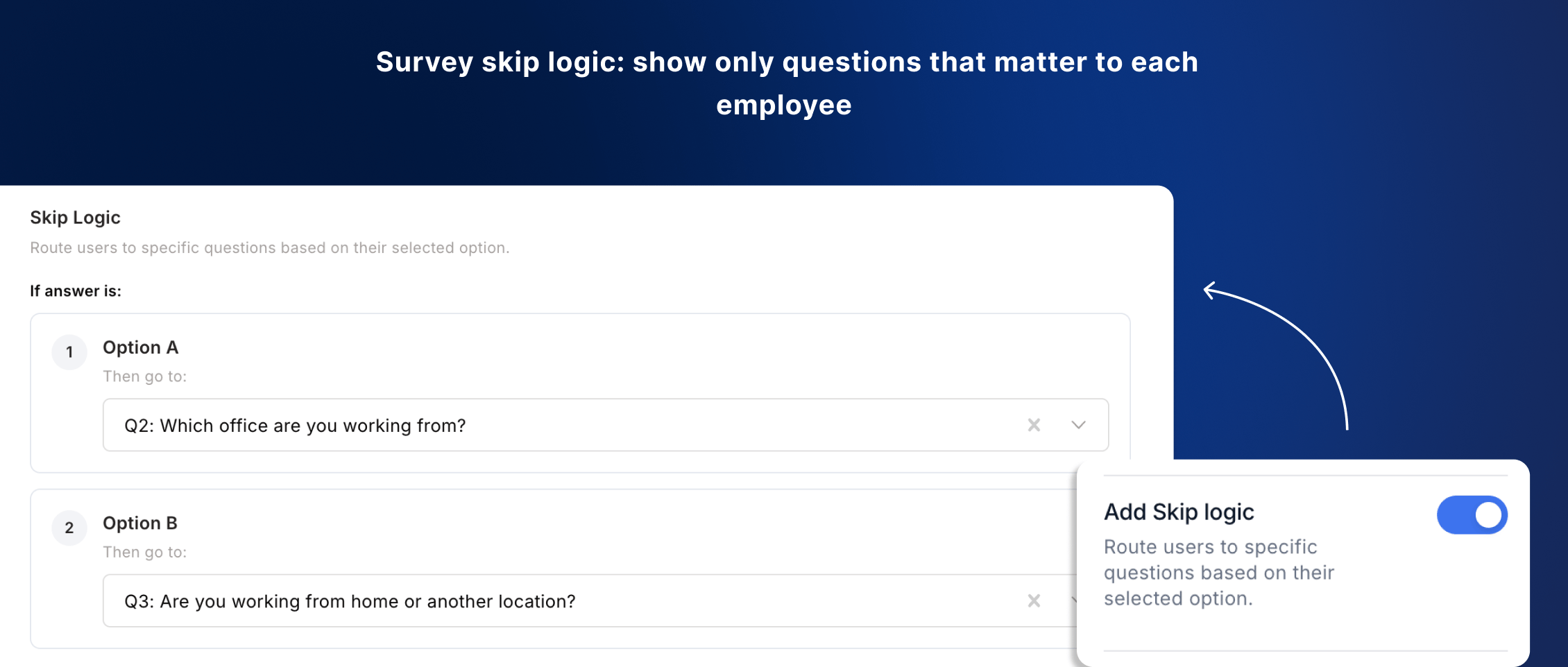
**6. Survey skip logic: show only questions that matter to each employee**
Questions now adapt based on previous answers — employees only see what's relevant to them, not a fixed sequence for everyone.
* **Set conditions once:** Define a rule like "if answer is No, skip to question 5" and the platform routes every respondent automatically.
* **Better data quality:** Focused surveys reduce drop-off and improve the depth of responses you collect.
***
**6. Survey skip logic: show only questions that matter to each employee**
Questions now adapt based on previous answers — employees only see what's relevant to them, not a fixed sequence for everyone.
* **Set conditions once:** Define a rule like "if answer is No, skip to question 5" and the platform routes every respondent automatically.
* **Better data quality:** Focused surveys reduce drop-off and improve the depth of responses you collect.
 ***
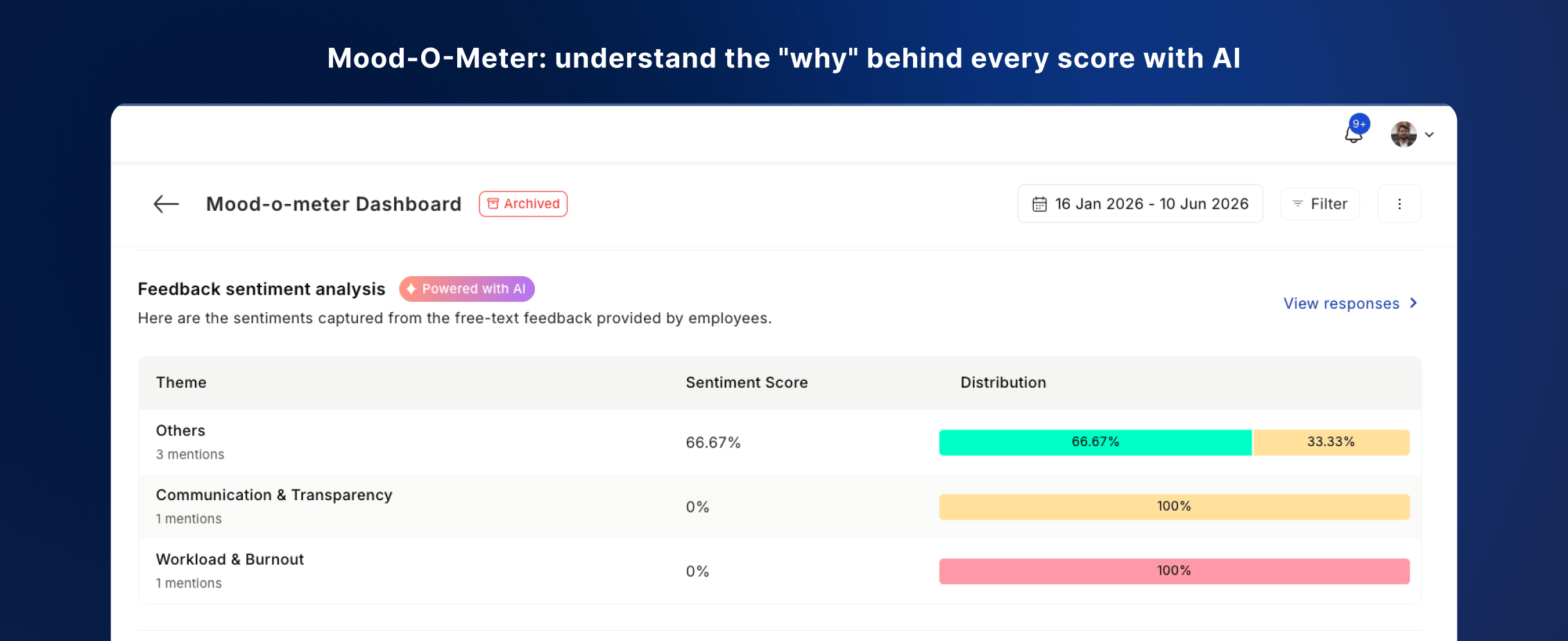
**7. Mood-O-Meter: understand the "why" behind every score with AI**
Two updates make Mood-O-Meter easier to respond to and richer in insight.
* **Email response links:** Employees respond directly from their inbox — no login required.
* **AI sentiment analysis:** A follow-up question captures the "why," with AI automatically surfacing themes across all responses.
📹 [Watch walkthrough](https://app.trupeer.ai/view/k7fbh9Pg1/empuls-moodometer-email-notifications-and-sentiment-analysis)
***
**7. Mood-O-Meter: understand the "why" behind every score with AI**
Two updates make Mood-O-Meter easier to respond to and richer in insight.
* **Email response links:** Employees respond directly from their inbox — no login required.
* **AI sentiment analysis:** A follow-up question captures the "why," with AI automatically surfacing themes across all responses.
📹 [Watch walkthrough](https://app.trupeer.ai/view/k7fbh9Pg1/empuls-moodometer-email-notifications-and-sentiment-analysis)
 ***
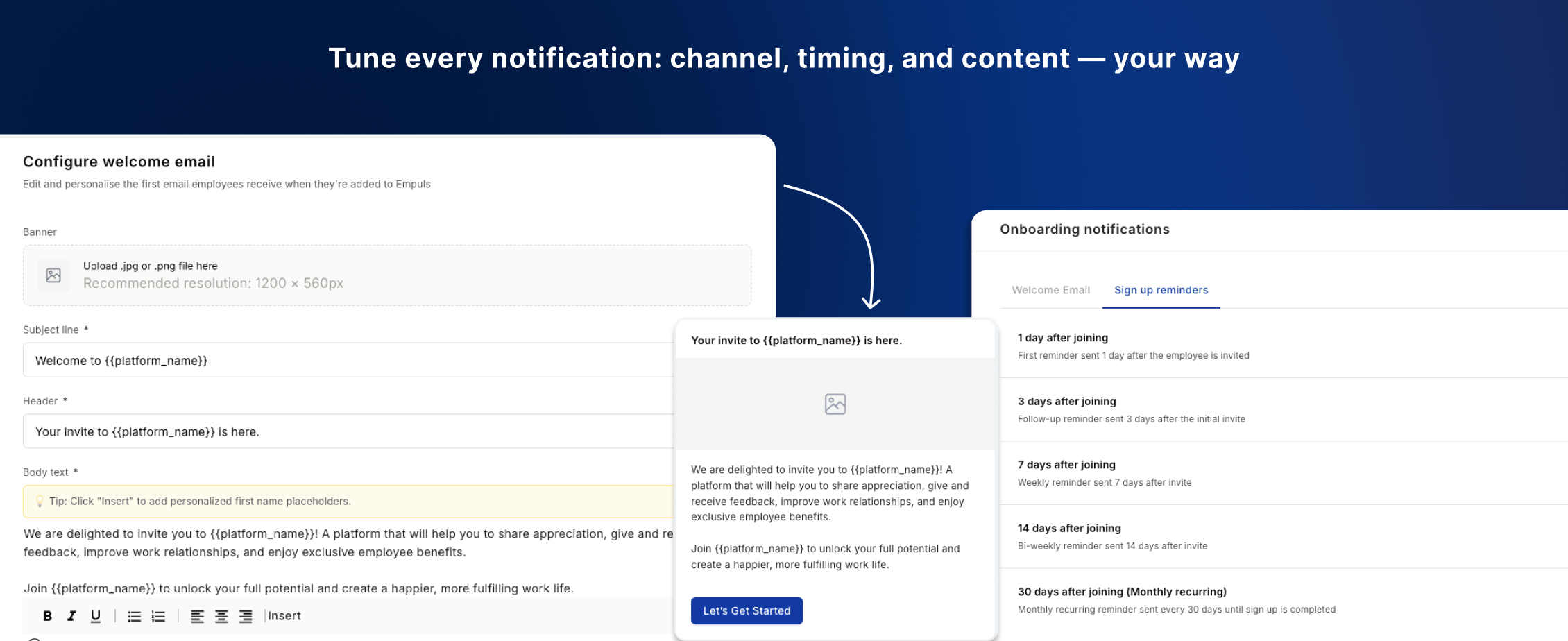
**8. Tune every notification: channel, timing, and content — your way**
Notification settings are now per-touchpoint — adjust channel, frequency, and content independently for each.
* **Per-touchpoint control:** Welcome Emails, Sign-Up Reminders, Redemption Reminders, and Wishboard Nudges each have their own settings.
* **Edit the message itself:** Customise the actual email content for each notification type to match your organisation's tone.
📹 [Watch walkthrough](https://app.trupeer.ai/view/eFDru2yd3/configuring-custom-notifications-in-empuls)
***
**8. Tune every notification: channel, timing, and content — your way**
Notification settings are now per-touchpoint — adjust channel, frequency, and content independently for each.
* **Per-touchpoint control:** Welcome Emails, Sign-Up Reminders, Redemption Reminders, and Wishboard Nudges each have their own settings.
* **Edit the message itself:** Customise the actual email content for each notification type to match your organisation's tone.
📹 [Watch walkthrough](https://app.trupeer.ai/view/eFDru2yd3/configuring-custom-notifications-in-empuls)
 ***
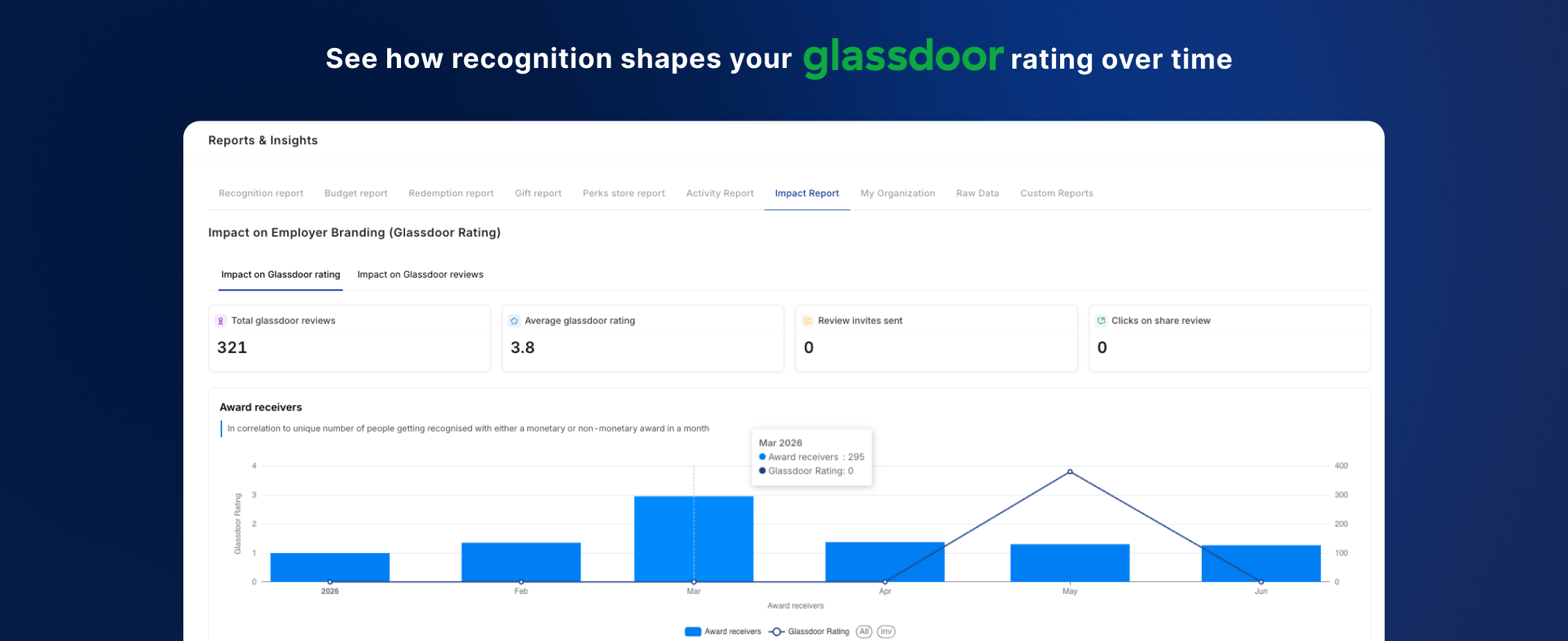
**9. See how recognition shapes your Glassdoor rating over time**
A new report correlates your recognition activity in Empuls with Glassdoor ratings month over month — making the ROI case for leadership.
* **Prove impact to leadership:** Show CHROs and CFOs how R\&R activity tracks with employer brand perception over time.
* **No manual analysis:** Data is automatically correlated and visualised — ready to present as-is.
📹 [Watch walkthrough](https://app.trupeer.ai/view/0qAJiLpFL/measuring-recognition-program-roi-with-impact-report)
***
**9. See how recognition shapes your Glassdoor rating over time**
A new report correlates your recognition activity in Empuls with Glassdoor ratings month over month — making the ROI case for leadership.
* **Prove impact to leadership:** Show CHROs and CFOs how R\&R activity tracks with employer brand perception over time.
* **No manual analysis:** Data is automatically correlated and visualised — ready to present as-is.
📹 [Watch walkthrough](https://app.trupeer.ai/view/0qAJiLpFL/measuring-recognition-program-roi-with-impact-report)
 ***
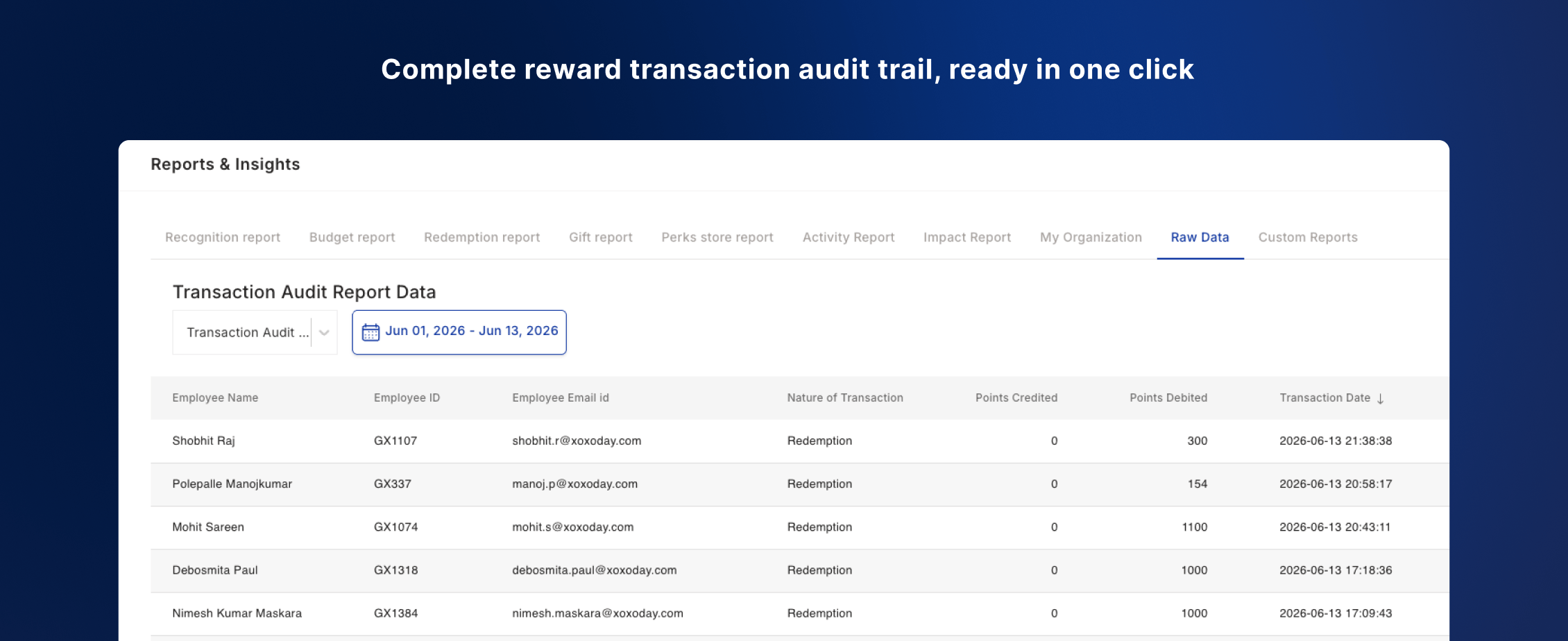
**10. Complete reward transaction audit trail, ready in one click**
Download a single report covering all point credits, redemptions, and expirations for any date range.
* **One file, full picture:** Replaces the need to stitch multiple reports for audits or budget reconciliation.
* **Audit-ready:** Built for finance teams and compliance reviews out of the box.
📹 [Watch walkthrough](https://app.trupeer.ai/view/OOhMaDk50/empuls-transaction-audit-reports)
***
**10. Complete reward transaction audit trail, ready in one click**
Download a single report covering all point credits, redemptions, and expirations for any date range.
* **One file, full picture:** Replaces the need to stitch multiple reports for audits or budget reconciliation.
* **Audit-ready:** Built for finance teams and compliance reviews out of the box.
📹 [Watch walkthrough](https://app.trupeer.ai/view/OOhMaDk50/empuls-transaction-audit-reports)
 ***
## Upcoming features
⭐ **Scheduling of custom reports:** Schedule and auto-deliver reports to the right stakeholders at the right time — no manual exports needed.
⭐ **Agentic support for reports & insights (MCP):** MCP integration lets your AI tools talk to Empuls — pull live reports, surface insights, and answer leadership questions on demand.
⭐ **Event RSVP:** Let employees discover and RSVP to company events directly within Empuls.
⭐ **Referral incentive programs:** Run fully automated employee referral programs — from submission to reward — without any manual intervention.
***
**Want to request a feature on Empuls?**
Get in touch with our customer success team through Messenger on platform, or email us at [cs@xoxoday.com](mailto:cs@xoxoday.com).
***
## Upcoming features
⭐ **Scheduling of custom reports:** Schedule and auto-deliver reports to the right stakeholders at the right time — no manual exports needed.
⭐ **Agentic support for reports & insights (MCP):** MCP integration lets your AI tools talk to Empuls — pull live reports, surface insights, and answer leadership questions on demand.
⭐ **Event RSVP:** Let employees discover and RSVP to company events directly within Empuls.
⭐ **Referral incentive programs:** Run fully automated employee referral programs — from submission to reward — without any manual intervention.
***
**Want to request a feature on Empuls?**
Get in touch with our customer success team through Messenger on platform, or email us at [cs@xoxoday.com](mailto:cs@xoxoday.com).