> ## Documentation Index
> Fetch the complete documentation index at: https://help-empuls.xoxoday.com/llms.txt
> Use this file to discover all available pages before exploring further.
# Product Updates - December 2024
> Latest feature updates - December'24
We're excited to bring you the latest enhancements designed to enrich your experience on Empuls.
**Here's what's new:**
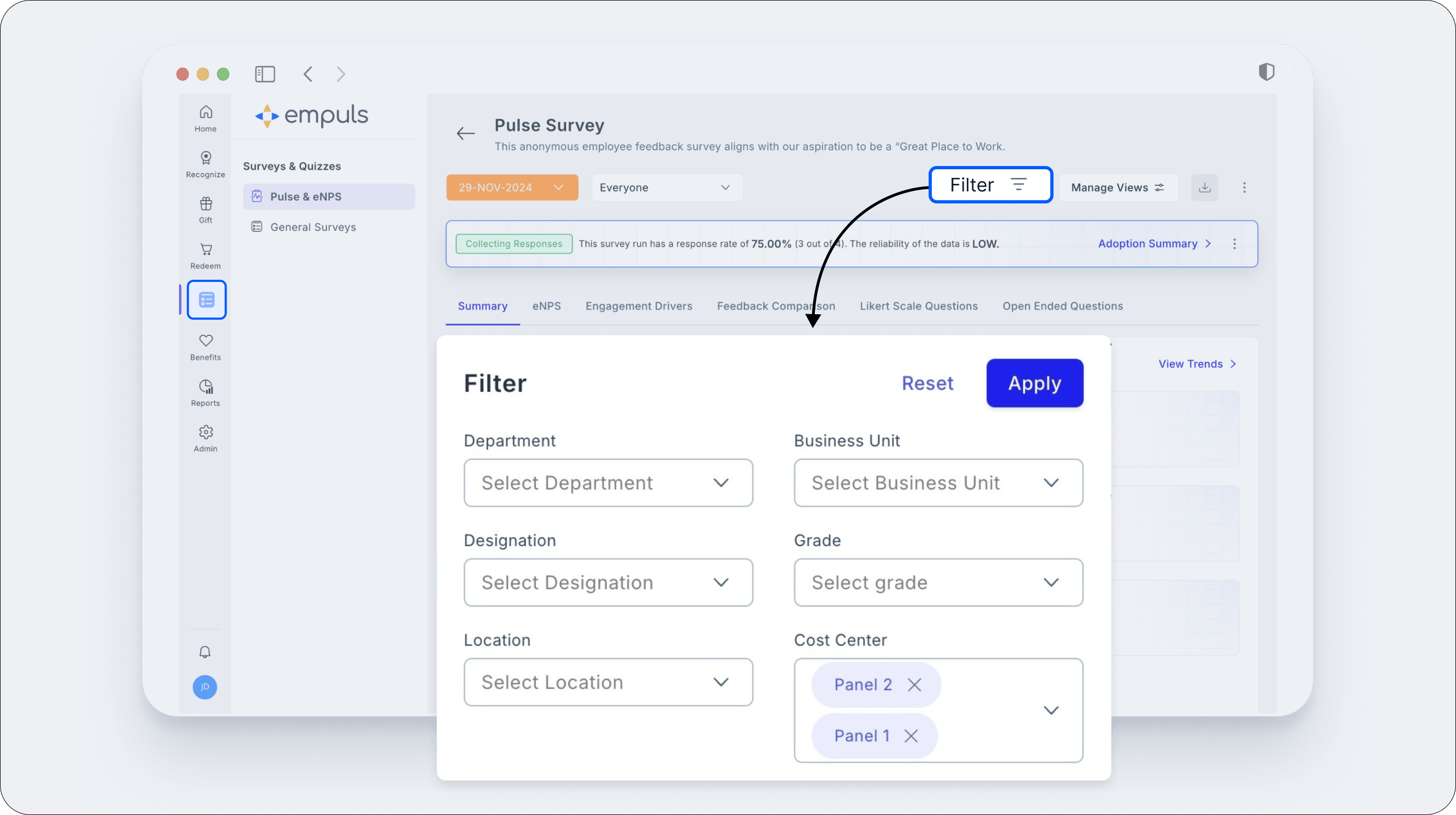
1. **Filter Survey Responses by Cost Center**
Admins can analyze survey results by filtering responses based on Cost Centers, gaining insights specific to each department or unit. To do so, navigate to the Surveys tab, select the survey you want to view responses for, click on the filter icon, and choose the desired Cost Center.
 2. **Meaningful Recognition Through Nomination Limits**
Super Admins can now set a limit on the number of nominations each user can submit per reward cycle. This prevents repetitive nominations from the same individuals and promotes broader participation. By emphasizing the value of each nomination, employees are inspired to carefully select and recognize the most deserving peers, ensuring every nomination carries genuine significance.
2. **Meaningful Recognition Through Nomination Limits**
Super Admins can now set a limit on the number of nominations each user can submit per reward cycle. This prevents repetitive nominations from the same individuals and promotes broader participation. By emphasizing the value of each nomination, employees are inspired to carefully select and recognize the most deserving peers, ensuring every nomination carries genuine significance.
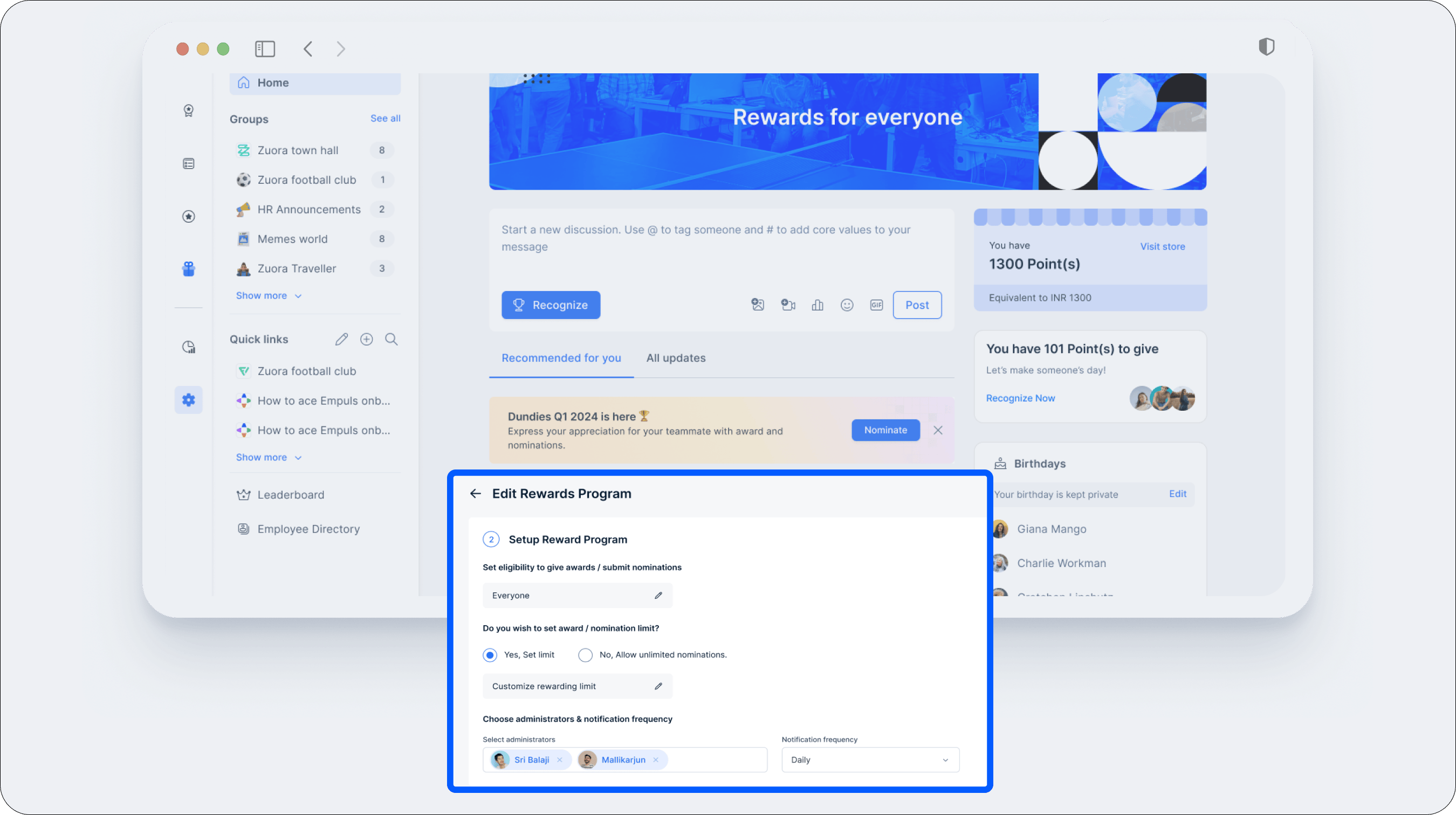 3. **Auto-Approval for Jury-Based Awards**
This feature enables automatic approval of nominations from any account based on the available budget in different accounts. Super admins can configure who can act as a nominator simplifying awards management.
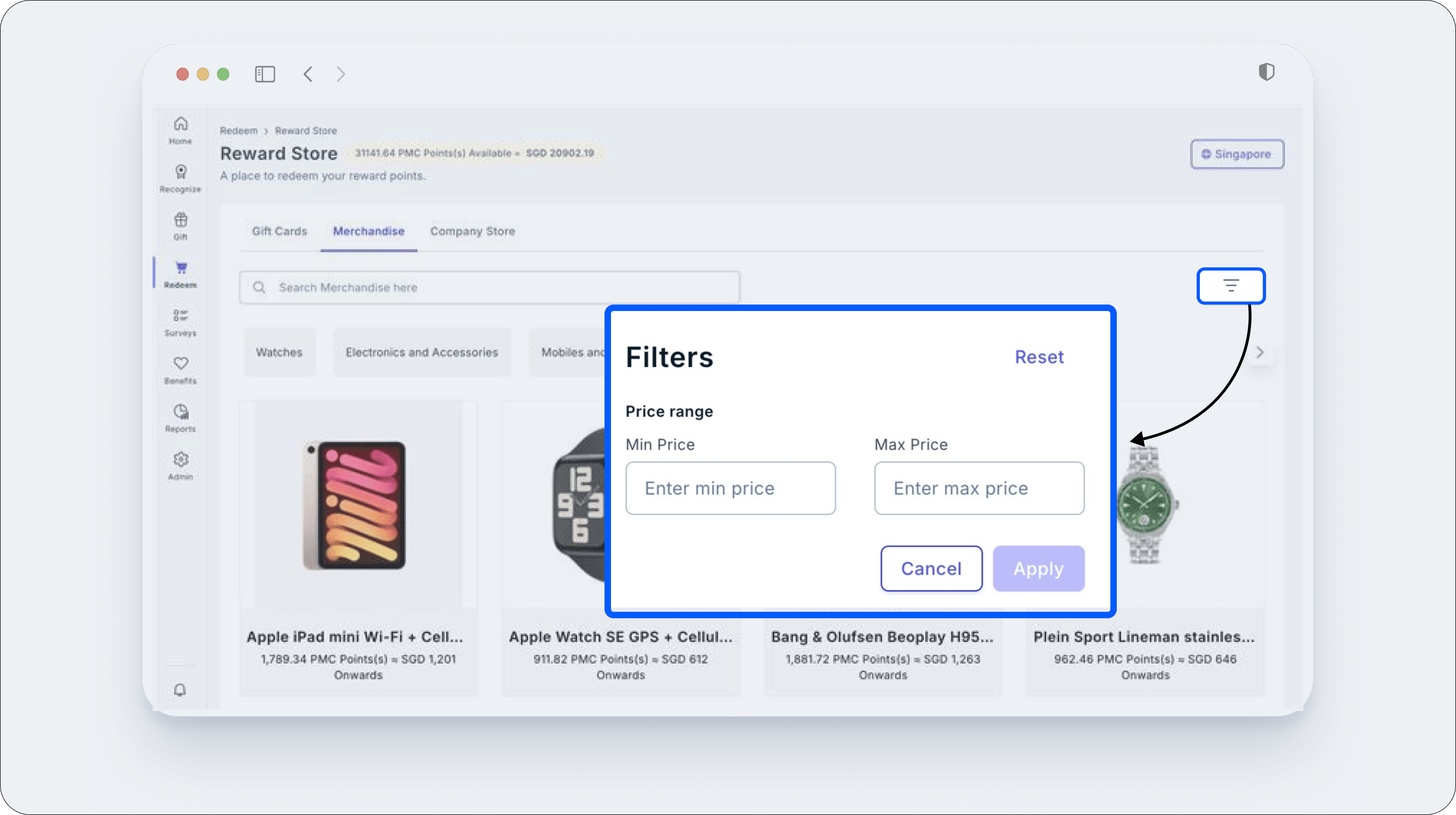
4. **Price Filter for Merchandise Store**
Users can filter Merchandise by price range (min to max) when redeeming rewards. Navigate to the "Redeem" section, go to the Merchandise tab, click the filter icon at the top right, and set your desired price range.
3. **Auto-Approval for Jury-Based Awards**
This feature enables automatic approval of nominations from any account based on the available budget in different accounts. Super admins can configure who can act as a nominator simplifying awards management.
4. **Price Filter for Merchandise Store**
Users can filter Merchandise by price range (min to max) when redeeming rewards. Navigate to the "Redeem" section, go to the Merchandise tab, click the filter icon at the top right, and set your desired price range.
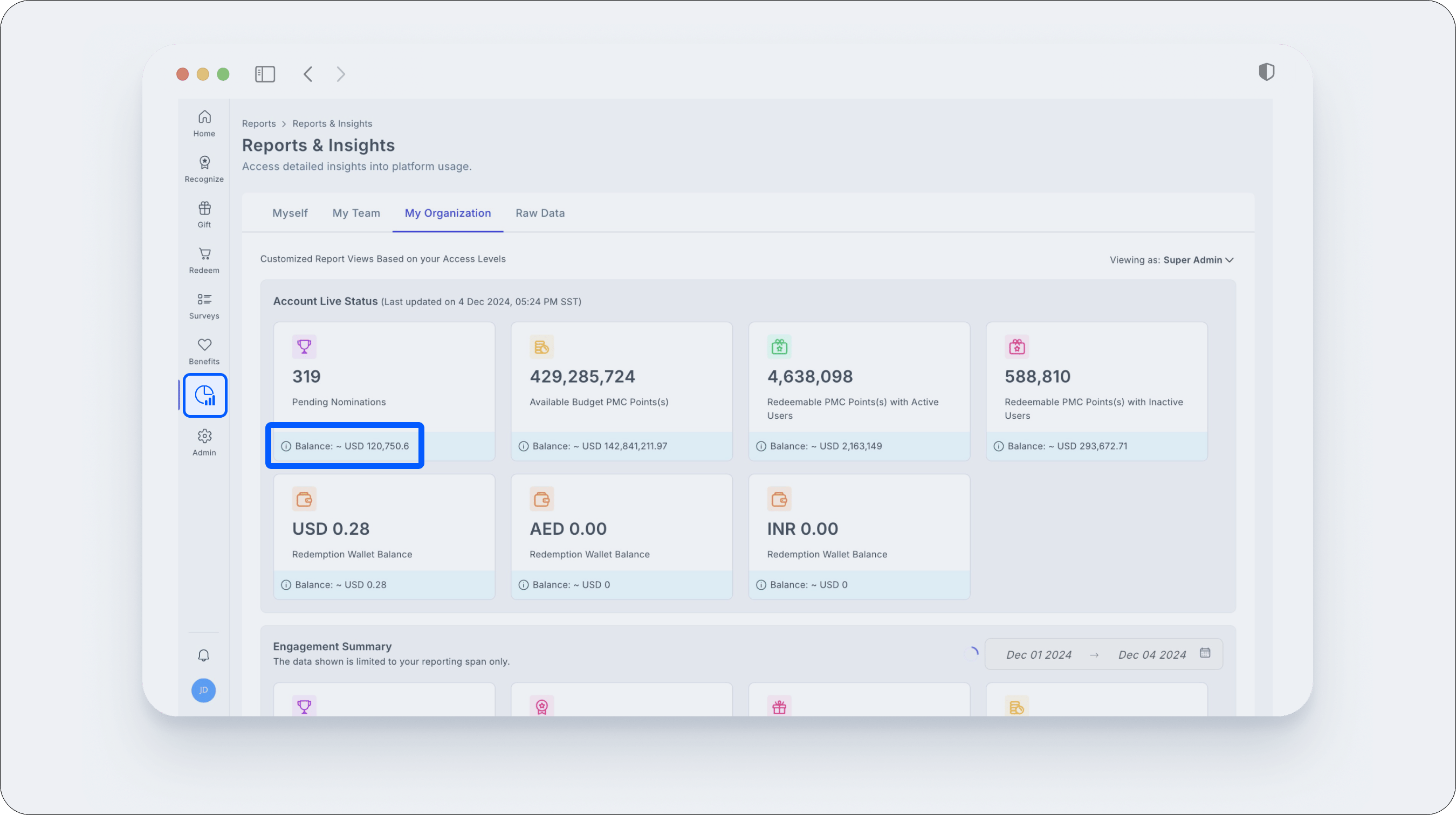
 5. **Base Currency in Reports**
Reports for Budget, Awards, and Gifts now show values in your company's base currency, ensuring consistent financial insights. The blue tab under each metric represents these amounts. Go to Home > Reports > My Org > Account Live Status to access.
5. **Base Currency in Reports**
Reports for Budget, Awards, and Gifts now show values in your company's base currency, ensuring consistent financial insights. The blue tab under each metric represents these amounts. Go to Home > Reports > My Org > Account Live Status to access.
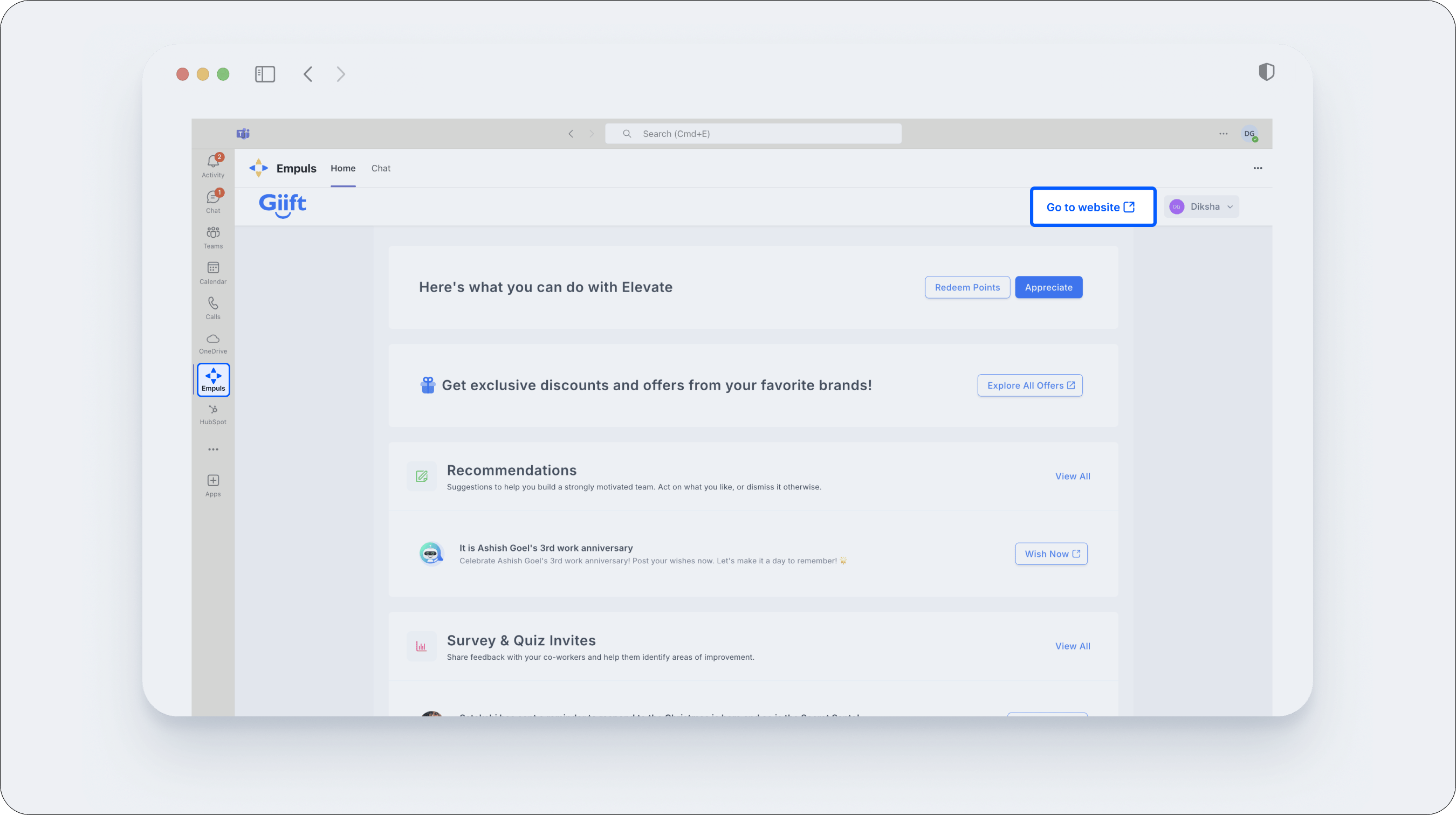
 6. **Teams Shortcut to Empuls Platform**
Access Empuls directly through Teams without re-logging—open the Empuls app and click "Go to Website" on the top right.
6. **Teams Shortcut to Empuls Platform**
Access Empuls directly through Teams without re-logging—open the Empuls app and click "Go to Website" on the top right.
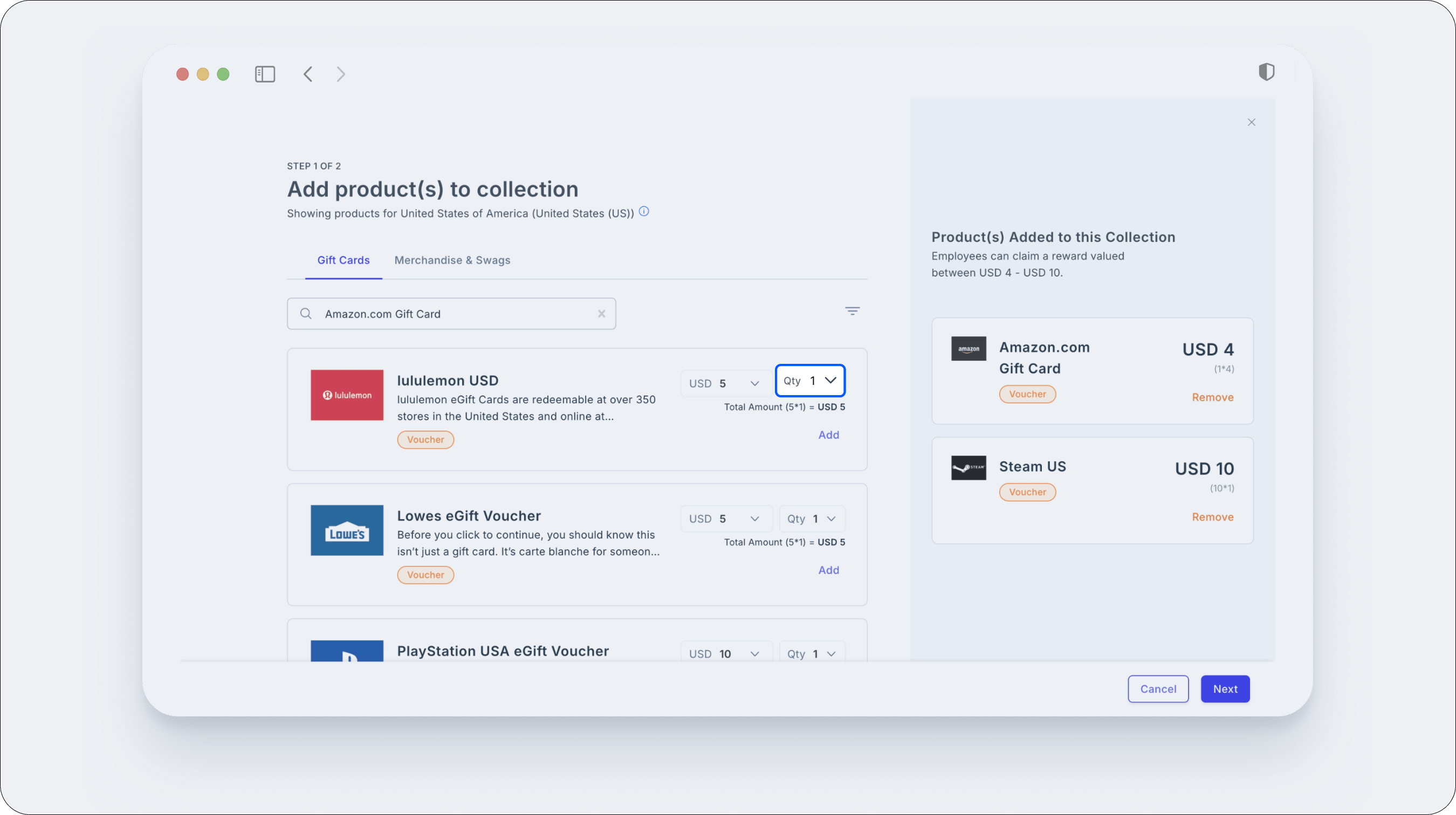
 7. **Quantity Filter for GV-Based Collections**
Admins and Super Admins can now effortlessly add multiple gift vouchers of the same denomination to GV-based collections, enhancing flexibility in rewards distribution. Previously, only one voucher per denomination could be added. Now, select a gift card in the product store, set the quantity, and configure your collection—making it easy to send multiple vouchers from the same brand to users.
7. **Quantity Filter for GV-Based Collections**
Admins and Super Admins can now effortlessly add multiple gift vouchers of the same denomination to GV-based collections, enhancing flexibility in rewards distribution. Previously, only one voucher per denomination could be added. Now, select a gift card in the product store, set the quantity, and configure your collection—making it easy to send multiple vouchers from the same brand to users.
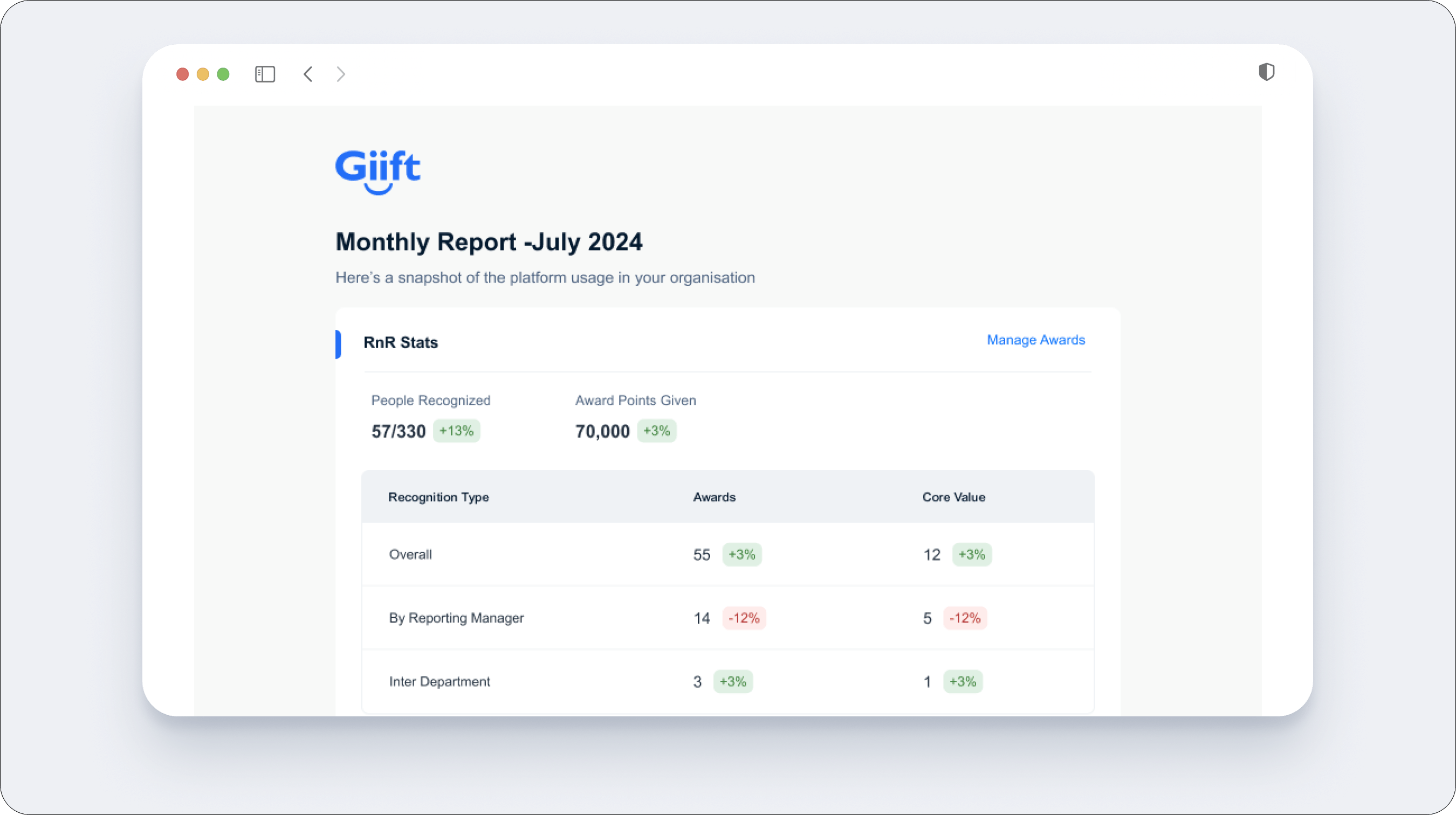
 8. **Monthly R\&R & Budget Utilization Report**
Admins and budget creators will receive a monthly email with two reports:
* **R\&R Report**: Insights on recognition, rewards, gifting, redemptions, and engagement to track performance and boost workplace motivation.
* **Budget Utilization Summary**: A snapshot of how employees use their reward budgets, helping assess program effectiveness and guide decisions.
8. **Monthly R\&R & Budget Utilization Report**
Admins and budget creators will receive a monthly email with two reports:
* **R\&R Report**: Insights on recognition, rewards, gifting, redemptions, and engagement to track performance and boost workplace motivation.
* **Budget Utilization Summary**: A snapshot of how employees use their reward budgets, helping assess program effectiveness and guide decisions.
 9. **Mood-o-Meter via Custom Pulse Surveys**
We've introduced the Mood-o-Meter, a survey sent weekly or monthly to capture your employees' sentiments. By assessing their emotional state through targeted questions, it provides real-time insights to enhance workplace wellbeing.
9. **Mood-o-Meter via Custom Pulse Surveys**
We've introduced the Mood-o-Meter, a survey sent weekly or monthly to capture your employees' sentiments. By assessing their emotional state through targeted questions, it provides real-time insights to enhance workplace wellbeing.
 **Upcoming features:**
⭐ **Milestone Rewards Program**: Super admins can set specific milestones and link them to reward points. Employees earn these points once they reach the designated milestones.
**⭐ Reward Cycle Dashboard**: A new dashboard to track reward cycle metrics, with email notifications prompting nominators and users to approve, submit, and manage nominations.
**⭐ Taxation Reports for Rewards & Benefits**: Comprehensive reports for finance teams to accurately calculate taxes on employee rewards and benefits, ensuring compliance and financial precision.
\*\*⭐ Polls & Central Post Widget:\*\*The new UI improvements allow users to create and share polls directly from the social intranet widget.
**Want to request a feature on Empuls?**
Get in touch with our customer success team through Messenger on platform, or email us at [cs@xoxoday.com](mailto:cs@xoxoday.com).
Related Articles[Product Updates - July 2024](https://intercom.help/empuls/en/articles/9706022-product-updates-july-2024)[Product Updates - January 2025](https://intercom.help/empuls/en/articles/10449043-product-updates-january-2025)[Product Updates - Feb 2025](https://intercom.help/empuls/en/articles/10931744-product-updates-feb-2025)[Product Updates - July/August 2025](https://intercom.help/empuls/en/articles/12065269-product-updates-july-august-2025)[Product Updates - October 2025](https://intercom.help/empuls/en/articles/12537882-product-updates-october-2025)
**Upcoming features:**
⭐ **Milestone Rewards Program**: Super admins can set specific milestones and link them to reward points. Employees earn these points once they reach the designated milestones.
**⭐ Reward Cycle Dashboard**: A new dashboard to track reward cycle metrics, with email notifications prompting nominators and users to approve, submit, and manage nominations.
**⭐ Taxation Reports for Rewards & Benefits**: Comprehensive reports for finance teams to accurately calculate taxes on employee rewards and benefits, ensuring compliance and financial precision.
\*\*⭐ Polls & Central Post Widget:\*\*The new UI improvements allow users to create and share polls directly from the social intranet widget.
**Want to request a feature on Empuls?**
Get in touch with our customer success team through Messenger on platform, or email us at [cs@xoxoday.com](mailto:cs@xoxoday.com).
Related Articles[Product Updates - July 2024](https://intercom.help/empuls/en/articles/9706022-product-updates-july-2024)[Product Updates - January 2025](https://intercom.help/empuls/en/articles/10449043-product-updates-january-2025)[Product Updates - Feb 2025](https://intercom.help/empuls/en/articles/10931744-product-updates-feb-2025)[Product Updates - July/August 2025](https://intercom.help/empuls/en/articles/12065269-product-updates-july-august-2025)[Product Updates - October 2025](https://intercom.help/empuls/en/articles/12537882-product-updates-october-2025)