> ## Documentation Index
> Fetch the complete documentation index at: https://help-empuls.xoxoday.com/llms.txt
> Use this file to discover all available pages before exploring further.
# Product Updates - August 2026
> See what's new in Empuls for August 2026: scheduled custom reports, award denominations with approver masking, flexible budget deduction, email approvals, Google Chat commands, award versioning, and more.
Thank you for trusting Xoxoday Empuls to power your engagement journey. This period brought significant upgrades across recognition workflows, approval controls, reporting, and integrations. Here are the highlights.
**Here's what's new:**
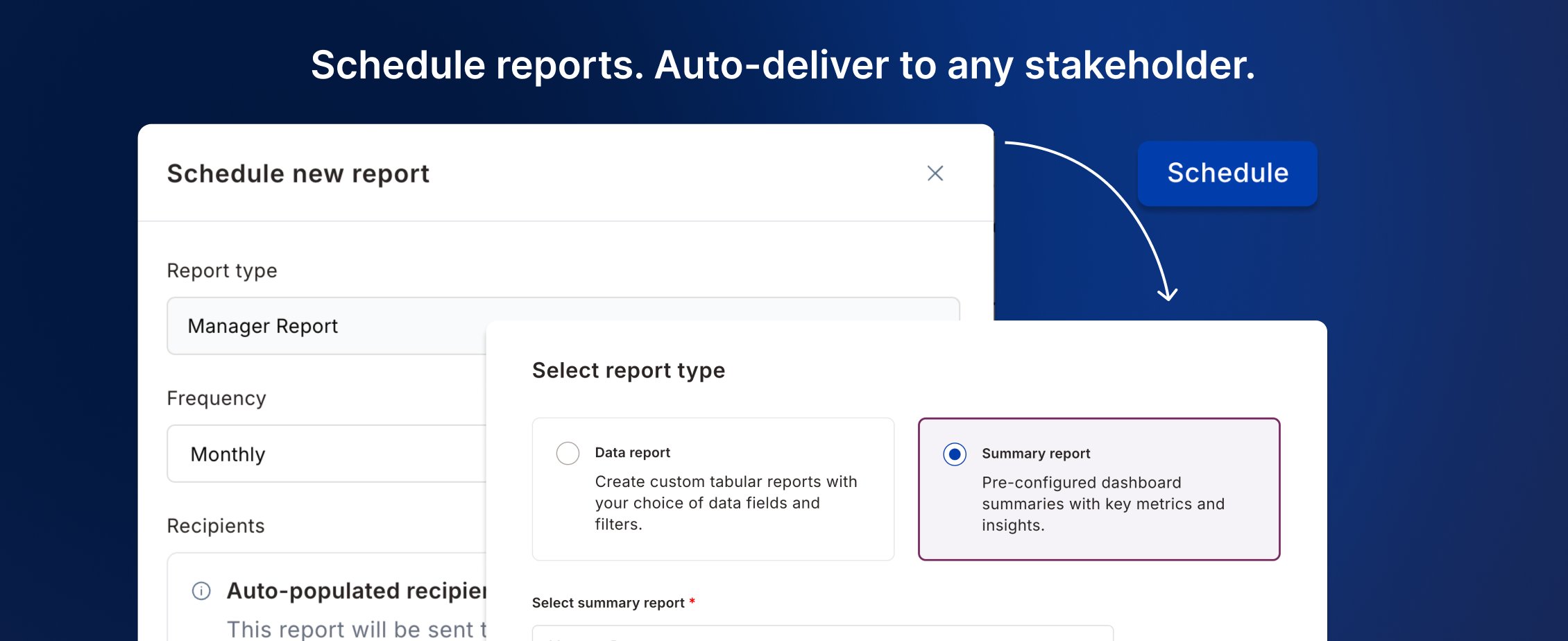
**1. Schedule custom reports and auto-deliver to any stakeholder**
Manually exporting and sharing reports with BU heads, HODs, and managers added overhead to every review cycle. Custom Reports are now redesigned — with Raw Data built in and scheduling that handles distribution automatically.
* **Raw data in custom reports:** Raw Data is now accessible inside Custom Reports — build, filter, and save reports from one place without navigating between modules.
* **Scheduled delivery:** Set a frequency (daily, weekly, monthly, quarterly) and a target audience — reports go out automatically, no manual export needed.
📹 [Watch walkthrough](https://app.trupeer.ai/view/ScEcB9RGb/automated-custom-report-scheduling-in-empuls)
 ***
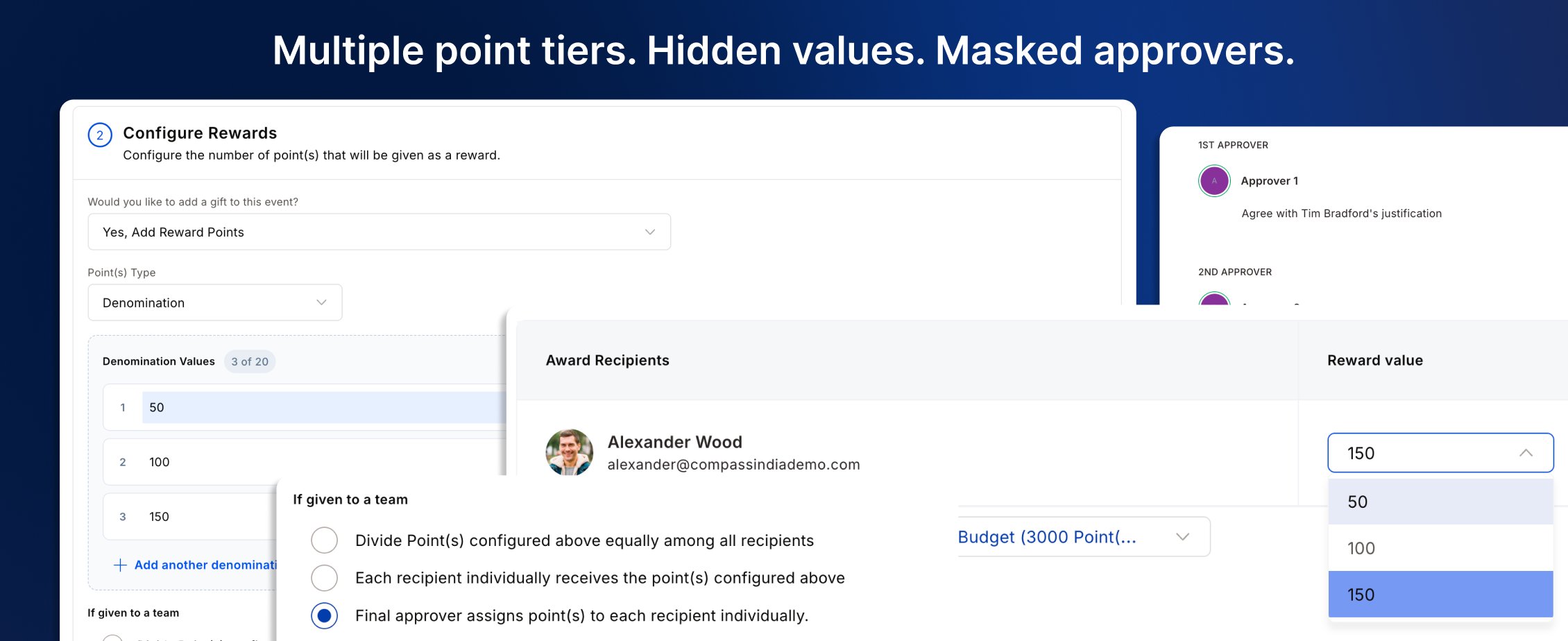
**2. Set multiple award denominations and mask approver identities**
Complex award programs needed tighter controls on what approvers decide and who stays anonymous in the process.
* **Multiple point tiers, hidden from nominators:** Create one award with multiple denominations — approvers pick the right tier at approval. A separate toggle hides the point value entirely during nomination, so nominators submit blind and the approver decides what the recognition is worth.
* **Unbiased multi-level approvals:** L2 approvers don't see who approved at L1 — each level reviews independently, so decisions aren't influenced by who came before. Admins always retain full visibility.
* **Admins stay in control:** Both controls are independent and configurable per award — mix and match based on how each program is run.
📹 [Watch walkthrough](https://app.trupeer.ai/view/3Q15JVGtA/configuring-award-denominations-and-approver-masking-in)
***
**2. Set multiple award denominations and mask approver identities**
Complex award programs needed tighter controls on what approvers decide and who stays anonymous in the process.
* **Multiple point tiers, hidden from nominators:** Create one award with multiple denominations — approvers pick the right tier at approval. A separate toggle hides the point value entirely during nomination, so nominators submit blind and the approver decides what the recognition is worth.
* **Unbiased multi-level approvals:** L2 approvers don't see who approved at L1 — each level reviews independently, so decisions aren't influenced by who came before. Admins always retain full visibility.
* **Admins stay in control:** Both controls are independent and configurable per award — mix and match based on how each program is run.
📹 [Watch walkthrough](https://app.trupeer.ai/view/3Q15JVGtA/configuring-award-denominations-and-approver-masking-in)
 ***
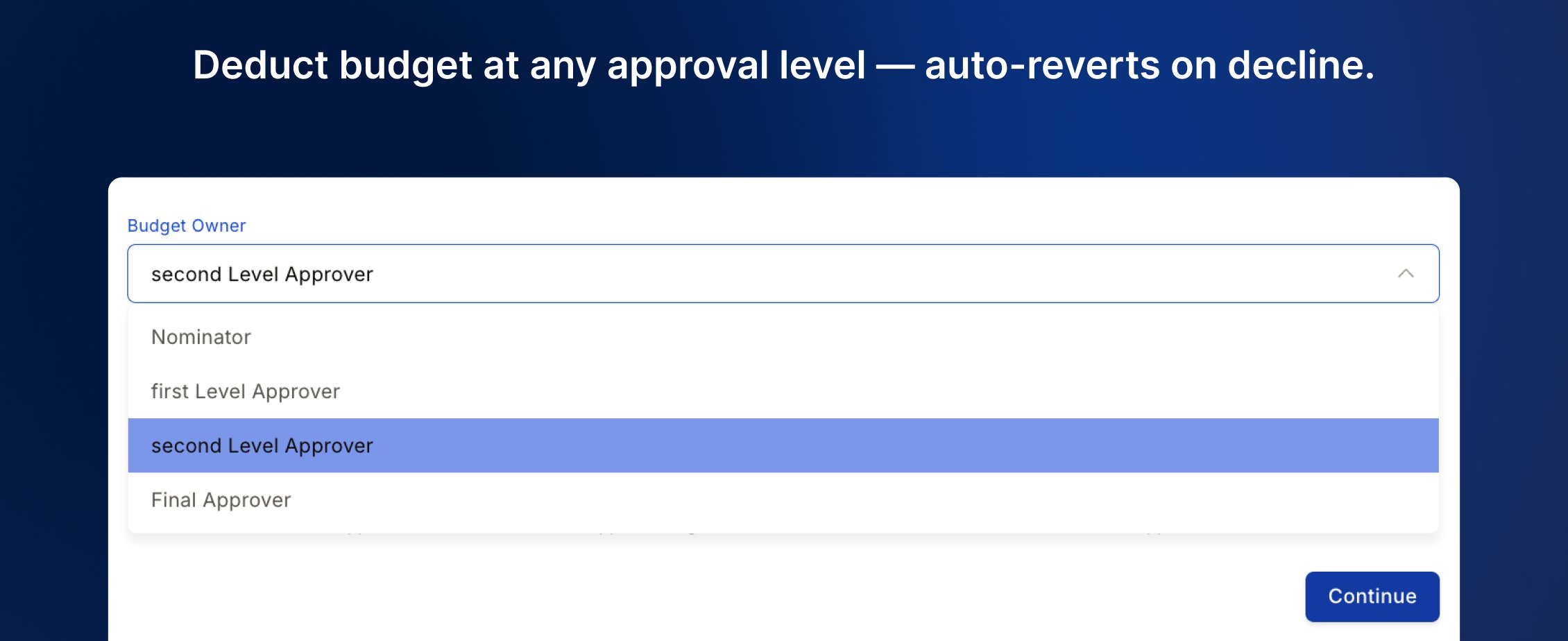
**3. Deduct budget at any approval level, not just the last**
Previously, budget was always deducted at final approval — blocking intermediate managers from owning their spend within their own wallet limits.
* **Flexible deduction point:** Configure at which approval level budget is deducted — give L1 or L2 managers real budget ownership, not just a rubber stamp.
* **Auto-revert on decline:** If a nomination is declined after budget deduction, points automatically return to the originating wallet — no manual reconciliation needed.
📹 [Watch walkthrough](https://app.trupeer.ai/view/wQZXCHKQP/configuring-budget-ownership-in-approval-chains)
***
**3. Deduct budget at any approval level, not just the last**
Previously, budget was always deducted at final approval — blocking intermediate managers from owning their spend within their own wallet limits.
* **Flexible deduction point:** Configure at which approval level budget is deducted — give L1 or L2 managers real budget ownership, not just a rubber stamp.
* **Auto-revert on decline:** If a nomination is declined after budget deduction, points automatically return to the originating wallet — no manual reconciliation needed.
📹 [Watch walkthrough](https://app.trupeer.ai/view/wQZXCHKQP/configuring-budget-ownership-in-approval-chains)
 ***
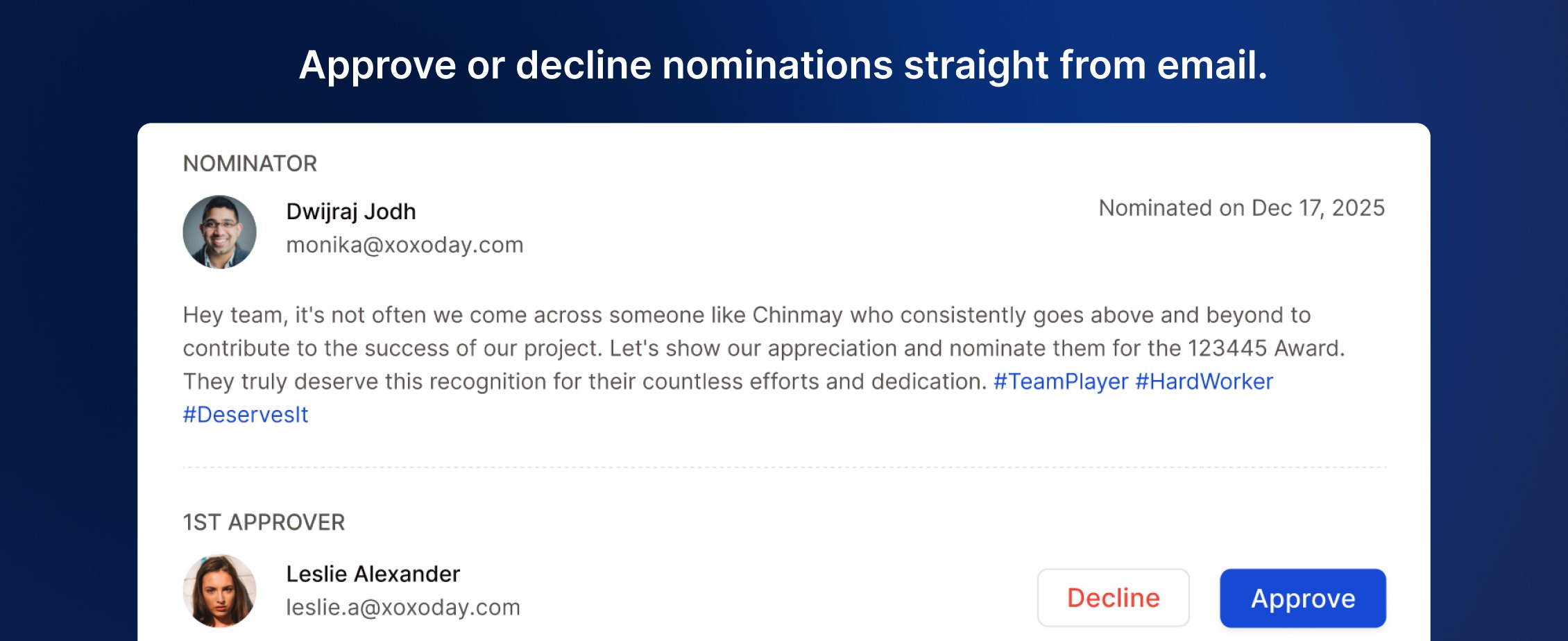
**4. Approve or decline award nominations directly from email**
Approvers had to log into the platform to act on nominations, creating delays in programs with multi-level workflows.
* **Full context in the email:** Award name, nominees, nominator, and citation — all visible in the notification email without opening the platform.
* **No login required:** Approve or decline directly from the email — faster decisions, less friction for every approver in the chain.
***
**4. Approve or decline award nominations directly from email**
Approvers had to log into the platform to act on nominations, creating delays in programs with multi-level workflows.
* **Full context in the email:** Award name, nominees, nominator, and citation — all visible in the notification email without opening the platform.
* **No login required:** Approve or decline directly from the email — faster decisions, less friction for every approver in the chain.
 ***
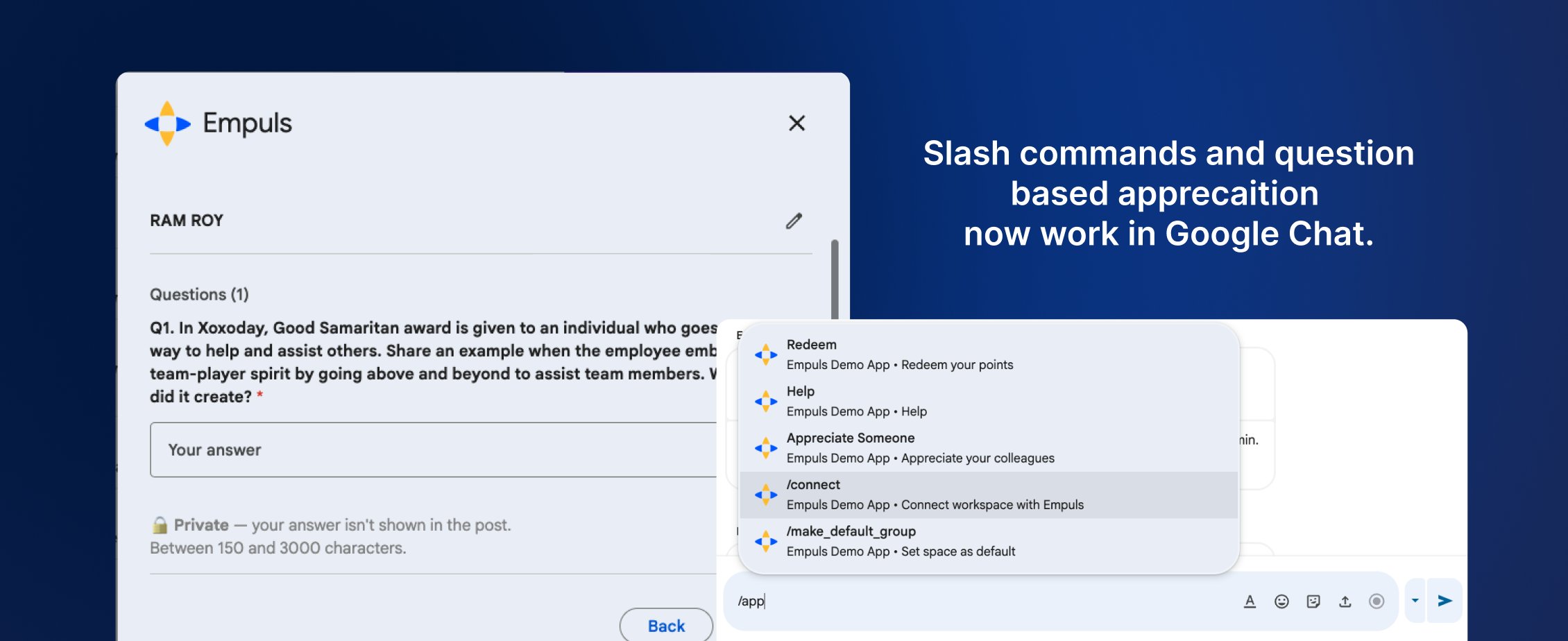
**5. Slash commands and question-based awards now live in Google Chat**
The Empuls app in Google Chat previously only sent notifications — and awards with questions were silently excluded from the recognition wizard without explanation.
* **Slash commands:** Type `/appreciate` to recognize a colleague or `/redeem` to browse and use points — directly inside Google Chat, no switching tabs.
* **Question-based awards supported:** Awards with additional questions now appear and work fully in the Google Chat wizard — employees can answer questions and submit nominations end to end.
***
**5. Slash commands and question-based awards now live in Google Chat**
The Empuls app in Google Chat previously only sent notifications — and awards with questions were silently excluded from the recognition wizard without explanation.
* **Slash commands:** Type `/appreciate` to recognize a colleague or `/redeem` to browse and use points — directly inside Google Chat, no switching tabs.
* **Question-based awards supported:** Awards with additional questions now appear and work fully in the Google Chat wizard — employees can answer questions and submit nominations end to end.
 ***
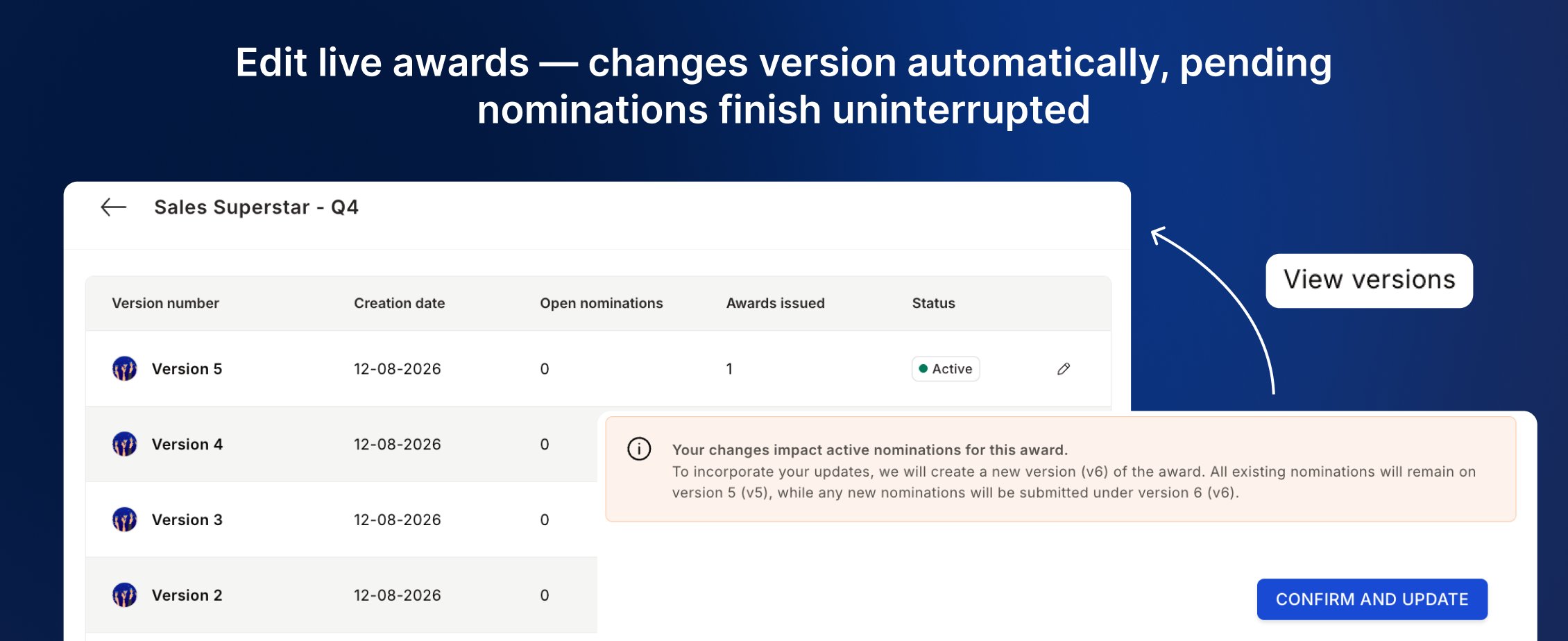
**6. Edit live awards without disrupting existing nominations**
Admins couldn't change approvers or eligibility rules while nominations were open, forcing them to freeze awards and clear all pending nominations first.
* **Automatic versioning:** Major edits — approvers, eligibility, point values — auto-create a new award version. In-flight nominations continue on the original version without interruption.
* **Version history:** Every award shows its full version history with open nomination counts, creation dates, and read-only config per version.
📹 [Watch walkthrough](https://app.trupeer.ai/view/Cfko5Hwsy/award-versioning-in-empuls)
***
**6. Edit live awards without disrupting existing nominations**
Admins couldn't change approvers or eligibility rules while nominations were open, forcing them to freeze awards and clear all pending nominations first.
* **Automatic versioning:** Major edits — approvers, eligibility, point values — auto-create a new award version. In-flight nominations continue on the original version without interruption.
* **Version history:** Every award shows its full version history with open nomination counts, creation dates, and read-only config per version.
📹 [Watch walkthrough](https://app.trupeer.ai/view/Cfko5Hwsy/award-versioning-in-empuls)
 ***
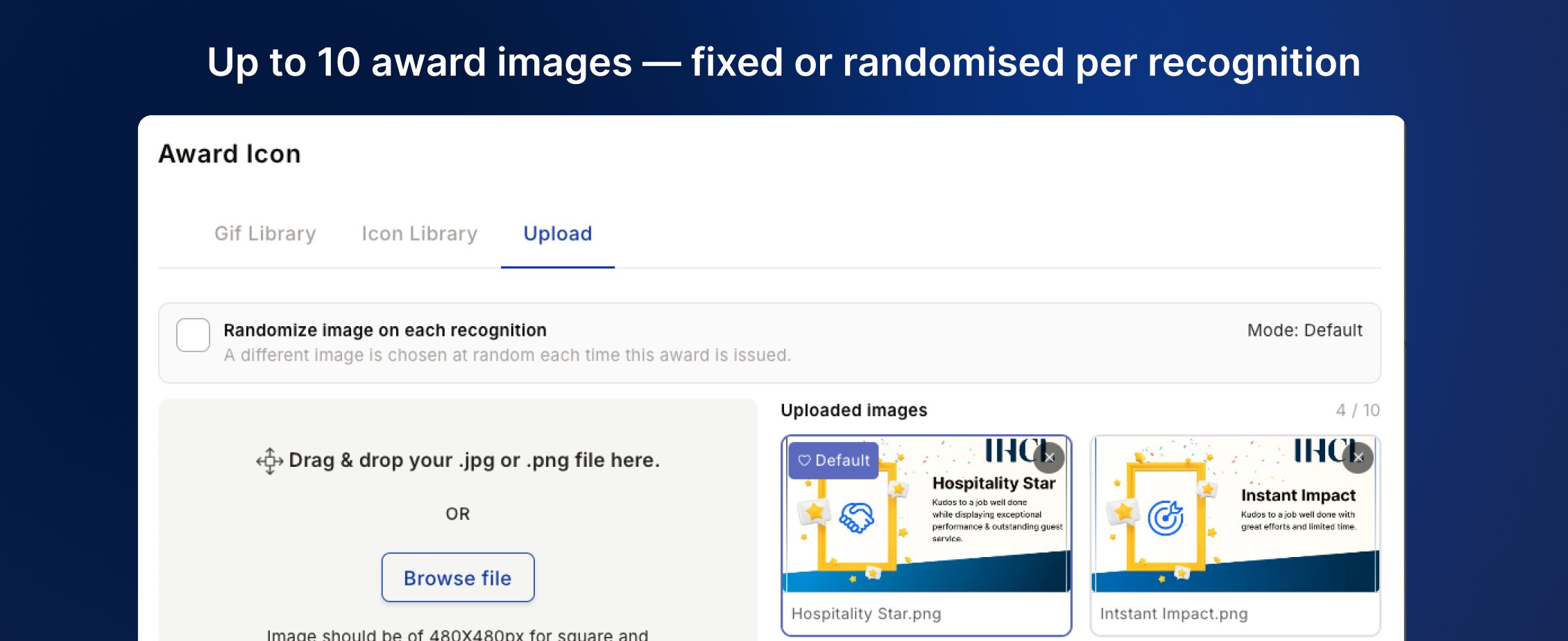
**7. Upload multiple award images — fixed default or randomized per recognition**
Each award was limited to one image. Admins who wanted visual variety had to duplicate awards with identical settings — fragmenting reporting and adding admin overhead.
* **Multi-image upload:** Add up to 10 images per award; set a fixed default or enable Randomize mode — each recognition automatically gets a different image from the pool.
* **Frozen at issuance:** Once selected, the image stays with that recognition permanently — the same image appears in the feed, email, and certificate every time.
📹 [Watch walkthrough](https://app.trupeer.ai/view/alp5aPVRu/managing-multiple-images-for-awards)
***
**7. Upload multiple award images — fixed default or randomized per recognition**
Each award was limited to one image. Admins who wanted visual variety had to duplicate awards with identical settings — fragmenting reporting and adding admin overhead.
* **Multi-image upload:** Add up to 10 images per award; set a fixed default or enable Randomize mode — each recognition automatically gets a different image from the pool.
* **Frozen at issuance:** Once selected, the image stays with that recognition permanently — the same image appears in the feed, email, and certificate every time.
📹 [Watch walkthrough](https://app.trupeer.ai/view/alp5aPVRu/managing-multiple-images-for-awards)
 ***
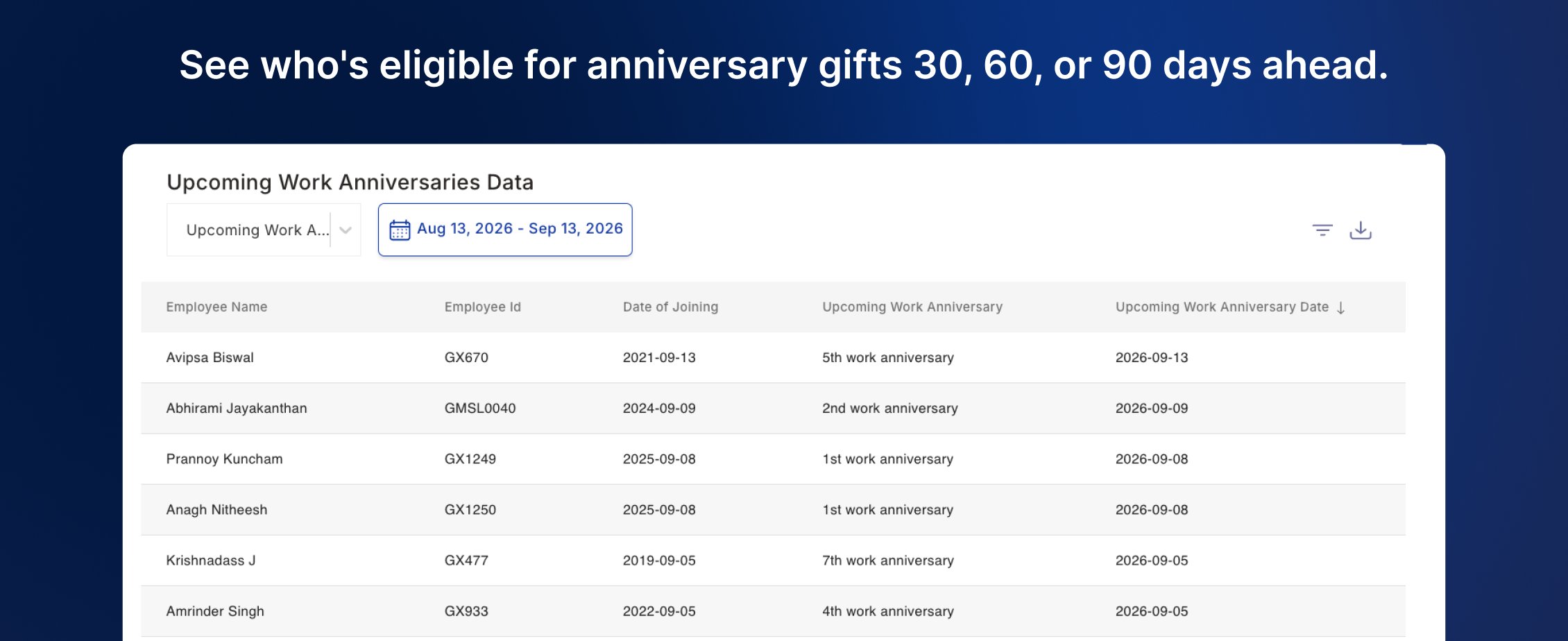
**8. See upcoming anniversary gift eligibility 30, 60, or 90 days ahead**
Admins running automated work anniversary gifting had no visibility into upcoming eligible employees, leading to last-minute coordination and inventory gaps.
* **30/60/90-day horizon:** See all employees approaching a work anniversary milestone within a configurable future window — filterable by department, location, grade, and more.
* **Plan before the gift fires:** Know who needs a gift, which milestone they're hitting, and exactly when — before the automated award is triggered.
***
**8. See upcoming anniversary gift eligibility 30, 60, or 90 days ahead**
Admins running automated work anniversary gifting had no visibility into upcoming eligible employees, leading to last-minute coordination and inventory gaps.
* **30/60/90-day horizon:** See all employees approaching a work anniversary milestone within a configurable future window — filterable by department, location, grade, and more.
* **Plan before the gift fires:** Know who needs a gift, which milestone they're hitting, and exactly when — before the automated award is triggered.
 ***
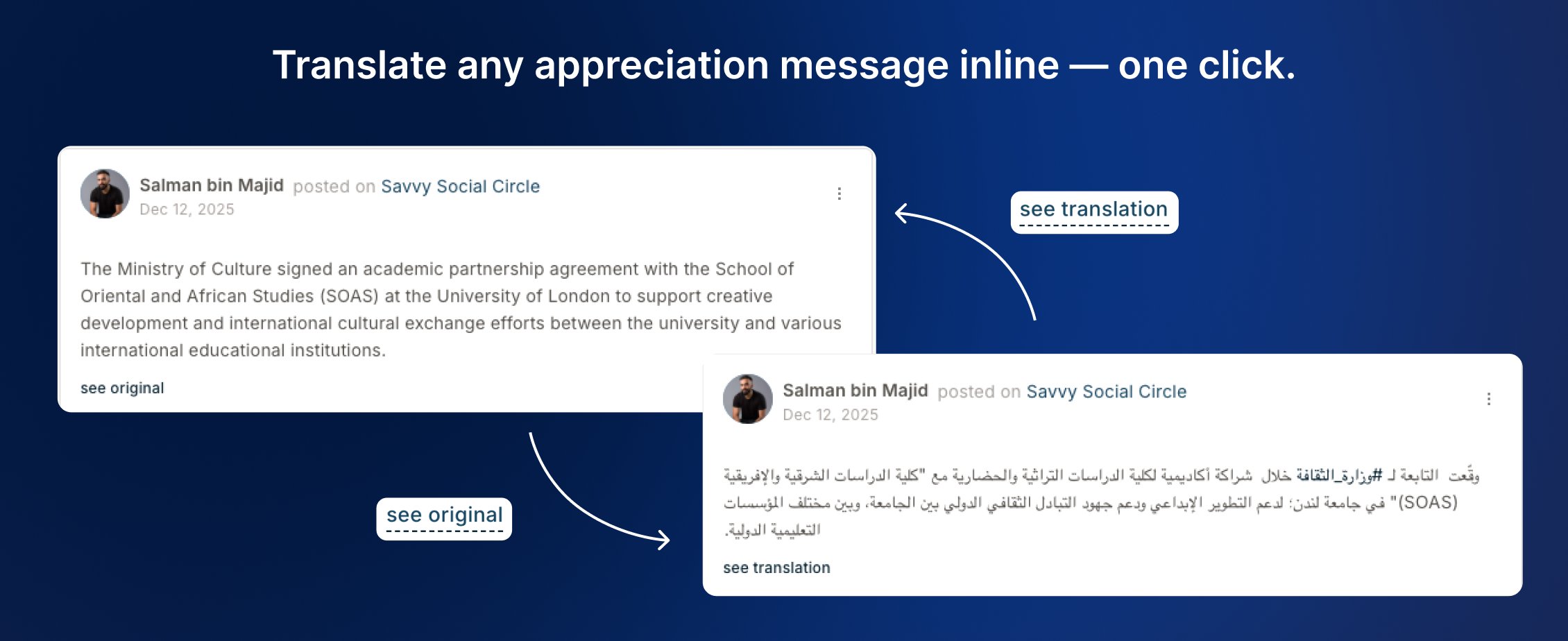
**9. Read any appreciation in your language — translate inline, instantly**
Recognition loses its impact when recipients can't read a message written in a different language. For multilingual organizations, that friction quietly reduces the value of every cross-team appreciation.
* **"See translation" on demand:** When an appreciation is written in a different language from your preference, a translate link appears inline — one click renders it in your language without leaving the page.
* **Original always preserved:** The source message is never altered — toggle "See original" anytime to return to what was written.
* **Consistent across surfaces:** Feed, notifications, and profile — the translation experience works wherever appreciation messages appear.
***
**9. Read any appreciation in your language — translate inline, instantly**
Recognition loses its impact when recipients can't read a message written in a different language. For multilingual organizations, that friction quietly reduces the value of every cross-team appreciation.
* **"See translation" on demand:** When an appreciation is written in a different language from your preference, a translate link appears inline — one click renders it in your language without leaving the page.
* **Original always preserved:** The source message is never altered — toggle "See original" anytime to return to what was written.
* **Consistent across surfaces:** Feed, notifications, and profile — the translation experience works wherever appreciation messages appear.