> ## Documentation Index
> Fetch the complete documentation index at: https://help-empuls.xoxoday.com/llms.txt
> Use this file to discover all available pages before exploring further.
# Reward campaigns
> Run structured, time-bound recognition cycles with built-in governance rules that keep recognition fair and auditable.
Reward campaigns (also called reward programs) let you run structured, time-bound recognition cycles. Rather than allowing ad-hoc nominations year-round, you define a window when nominations are open, set point budgets for the cycle, and configure governance rules to prevent favouritism.
Reward campaigns are particularly useful for:
* Annual recognition programmes like "Best Innovation" or "Team of the Year"
* Quarterly performance recognition cycles
* Festival or seasonal recognition events
## Video walkthrough
### Create a reward campaign
Go to **Admin Dashboard > Programs > Reward Campaigns** and click **Create Reward Program**.
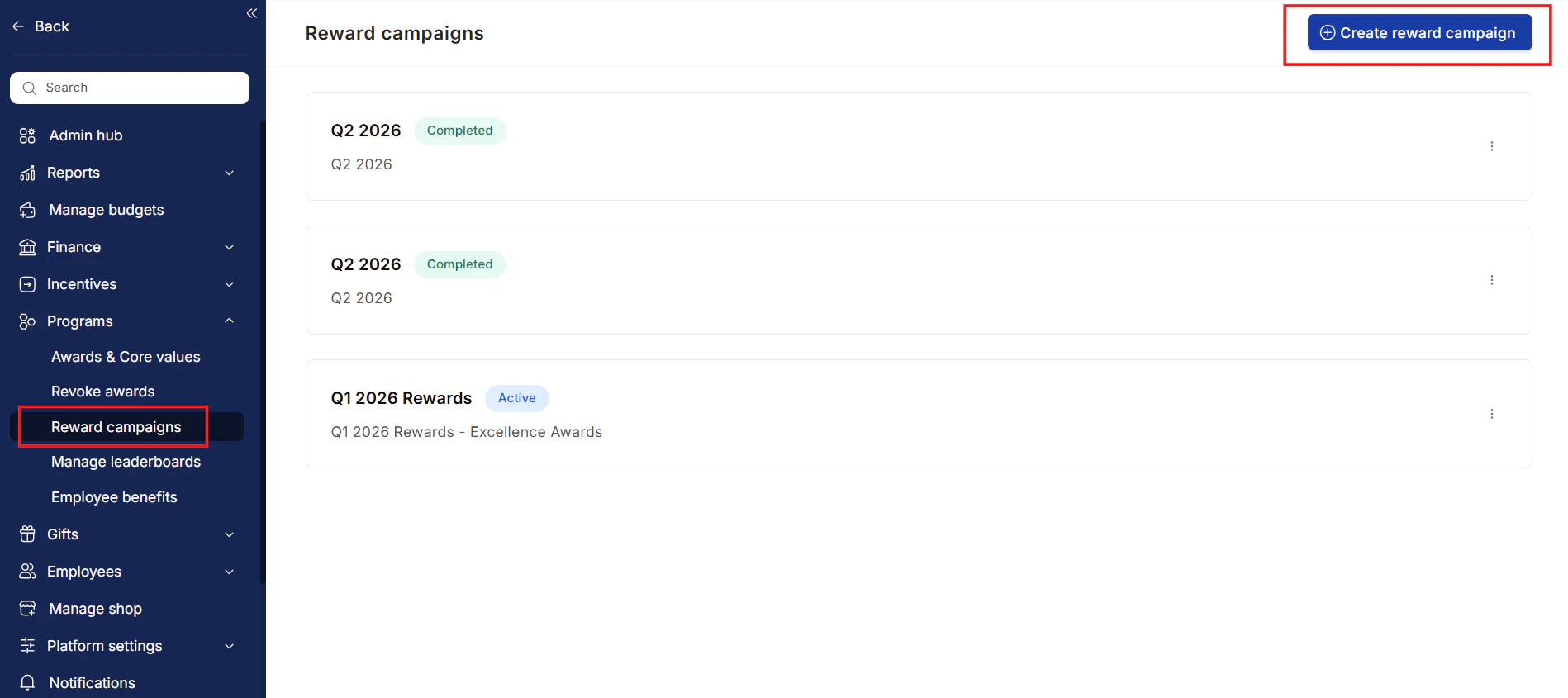 Enter a **Program Name** and **Description**. Select the awards to include in this campaign from the dropdown, and enter the total points budget allocated for the cycle.
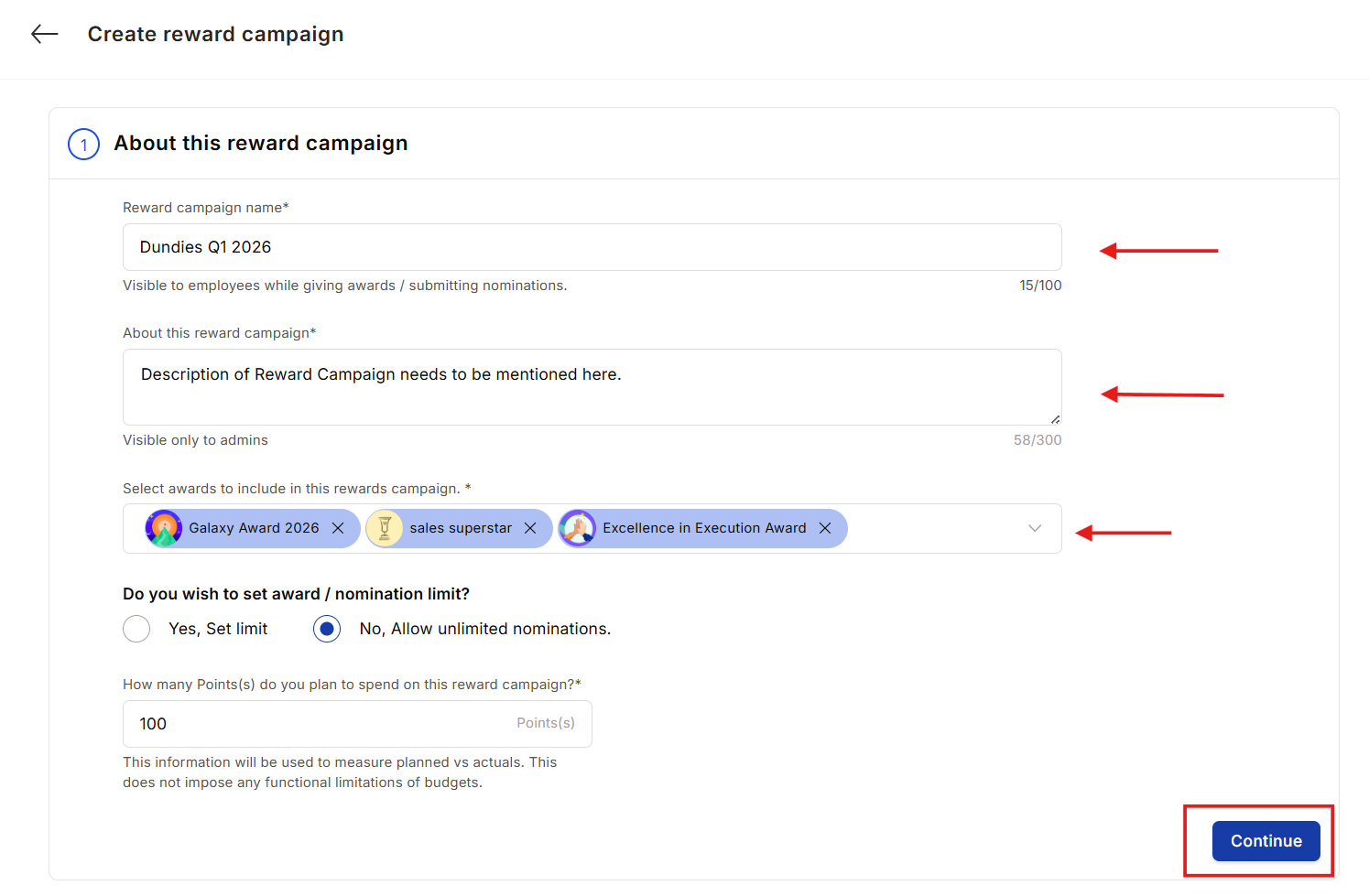 Click the pen icon to define who can submit nominations in this campaign. You can include everyone or filter by designation, department, location, or other attributes. Click **Save and Continue**.
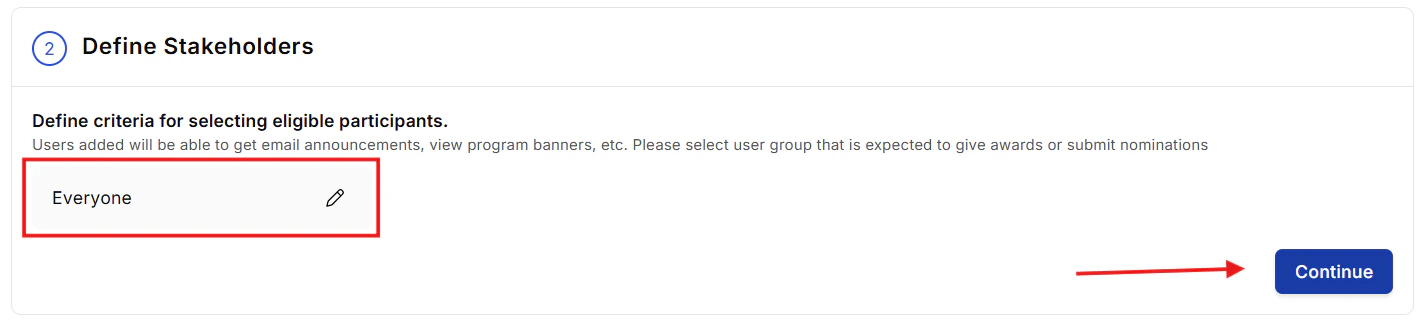 Toggle **Yes, Set Limit** to cap the number of nominations per award. Enter the maximum number per award (up to 99). This prevents any single award category from being flooded with nominations.
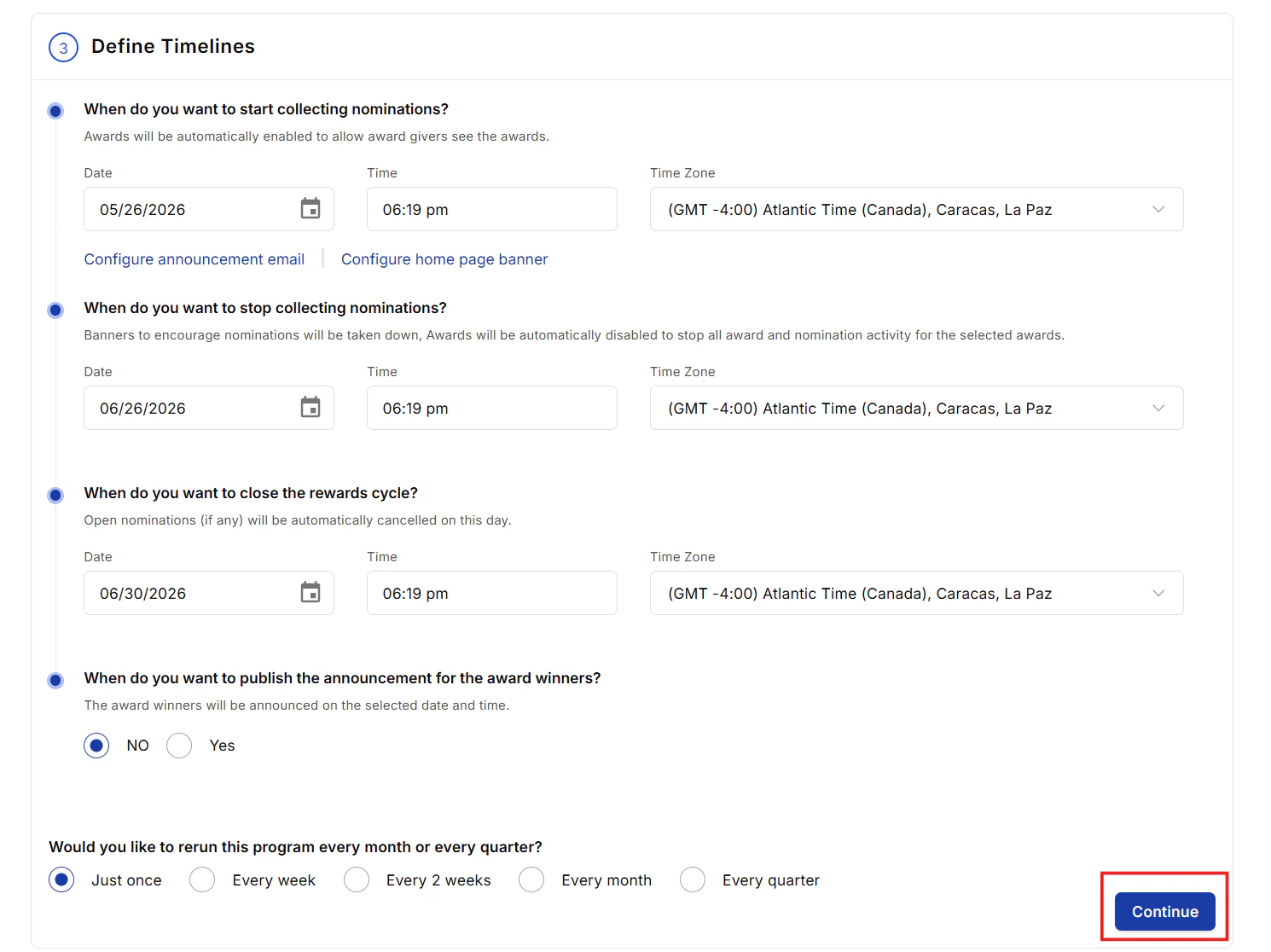
Set the **start date and time** for collecting nominations, the **end date** to stop accepting new nominations, and the final **program close date**. You can also configure a custom announcement email and a home page banner to promote the campaign.
Toggle **Yes, Set Limit** to cap the number of nominations per award. Enter the maximum number per award (up to 99). This prevents any single award category from being flooded with nominations.
Set the **start date and time** for collecting nominations, the **end date** to stop accepting new nominations, and the final **program close date**. You can also configure a custom announcement email and a home page banner to promote the campaign.
 Empuls includes built-in guardrails to ensure fair recognition:
* **Reciprocal recognition:** Flags or blocks situations where two employees only nominate each other.
* **Repetitive recognition:** Flags nominations where the same person is nominated by the same person multiple times within a configurable window.
* **Over-recognition:** Flags excessive nominations for the same individual.
For each rule, choose the enforcement level:
* **Observe mode:** Logs violations for admin review without blocking the action.
* **Restricted mode:** Blocks the action and asks the user to make a change.
Empuls includes built-in guardrails to ensure fair recognition:
* **Reciprocal recognition:** Flags or blocks situations where two employees only nominate each other.
* **Repetitive recognition:** Flags nominations where the same person is nominated by the same person multiple times within a configurable window.
* **Over-recognition:** Flags excessive nominations for the same individual.
For each rule, choose the enforcement level:
* **Observe mode:** Logs violations for admin review without blocking the action.
* **Restricted mode:** Blocks the action and asks the user to make a change.
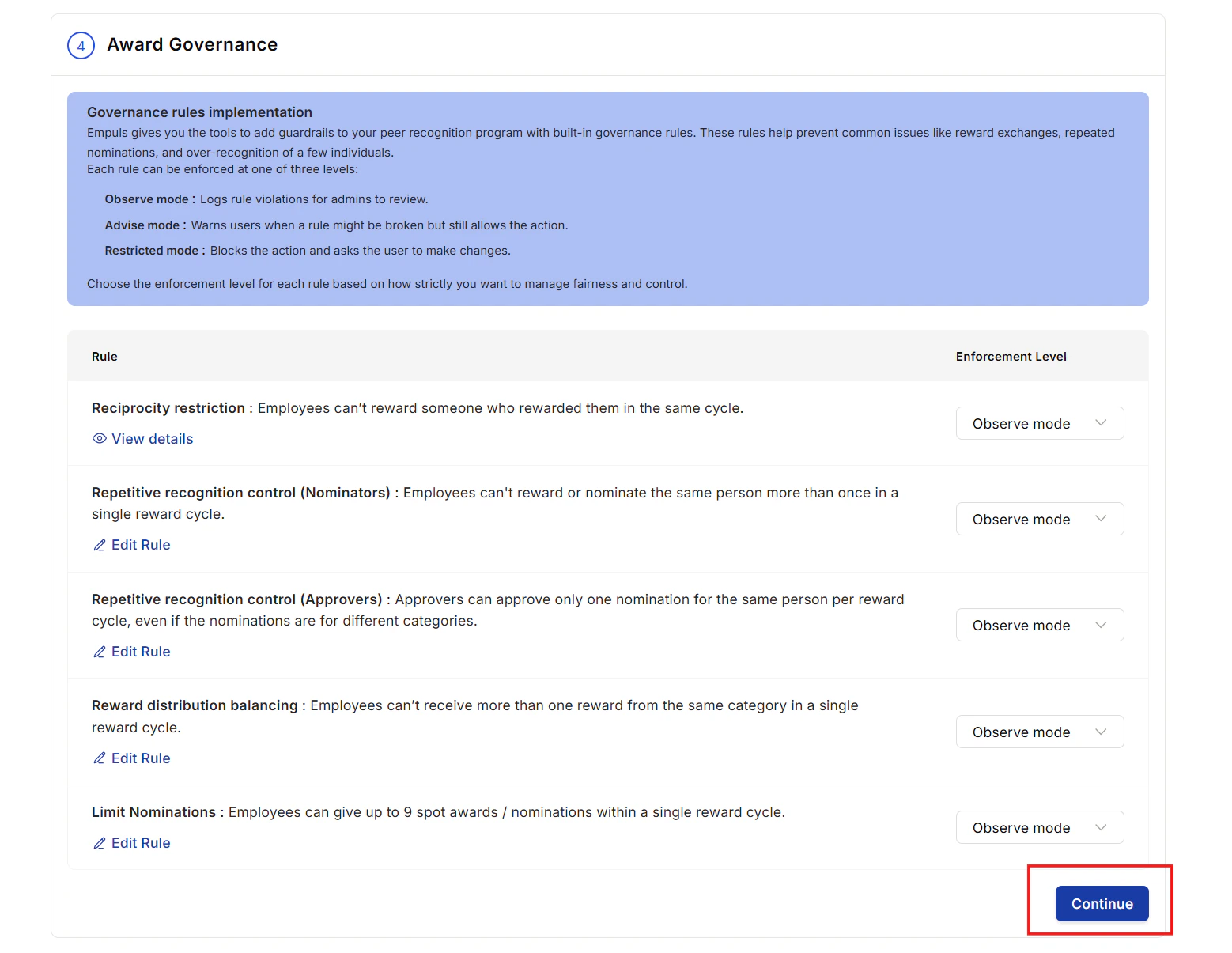 Review all settings and click **Save and Continue** to activate the campaign. Selected participants receive an announcement email and see the campaign banner on their home page.
### Monitor a running campaign
The **Reward Program Dashboard** (under **Programs > Reward Campaigns**) shows active and completed campaigns. Click any campaign to access:
* **Submission Details:** Total nominations received, who submitted them, number of participants. Send reminder nudges to all participants or filter by award and nominator.
* **Review Details:** Nominations awaiting review, approved, and declined. Send nudges to reviewers with pending actions.
* **Governance Report:** A log of rule violations in observe mode.
To copy a completed campaign for next quarter, click the three-dot icon on the campaign card and select **Make a Copy**. The dates automatically shift to the next period.
## Governance rules
Reward governance lets Super Admins define rules that prevent misuse — circular nominations, repeated nominations, and budget overrun — without requiring manual HR intervention.
### Available rules
An employee cannot reward someone who has already rewarded them within the same cycle, preventing point-swapping between friends.
A user cannot reward or nominate the same person more than once per cycle. Approvers can only approve one nomination per person per category per cycle.
An employee cannot receive more than one reward in the same award category per cycle, ensuring recognition spreads broadly across the workforce.
### Enforcement levels
| Mode | What happens |
| ------------------- | --------------------------------------------------------------------------------------------------------------- |
| **Observe mode** | The action proceeds but the violation is logged in the Governance Report for admin review. |
| **Restricted mode** | The action is blocked and the user sees an explanation prompt (e.g., "You have reached your nomination limit"). |
### Real-time messages
When a rule triggers, Empuls shows clear in-product messaging:
| Rule | Observe message | Restricted message |
| ------------------------- | ----------------------------------------------------------------- | -------------------------------------------------------------------------- |
| **Reciprocity** | "Reciprocal reward detected — consider whether this is unbiased." | "Action not allowed: reciprocal rewards are blocked to maintain fairness." |
| **Duplicate recognition** | "Duplicate detected — consider recognising someone else." | "Duplicate blocked: you cannot reward this person again this cycle." |
| **Category balancing** | "Recipient was already recognised in this category." | "Duplicate category blocked: only one reward per category is allowed." |
### Governance report
The **Governance Report** (accessible inside each campaign dashboard) logs every rule violation. Each row shows the date, the giver and receiver, which rule was triggered, the enforcement mode in effect, and the outcome (allowed, warned, or blocked). Use the report to monitor behaviour, assess rule impact, and tune your policies over quarter.
Governance rules apply per campaign cycle. The same employees can recognise each other freely across different campaigns.
Review all settings and click **Save and Continue** to activate the campaign. Selected participants receive an announcement email and see the campaign banner on their home page.
### Monitor a running campaign
The **Reward Program Dashboard** (under **Programs > Reward Campaigns**) shows active and completed campaigns. Click any campaign to access:
* **Submission Details:** Total nominations received, who submitted them, number of participants. Send reminder nudges to all participants or filter by award and nominator.
* **Review Details:** Nominations awaiting review, approved, and declined. Send nudges to reviewers with pending actions.
* **Governance Report:** A log of rule violations in observe mode.
To copy a completed campaign for next quarter, click the three-dot icon on the campaign card and select **Make a Copy**. The dates automatically shift to the next period.
## Governance rules
Reward governance lets Super Admins define rules that prevent misuse — circular nominations, repeated nominations, and budget overrun — without requiring manual HR intervention.
### Available rules
An employee cannot reward someone who has already rewarded them within the same cycle, preventing point-swapping between friends.
A user cannot reward or nominate the same person more than once per cycle. Approvers can only approve one nomination per person per category per cycle.
An employee cannot receive more than one reward in the same award category per cycle, ensuring recognition spreads broadly across the workforce.
### Enforcement levels
| Mode | What happens |
| ------------------- | --------------------------------------------------------------------------------------------------------------- |
| **Observe mode** | The action proceeds but the violation is logged in the Governance Report for admin review. |
| **Restricted mode** | The action is blocked and the user sees an explanation prompt (e.g., "You have reached your nomination limit"). |
### Real-time messages
When a rule triggers, Empuls shows clear in-product messaging:
| Rule | Observe message | Restricted message |
| ------------------------- | ----------------------------------------------------------------- | -------------------------------------------------------------------------- |
| **Reciprocity** | "Reciprocal reward detected — consider whether this is unbiased." | "Action not allowed: reciprocal rewards are blocked to maintain fairness." |
| **Duplicate recognition** | "Duplicate detected — consider recognising someone else." | "Duplicate blocked: you cannot reward this person again this cycle." |
| **Category balancing** | "Recipient was already recognised in this category." | "Duplicate category blocked: only one reward per category is allowed." |
### Governance report
The **Governance Report** (accessible inside each campaign dashboard) logs every rule violation. Each row shows the date, the giver and receiver, which rule was triggered, the enforcement mode in effect, and the outcome (allowed, warned, or blocked). Use the report to monitor behaviour, assess rule impact, and tune your policies over quarter.
Governance rules apply per campaign cycle. The same employees can recognise each other freely across different campaigns.