> ## Documentation Index
> Fetch the complete documentation index at: https://help-empuls.xoxoday.com/llms.txt
> Use this file to discover all available pages before exploring further.
# Homepage editor
> Customize your Empuls homepage by choosing from three layouts that match your company’s culture and communication needs.
## Overview
Empuls offers three homepage layout options to help organizations personalize the employee experience based on their communication and engagement priorities.
Each layout contains the same widgets but arranges them differently to support various goals such as:
* Peer recognition
* Leadership communication
* Employee engagement
* Balanced collaboration experiences
> **Note:** Layout changes can be enabled from the backend upon request. Contact [cs@xoxoday.com](mailto:cs@xoxoday.com) for assistance.
***
## Choosing a Homepage Layout
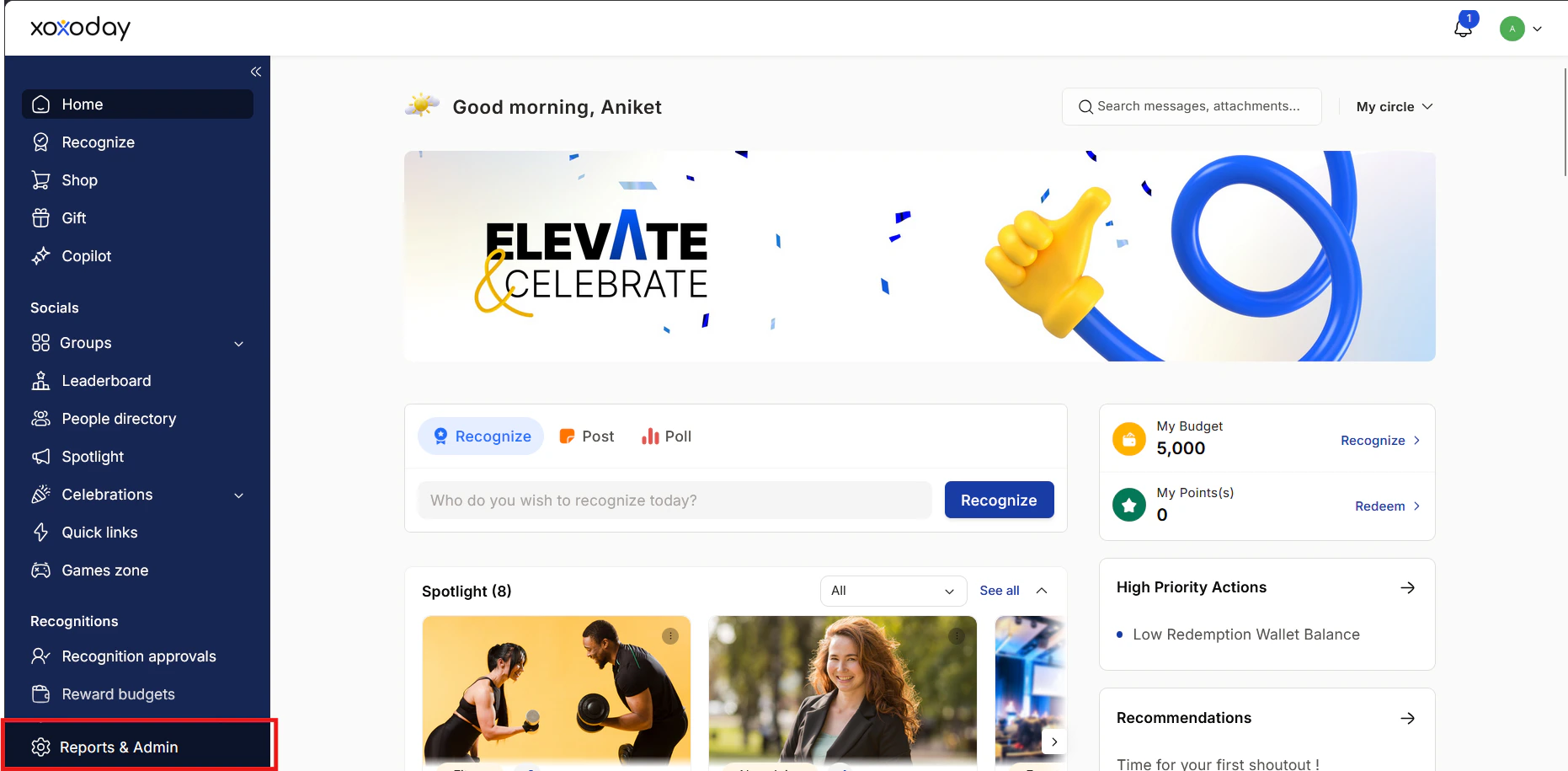
### Step 1: Go to Admin Dashboard
Click on **Reports and Admin** to open the admin dashboard.
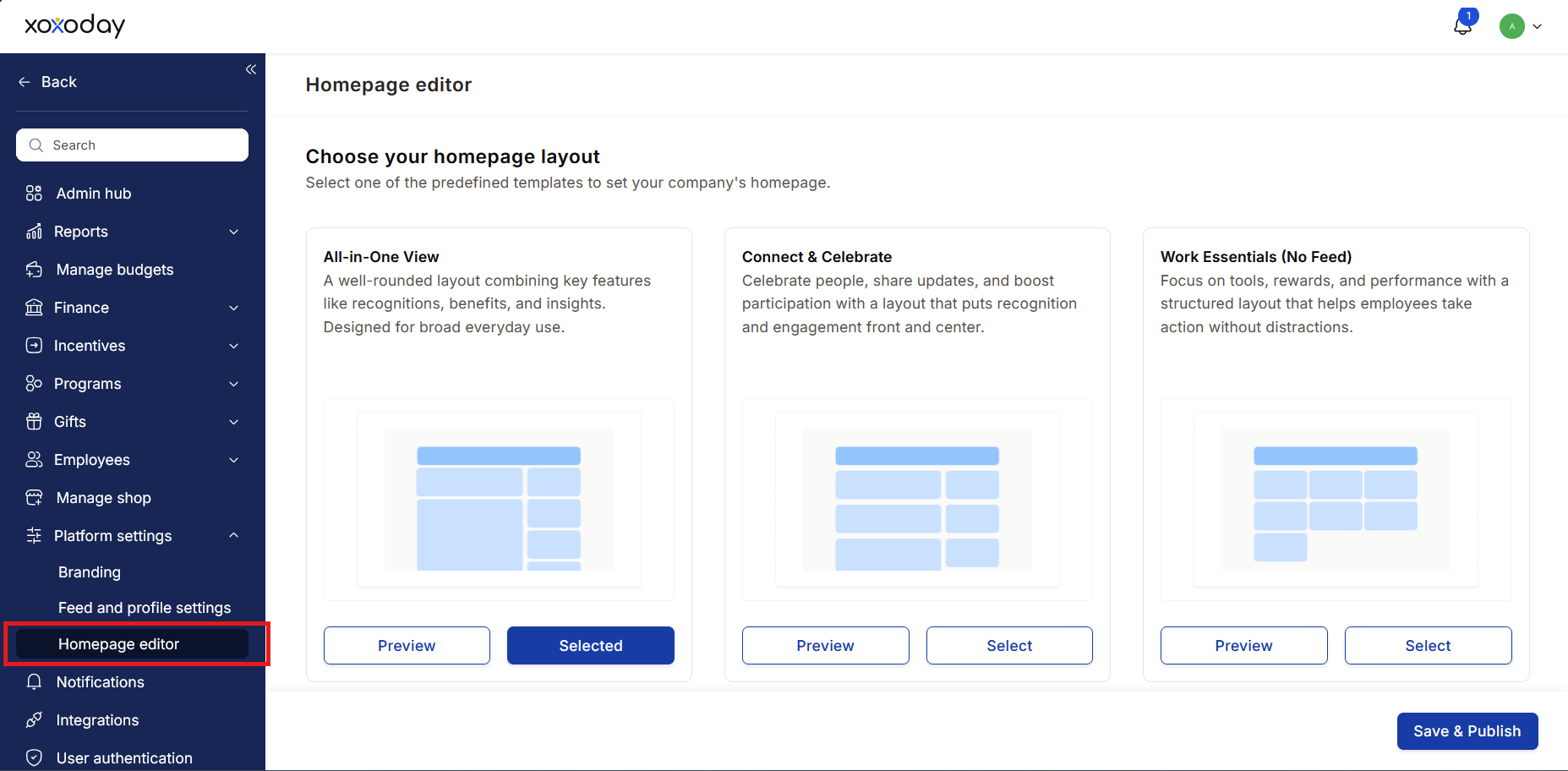
 ### Step 2: Open Homepage Editor
Navigate to:
`Platform Settings > Homepage Editor`
### Step 2: Open Homepage Editor
Navigate to:
`Platform Settings > Homepage Editor`
 ### Step 3: Preview and Select Layout
Preview the available homepage layouts.
### Step 3: Preview and Select Layout
Preview the available homepage layouts.
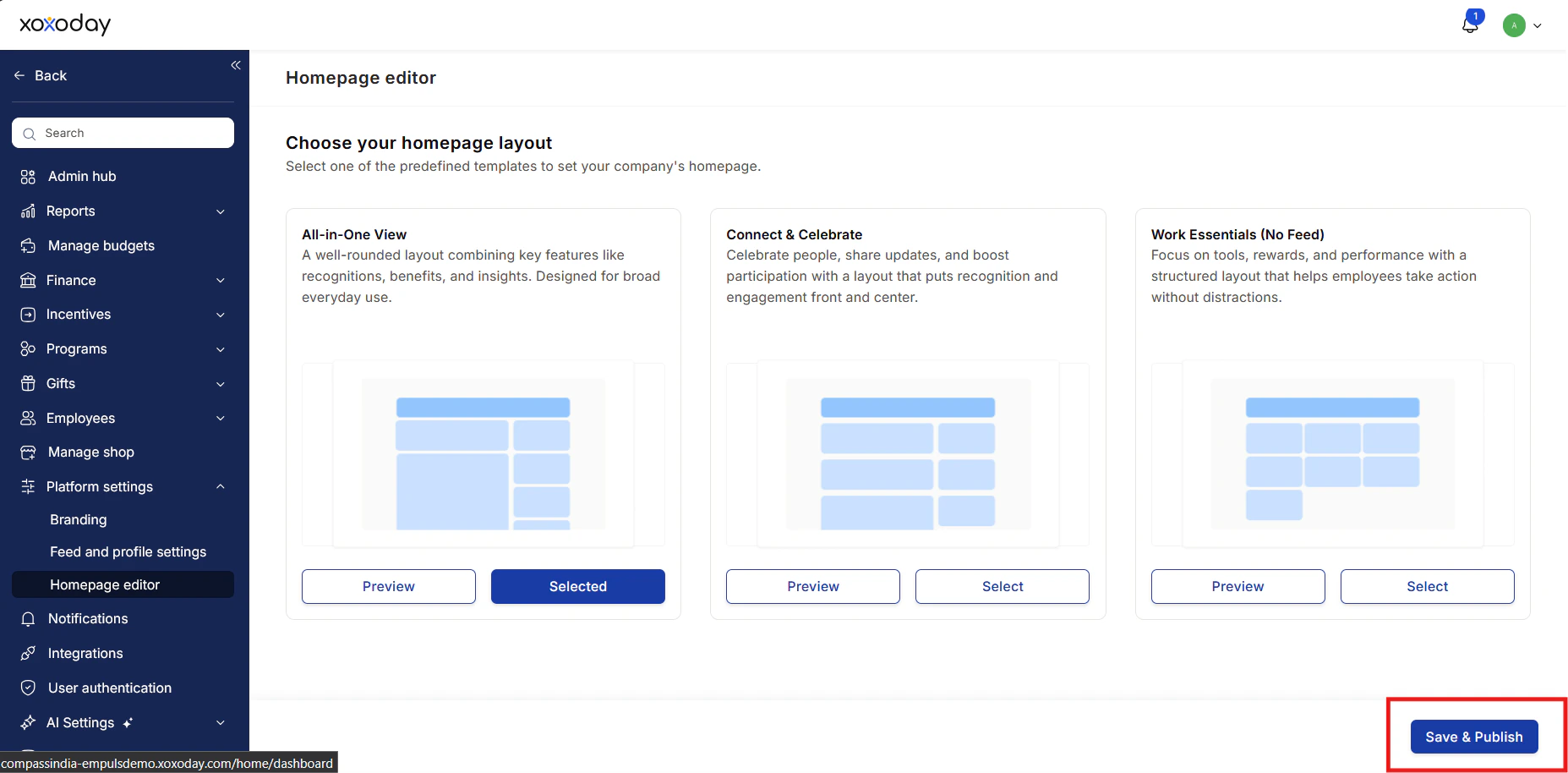 Once you decide on a layout:
1. Click **Select** below the preferred layout
2. Click **Save and Publish**
***
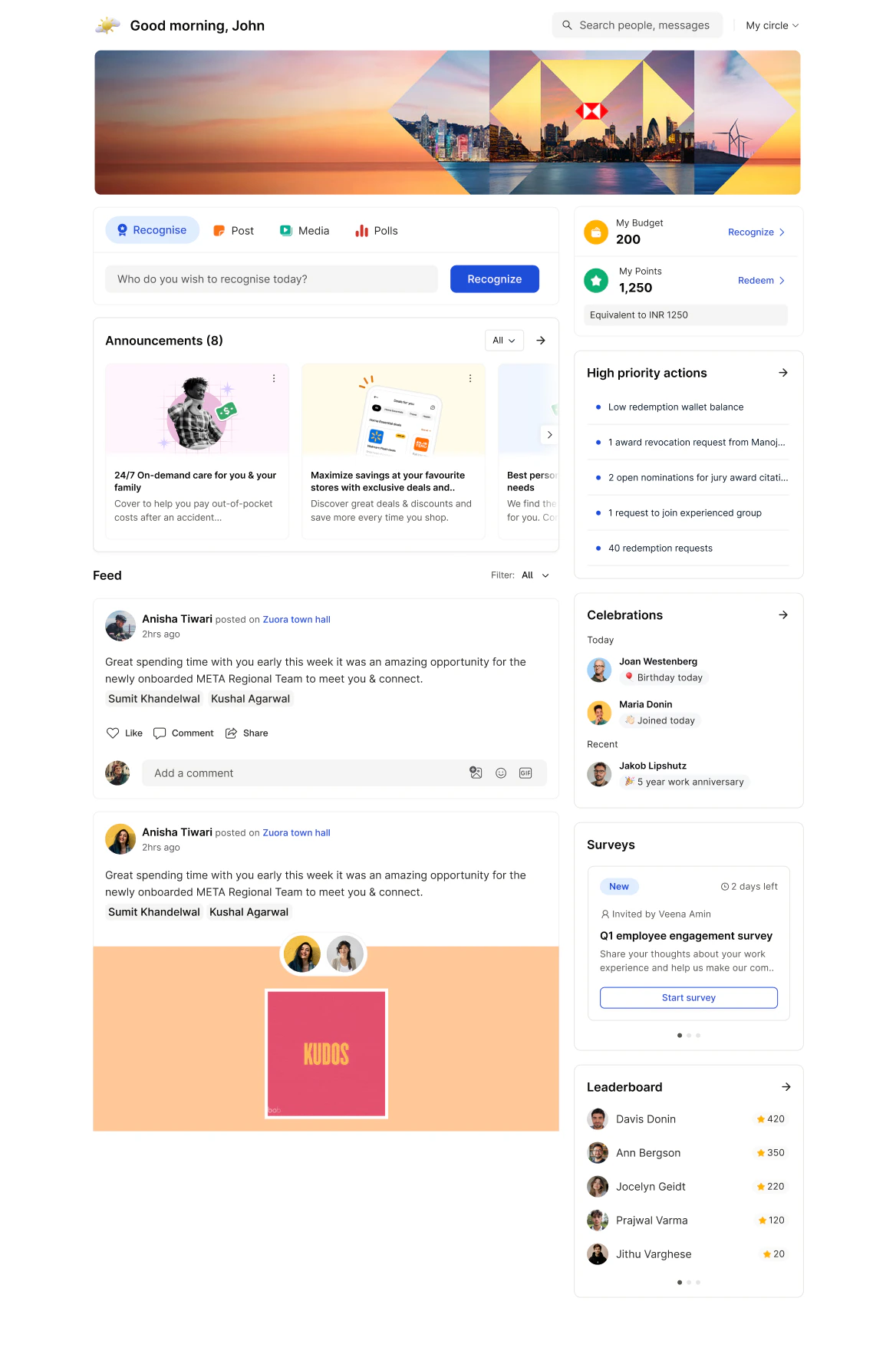
# Layout 1: Current Feed (Default)
**Best for:** Organizations looking for a balanced employee experience combining recognition, updates, and engagement tools.
## Widget Flow
1. **Banner** – Displays your organization’s customized banner
2. **Spotlight** – Highlights important announcements
3. **Feed** – Shows recognitions, social interactions, and company updates
4. **Points** – Displays the user’s reward point balance
5. **Recommendations** – Suggests people to recognize or actions to take
6. **Surveys** – Displays pulse surveys and feedback requests
7. **Celebrations** – Shows birthdays, new joiners, and anniversaries
8. **Leaderboard** – Displays leaderboard winners
9. **High Priority Actions** – Highlights tasks requiring user attention
Once you decide on a layout:
1. Click **Select** below the preferred layout
2. Click **Save and Publish**
***
# Layout 1: Current Feed (Default)
**Best for:** Organizations looking for a balanced employee experience combining recognition, updates, and engagement tools.
## Widget Flow
1. **Banner** – Displays your organization’s customized banner
2. **Spotlight** – Highlights important announcements
3. **Feed** – Shows recognitions, social interactions, and company updates
4. **Points** – Displays the user’s reward point balance
5. **Recommendations** – Suggests people to recognize or actions to take
6. **Surveys** – Displays pulse surveys and feedback requests
7. **Celebrations** – Shows birthdays, new joiners, and anniversaries
8. **Leaderboard** – Displays leaderboard winners
9. **High Priority Actions** – Highlights tasks requiring user attention
 ***
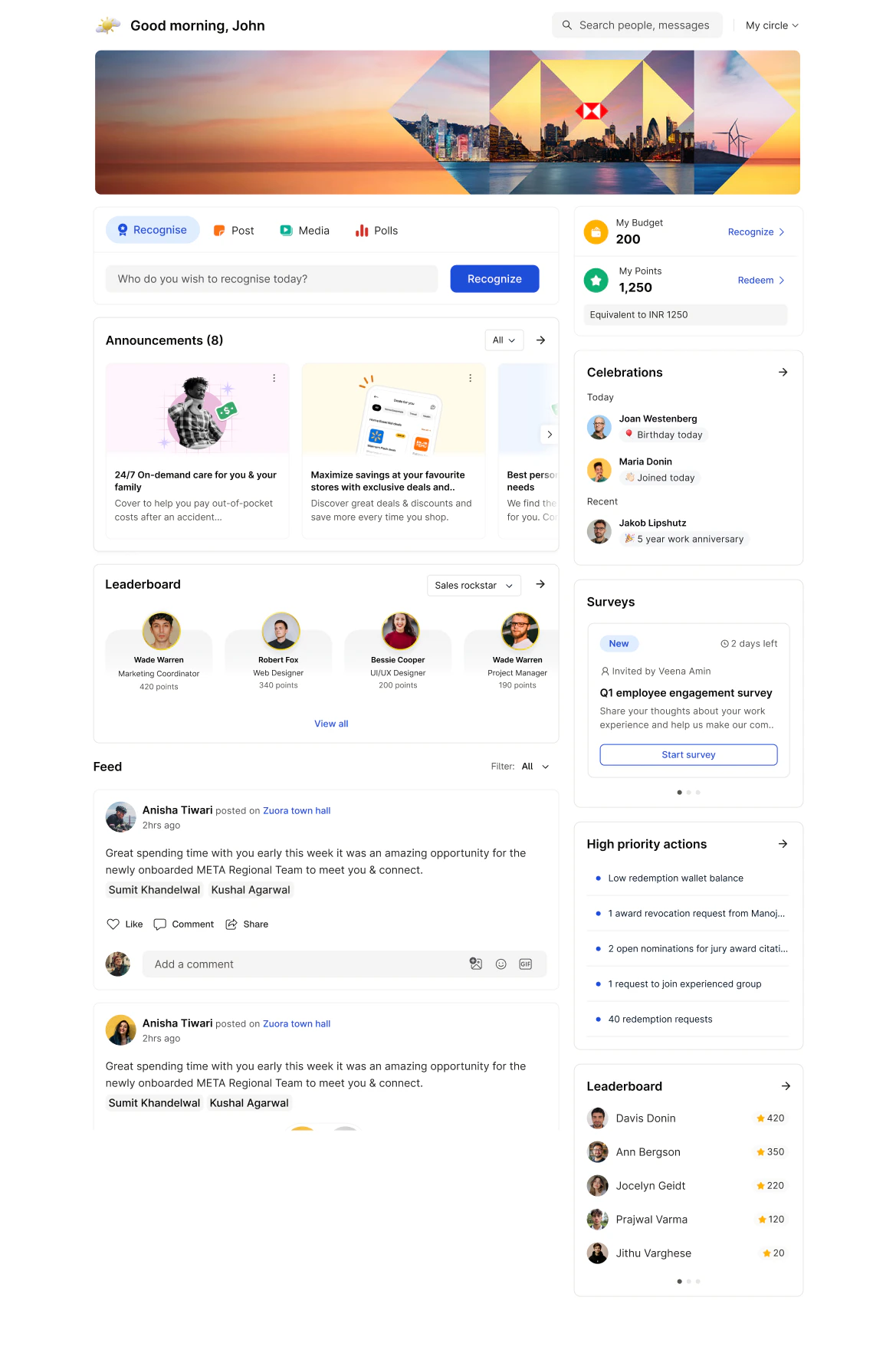
# Layout 2: Communication-First
**Best for:** Organizations focused on leadership communication and company-wide updates.
## Widget Flow
1. **Banner** – Displays your organization’s customized banner
2. **Spotlight** – Highlights important announcements
3. **Feed** – Shows recognitions, social interactions, and company updates
4. **Surveys** – Displays pulse surveys and feedback requests
5. **High Priority Actions** – Highlights tasks requiring user attention
6. **Celebrations** – Shows birthdays, new joiners, and anniversaries
7. **Points** – Displays the user’s reward point balance
8. **Leaderboard** – Displays leaderboard winners
9. **Recommendations** – Suggests people to recognize or actions to take
***
# Layout 2: Communication-First
**Best for:** Organizations focused on leadership communication and company-wide updates.
## Widget Flow
1. **Banner** – Displays your organization’s customized banner
2. **Spotlight** – Highlights important announcements
3. **Feed** – Shows recognitions, social interactions, and company updates
4. **Surveys** – Displays pulse surveys and feedback requests
5. **High Priority Actions** – Highlights tasks requiring user attention
6. **Celebrations** – Shows birthdays, new joiners, and anniversaries
7. **Points** – Displays the user’s reward point balance
8. **Leaderboard** – Displays leaderboard winners
9. **Recommendations** – Suggests people to recognize or actions to take
 ***
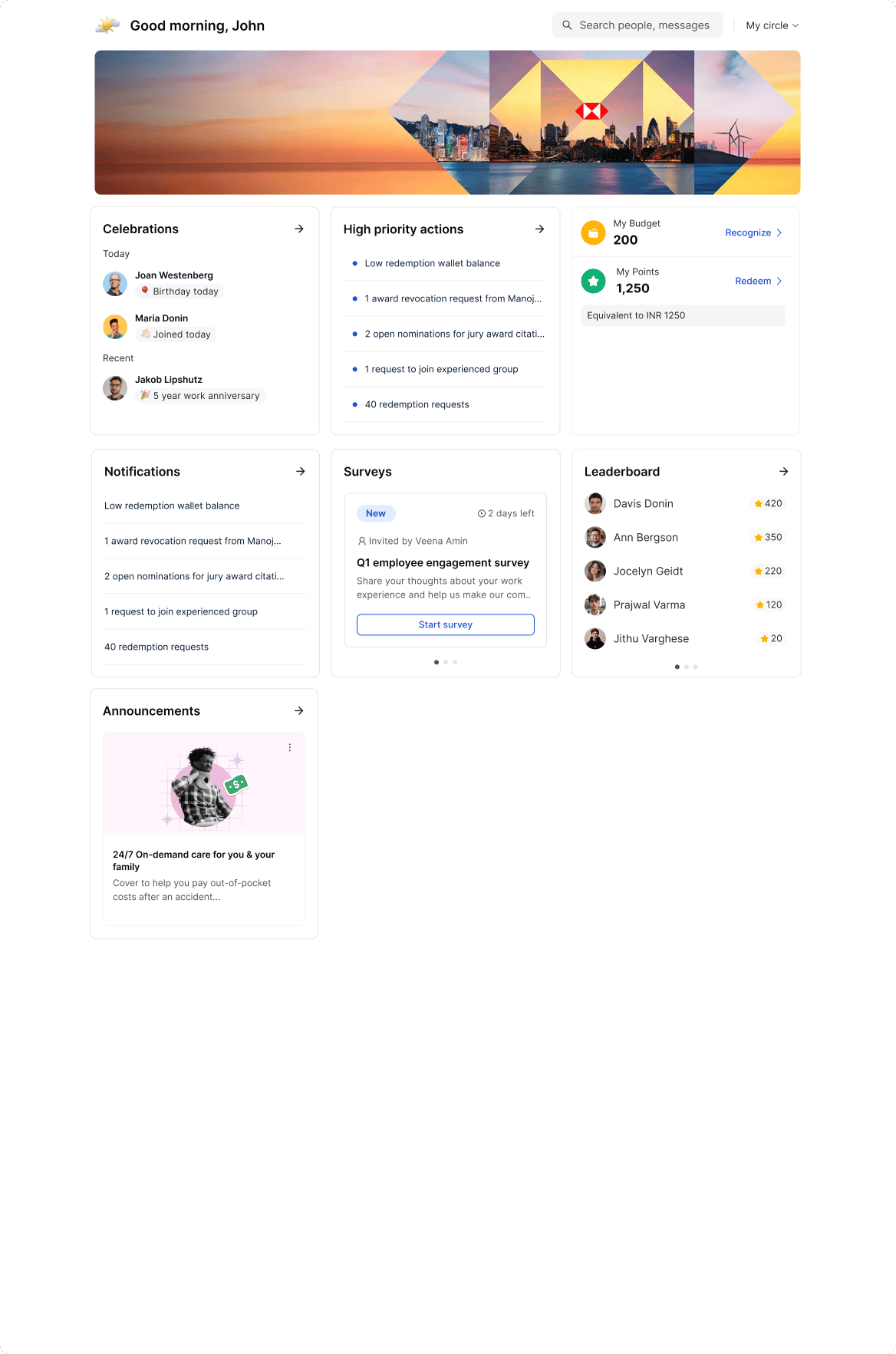
# Layout 3: Goal & Recognition Focused
**Best for:** Organizations that want to spotlight achievements and encourage continuous engagement.
## Widget Flow
1. **Banner** – Displays your organization’s customized banner
2. **Spotlight** – Highlights important announcements
3. **Points** – Displays the user’s reward point balance
4. **Recommendations** – Suggests people to recognize or actions to take
5. **Surveys** – Displays pulse surveys and feedback requests
6. **Leaderboard** – Displays leaderboard winners
7. **High Priority Actions** – Highlights tasks requiring user attention
***
# Layout 3: Goal & Recognition Focused
**Best for:** Organizations that want to spotlight achievements and encourage continuous engagement.
## Widget Flow
1. **Banner** – Displays your organization’s customized banner
2. **Spotlight** – Highlights important announcements
3. **Points** – Displays the user’s reward point balance
4. **Recommendations** – Suggests people to recognize or actions to take
5. **Surveys** – Displays pulse surveys and feedback requests
6. **Leaderboard** – Displays leaderboard winners
7. **High Priority Actions** – Highlights tasks requiring user attention
 ***
## Need Help?
Have questions or feedback? Reach out to:
[**cs@xoxoday.com**](mailto:cs@xoxoday.com)
***
## Need Help?
Have questions or feedback? Reach out to:
[**cs@xoxoday.com**](mailto:cs@xoxoday.com)