> ## Documentation Index
> Fetch the complete documentation index at: https://help-empuls.xoxoday.com/llms.txt
> Use this file to discover all available pages before exploring further.
# Holistic employee wellness with Yogifi
> Learn about integration of YogiFi with Empuls
## About YogiFi
YogiFi is an innovative AI-powered yoga solution that integrates intelligent sensor technology to offer personalized, real-time posture feedback during yoga sessions. This intelligent yoga mat helps users enhance their practice by providing accurate corrections, ensuring a more effective and therapeutic yoga experience.
## Why Connect YogiFi with Empuls
Integrating YogiFi with Empuls allows HR teams to promote physical wellness through personalized yoga programs. Employees can access real-time posture feedback and therapeutic yoga sessions, fostering a healthier workforce. HR leaders can track engagement, encourage holistic wellness, and reduce stress-related absenteeism, all while promoting a culture of wellness within the organization.
## Key Benefits
* **For HR**
* AI-driven wellness support
Personalized yoga sessions that correct posture and enhance practice.
* Data-driven insights
Monitor engagement and track wellness metrics across your organization.
* Employee retention boost
Improve morale and productivity through tailored wellness initiatives.
* Simplified program delivery
Easily integrate YogiFi’s digital yoga programs across the workforce.
* **For Employees**
* Real-time posture feedback
Improve your yoga practice with AI-powered corrections.
* Therapeutic yoga sessions
Enjoy stress relief and mental clarity anytime, anywhere.
* Accessible wellness
Yoga sessions that fit into any schedule and require no prior experience.
* Interactive learning
Engage with personalized sessions that adapt to your skill level.
## How Employees Can Use YogiFi
* **Personalized Yoga Classes**
Employees can participate in yoga sessions tailored to their unique needs, with real-time feedback that helps improve posture and enhances the practice.
* **Therapeutic Sessions**
Enjoy instant stress relief and therapeutic benefits with sessions designed to promote mental clarity and physical wellness.
* **Anywhere, Anytime Access**
With YogiFi, employees can practice yoga from the comfort of their home, office, or while traveling, ensuring wellness is always within reach.
* **Posture Correction**
YogiFi’s AI-driven sensor technology provides accurate posture corrections during yoga sessions, helping employees maintain proper alignment and avoid strain.
* **Engagement & Tracking**
HR leaders can monitor employee engagement with the program, track wellness progress, and ensure that every employee has access to the resources they need for a healthier lifestyle.
## Co-Sponsor & Deliver YogiFi Benefits at Scale
Employers can easily roll out YogiFi’s personalized yoga sessions across the organization, ensuring all employees have access to the therapeutic benefits of yoga. By integrating YogiFi with Empuls, companies can streamline wellness initiatives and promote a healthy, engaged workforce. Follow the steps below to bring YogiFi to your organization:
## Step-by-Step Setup for Admins
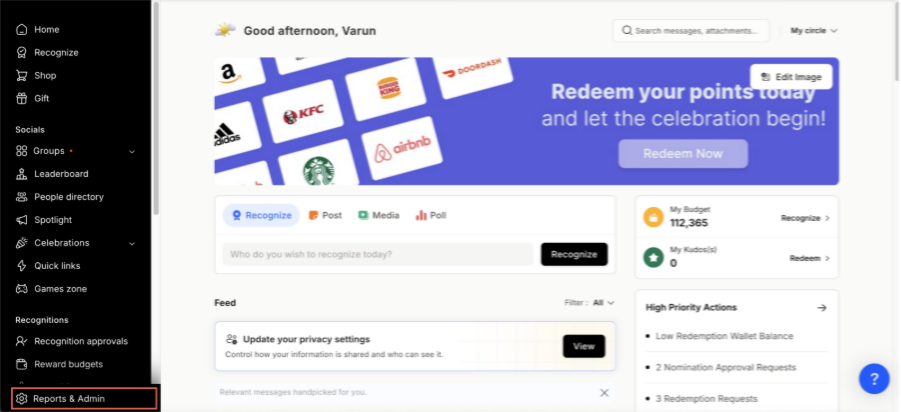
* Click on **Reports & Admin** to land onAdmin Dashboard.
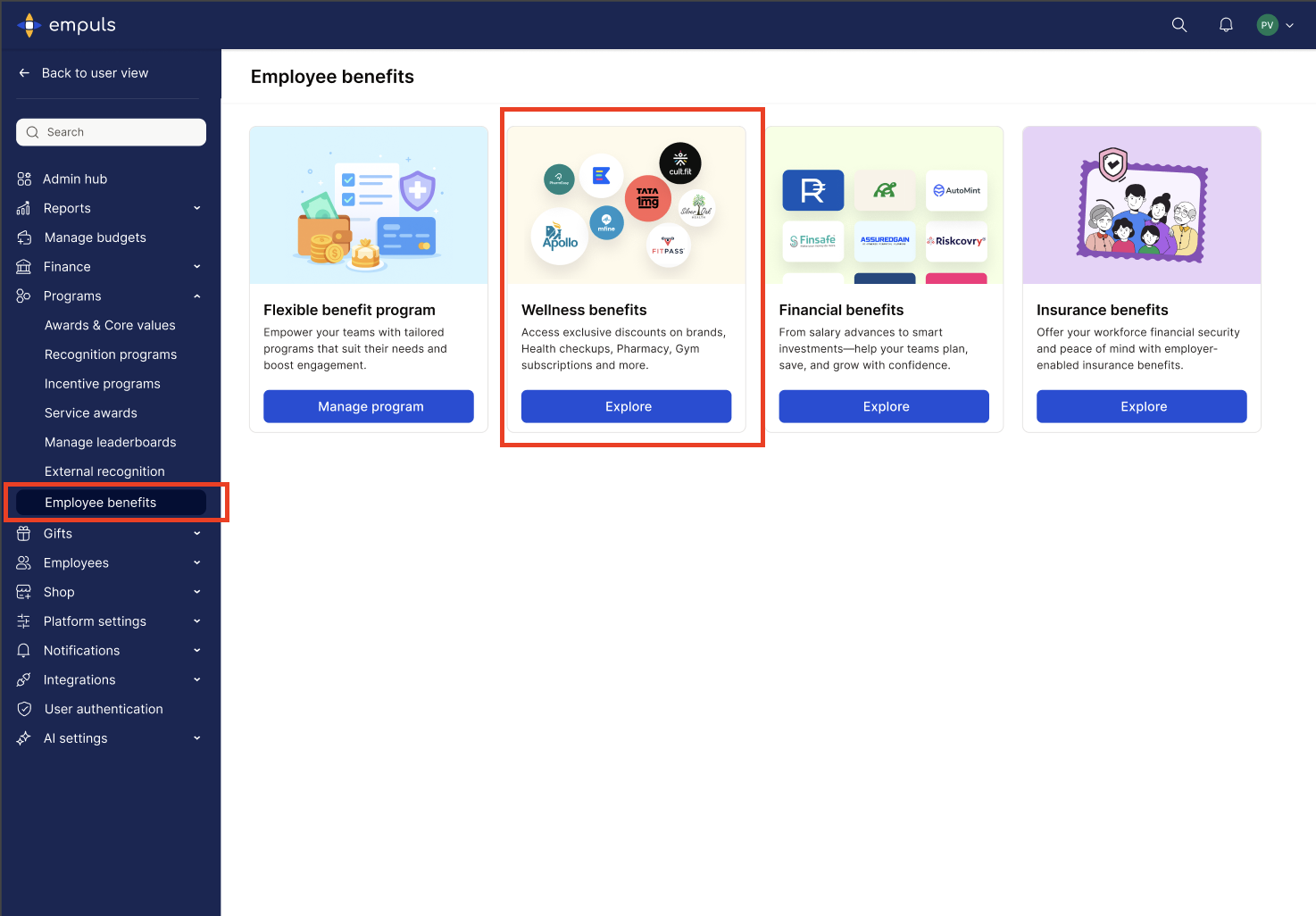
 * Navigate to **Program >> Manage Benefits >> Wellness Benefits**
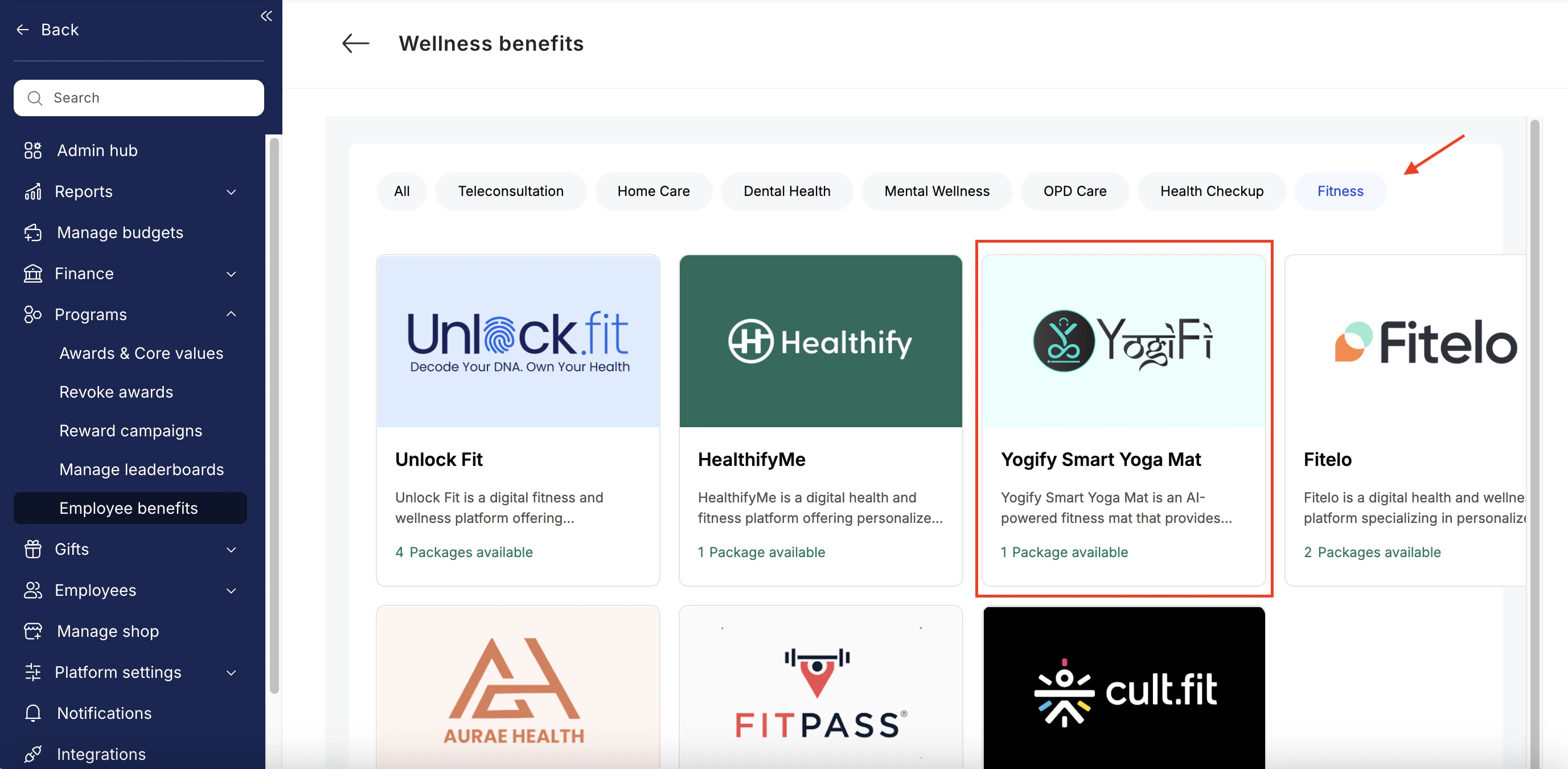
 * From the list of wellness partners, choose YogiFi.
 Enter:
* Number of employees
* Work email addresses
* Phone numbers
Enter:
* Number of employees
* Work email addresses
* Phone numbers
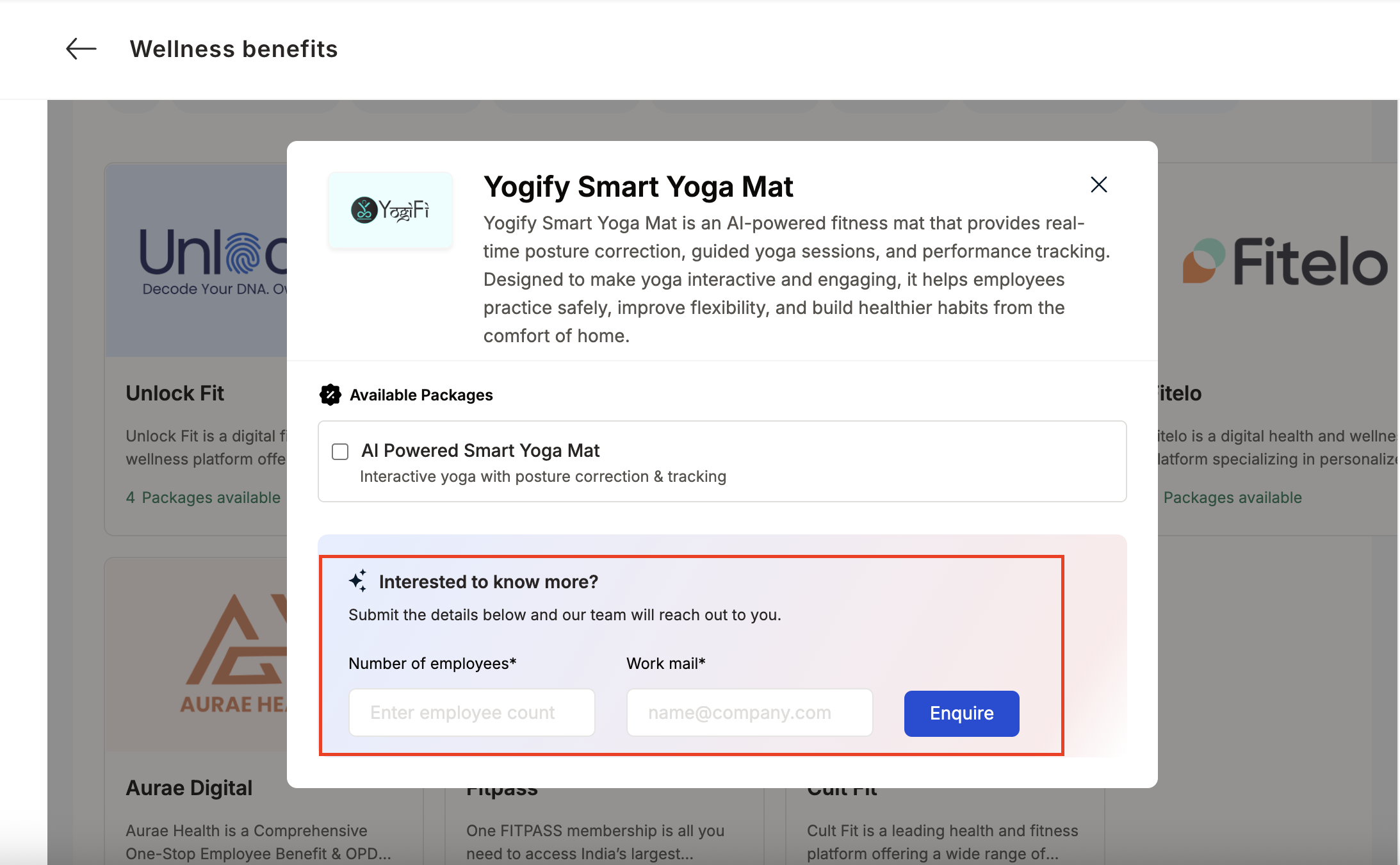 * Click **Enquire**.
* Our team will respond with details and pricing.
* Click **Enquire**.
* Our team will respond with details and pricing.
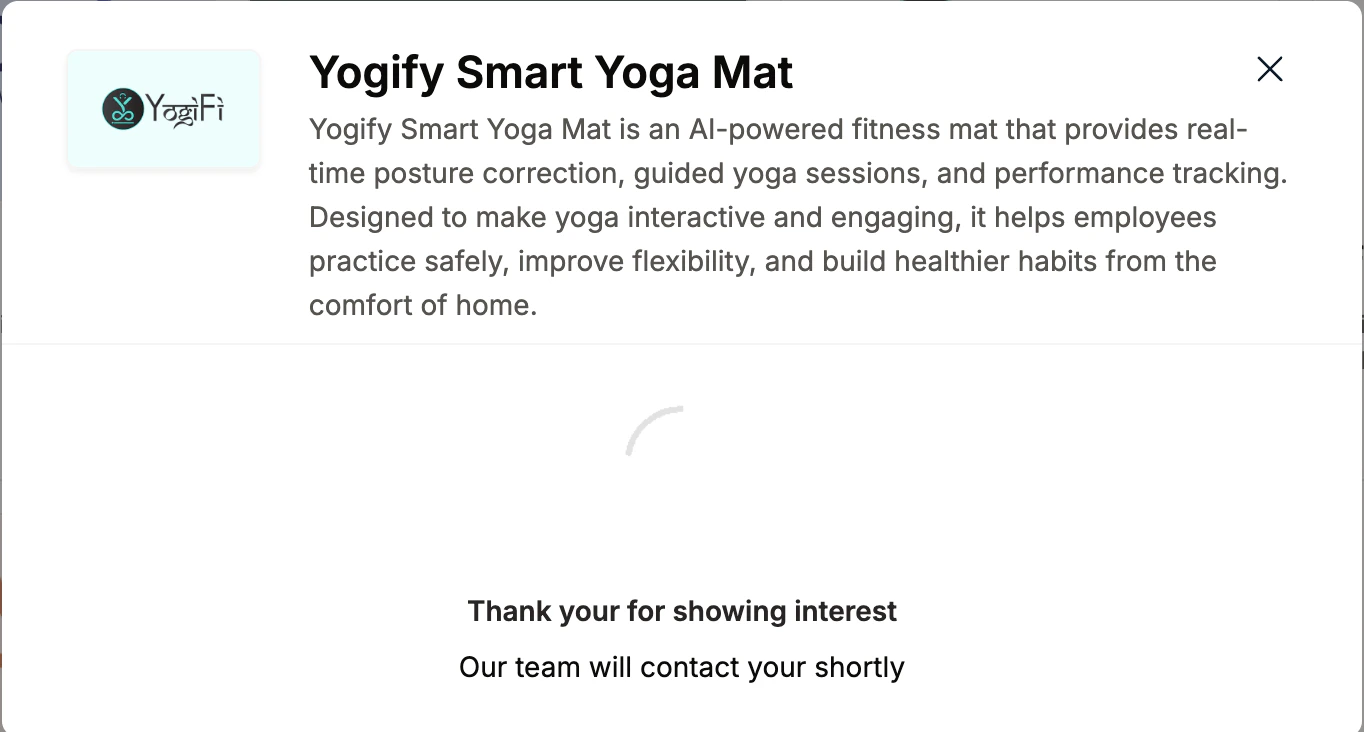 * Our team will connect with you, confirm pricing and requirements, and activate the benefit for all employees.
## How Employees Can Access YogiFi
Log in to Empuls with your credentials.
Navigate to **Shop → Health & Wellness.**
* Our team will connect with you, confirm pricing and requirements, and activate the benefit for all employees.
## How Employees Can Access YogiFi
Log in to Empuls with your credentials.
Navigate to **Shop → Health & Wellness.**
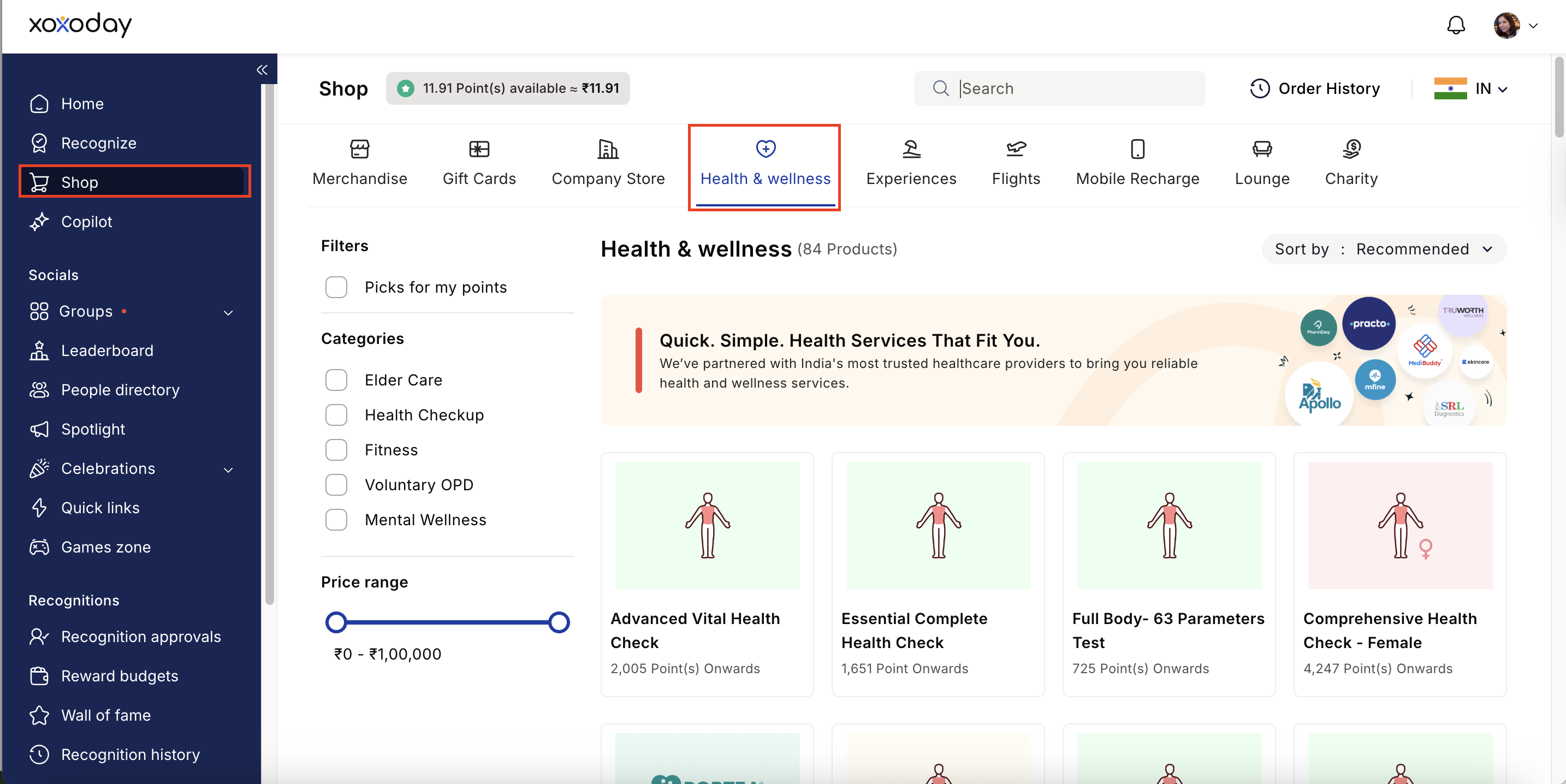 Select\*\* YogiFi \*\*from the available options.
Pick the well-being service you need.
Book your benefit by **c**licking on **Pay.**
## Support
For setup or usage assistance, contact us at **[cs@xoxoday.com](mailto:cs@xoxoday.com)**.
Select\*\* YogiFi \*\*from the available options.
Pick the well-being service you need.
Book your benefit by **c**licking on **Pay.**
## Support
For setup or usage assistance, contact us at **[cs@xoxoday.com](mailto:cs@xoxoday.com)**.