> ## Documentation Index
> Fetch the complete documentation index at: https://help-empuls.xoxoday.com/llms.txt
> Use this file to discover all available pages before exploring further.
# Smart digital healthcare with MFine
> Learn more about integrating Empuls with MFine
## About MFine
MFine is India’s AI-powered digital healthcare platform connecting users with leading hospitals, doctors, and diagnostic centers. With 600+ hospital partners, 5,000+ certified doctors, and services across 1,000+ cities, MFine empowers organizations to offer comprehensive employee healthcare wherever their employees are.
## Why Connect MFine with Empuls
Integrating MFine with Empuls helps organizations offer employees instant, data-driven healthcare and preventive wellness programs. Employees can access medical experts, schedule diagnostics, and track vitals—all in one place—while HR teams can promote proactive care, reduce absenteeism, and build a culture of holistic wellness and productivity.
## Key Benefits
* **For HR**
* **Unified health and engagement:** Combine employee engagement with medical support.
* **Preventive health strategy:** Detect and address issues early to lower healthcare costs.
* **Employee satisfaction:** Offer modern, tech-driven healthcare benefits.
* **Insightful analytics:** Track participation and wellness trends securely.
* **For Employees**
* **Convenient Access to Healthcare**
Employees can easily consult certified doctors, book lab tests, and order medicines—all from the comfort of their home through the MFine app.
* **Proactive Health Management**
Regular health checkups and diagnostic screenings help employees detect issues early, manage their health effectively, and maintain overall well-being.
## How Employees Can Use MFine
* **Book a Health Checkup**
Schedule comprehensive preventive screenings and diagnostic tests through MFine to monitor and manage your health effectively.
* **Get Early Detection Insights**
Use test results and expert analysis to identify potential health issues early and take proactive measures for better wellbeing.
* **Consult Certified Doctors Online**
Access quick and convenient outpatient consultations with qualified doctors directly from your home via MFine.
## Deliver MFine Benefits at Scale
Employers can enable MFine Corporate Health Programs to provide 24/7 digital medical access, preventive diagnostics, and wellness insights to their teams. This helps create a healthier, more resilient workforce—reducing absenteeism, improving morale, and ensuring timely healthcare for every employee.
**Follow the steps below:**
* Click on **Reports & Admin** to land onAdmin Dashboard.
* Navigate to **Program >> Manage Benefits >> Wellness Benefits**
* From the list of wellness partners, choose **MFine**
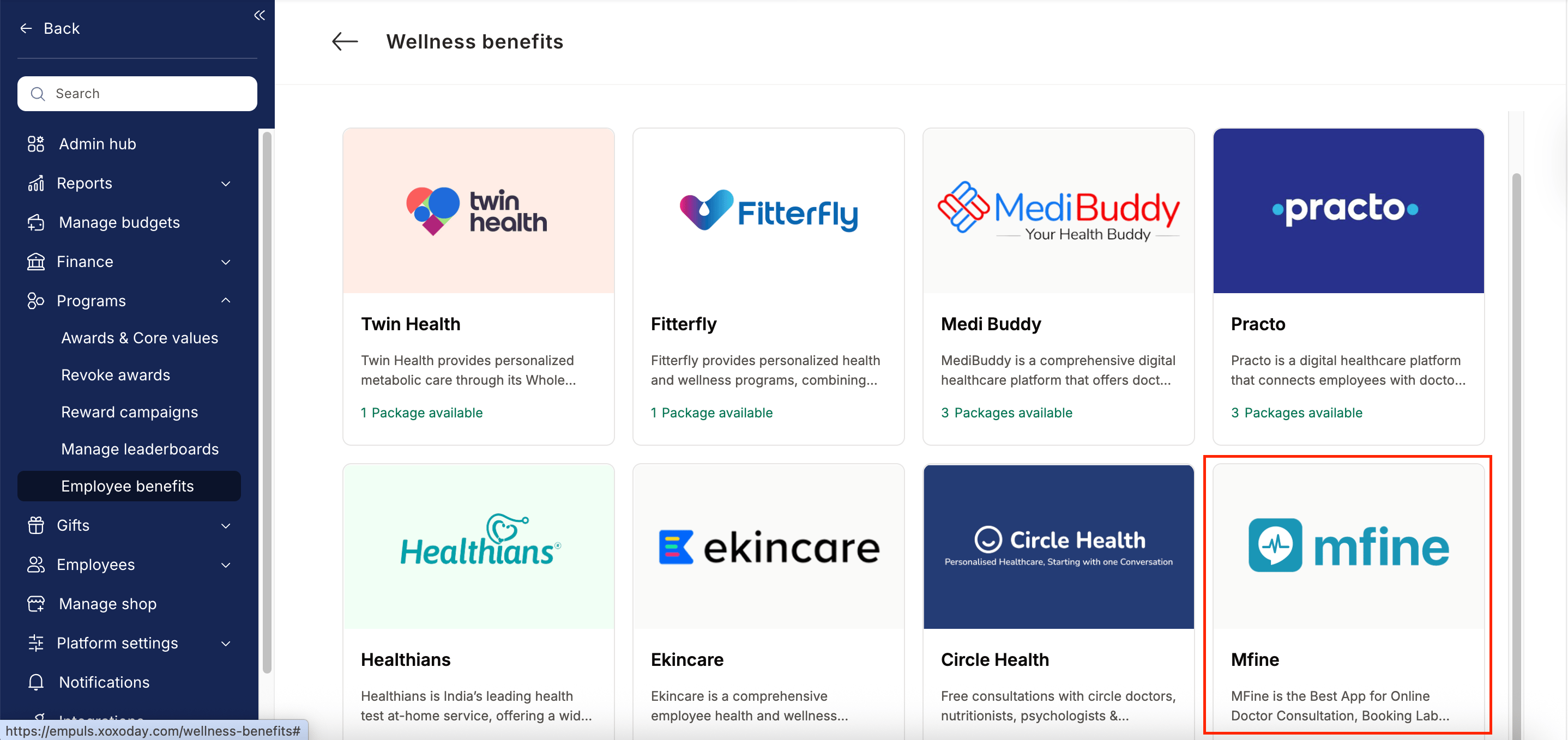 Enter:
* Number of employees
* Work email addresses
* Phone numbers
Enter:
* Number of employees
* Work email addresses
* Phone numbers
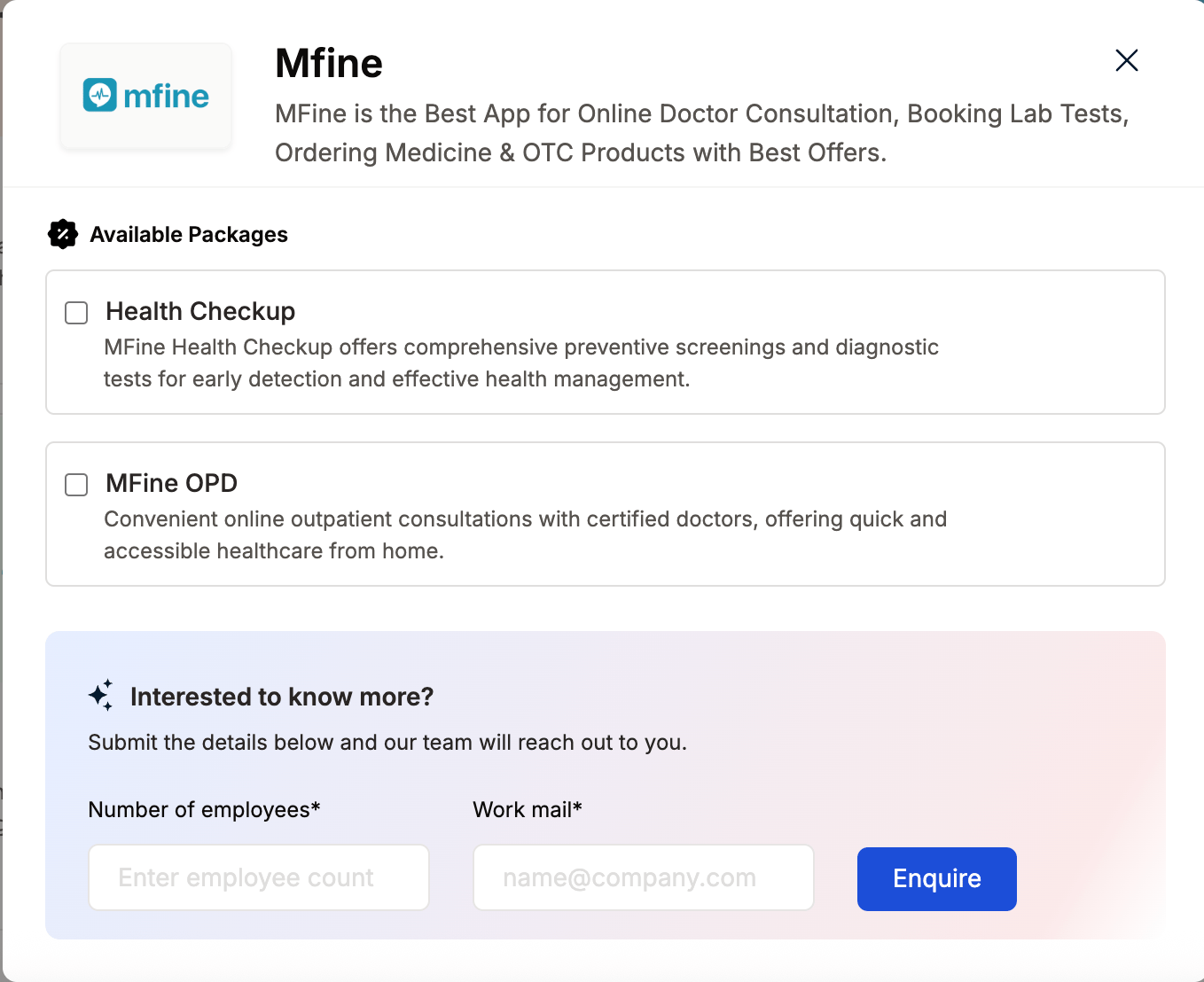 * Click **Enquire**.
* Our team will respond with details and pricing.
* Our team will connect with you, confirm pricing and requirements, and activate the benefit for all employees.
## How Employees Can Access MFine
Log in to Empuls with your credentials.
Navigate to \*\*Shop \*\*
Select\*\* MFine \*\*from the available options.
Pick the counselling or well-being service you need.
Book your benefit by clicking on **Pay.**
## Support
For setup or usage assistance, contact us at **[cs@xoxoday.com](mailto:cs@xoxoday.com)**.
* Click **Enquire**.
* Our team will respond with details and pricing.
* Our team will connect with you, confirm pricing and requirements, and activate the benefit for all employees.
## How Employees Can Access MFine
Log in to Empuls with your credentials.
Navigate to \*\*Shop \*\*
Select\*\* MFine \*\*from the available options.
Pick the counselling or well-being service you need.
Book your benefit by clicking on **Pay.**
## Support
For setup or usage assistance, contact us at **[cs@xoxoday.com](mailto:cs@xoxoday.com)**.