> ## Documentation Index
> Fetch the complete documentation index at: https://help-empuls.xoxoday.com/llms.txt
> Use this file to discover all available pages before exploring further.
# Wellbeing reimagined with Fitterfly
> Learn how to integrate Fitterfly with Empuls
## About Fitterfly
Fitterfly is a health-tech startup specializing in digital therapeutics (DTx) for metabolic health. Fitterfly combines personalized coaching with advanced technology to help individuals manage and reverse chronic conditions. The programs include:
* **Fitterfly Diabetes Prime**
A 6–12 month program designed to prevent, manage, or reverse type 2 diabetes and prediabetes.
* **Fitterfly Weight Loss**
A 3–6 month program focused on sustainable weight loss and maintenance.
* **Fitterfly FitHeart**
A program aimed at improving heart health through lifestyle modifications.
Fitterfly's programs are clinically validated and have shown significant improvements in health outcomes, including reductions in HbA1c levels, weight loss, and enhanced physical fitness.
## Why Connect Fitterfly with Empuls
This integration empowers HR teams to offer employees data-driven, personalized care plans backed by science. With real-time progress tracking and expert support, it enhances engagement, well-being, and overall organizational productivity.
## Key Benefits
* **For HR**
* **AI-driven health solutions**
Provide employees with personalized metabolic health plans based on real-time data.
* **Seamless integration**
Easily incorporate Fitterfly's programs into existing wellness initiatives through the Empuls platform.
* **Data-driven insights**
Monitor employee health metrics and track program engagement to assess effectiveness.
* **Cost-effective**
Reduce healthcare expenses by addressing the root causes of chronic conditions and promoting preventive care.
* **For Employees**
* **Personalized care**
Receive tailored recommendations for nutrition, activity, sleep, and stress management.
* **Continuous support**
Access a dedicated care team of health coaches and medical professionals.
* **Sustainable health improvements**
Achieve long-term health goals, such as weight loss and medication reduction, through evidence-based interventions.
* **User-friendly technology**
Utilize the Fitterfly app to track progress and stay connected with your care team.
## How Employees Can Use Fitterfly
* **Enroll in the Program**
Employees can sign up for Fitterfly's program through the Empuls platform, providing basic health information to personalize their care plan.
* **Wearable Sensors**
Upon enrollment, employees receive wearable sensors that continuously monitor key health metrics, feeding data into their digital twin.
* **Personalized Recommendations**
The Fitterfly app provides daily guidance on nutrition, activity, sleep, and stress management based on the individual's unique metabolic profile.
* **Regular Check-ins**
Employees have access to regular consultations with health coaches and medical professionals to discuss progress and adjust their care plan as needed.
* **Track Progress**
Through the Fitterfly app, employees can monitor their health metrics, set goals, and celebrate milestones, fostering motivation and sustained engagement.
## Co-Sponsor & Deliver Fitterfly Benefits at Scale
Enable employees to access Fitterfly’s personalized metabolic health programs organization-wide. Through Empuls integration, employers can easily launch wellness initiatives, monitor participation, and foster a healthier workplace culture. Follow the below steps:
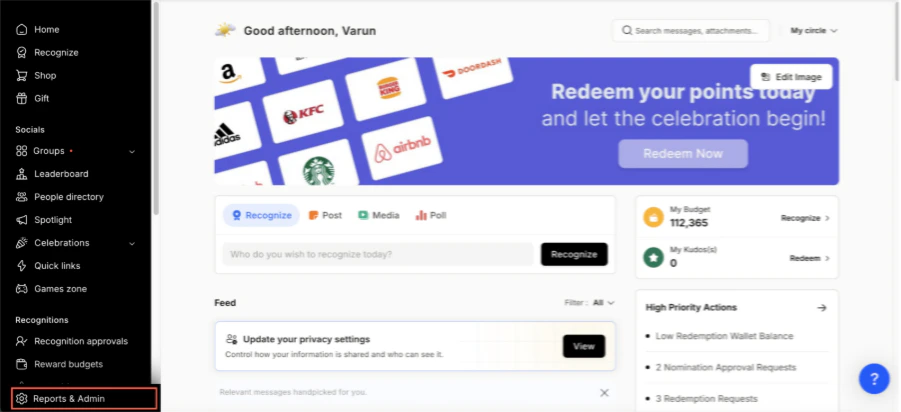
* Click on **Reports & Admin** to land onAdmin Dashboard.
 * Navigate to **Program >> Manage Benefits >> Wellness Benefits**
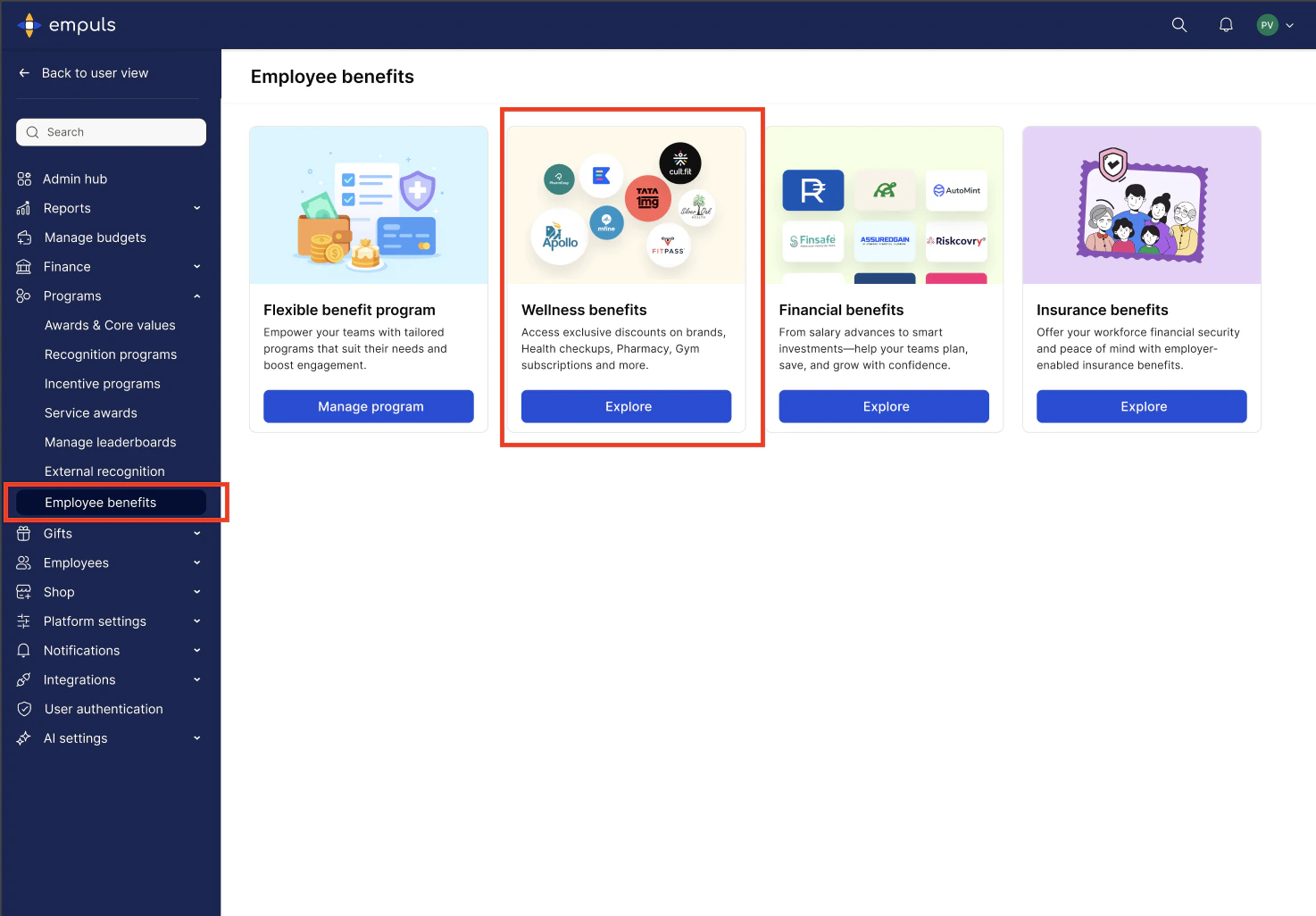 * From the list of wellness partners, choose Fitterfly.
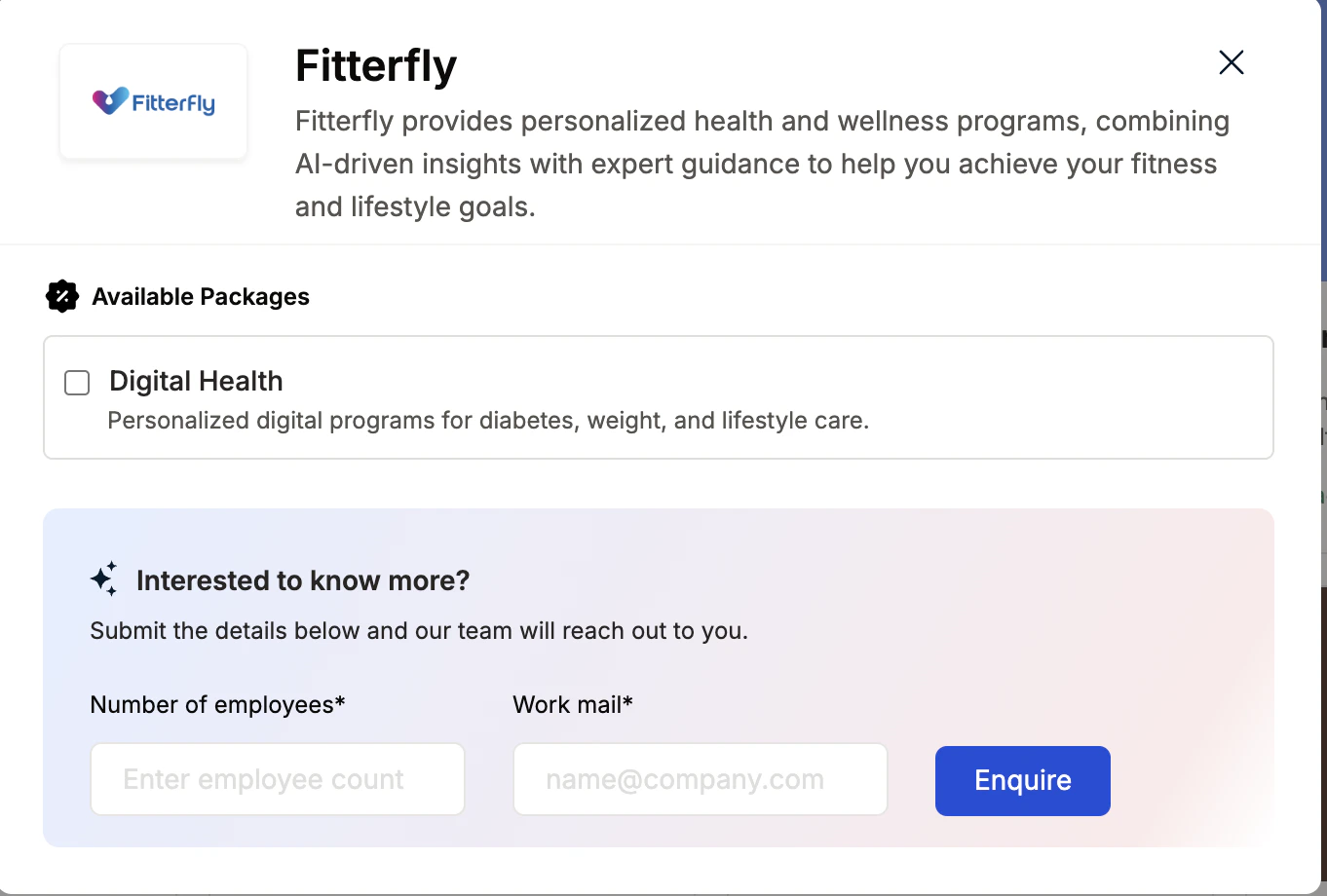 * Enter:
* Number of employees
* Work email addresses
* Phone numbers
* Click **Enquire**.
* Our team will respond with details and pricing.
* Our team will connect with you, confirm pricing and requirements, and activate the benefit for all employees.
## How Employees Can Access Fitterfly
Log in to Empuls with your credentials.
Navigate to **Shop → Health & Wellness.**
Select\*\* Fitterfly \*\*from the available options.
* Enter:
* Number of employees
* Work email addresses
* Phone numbers
* Click **Enquire**.
* Our team will respond with details and pricing.
* Our team will connect with you, confirm pricing and requirements, and activate the benefit for all employees.
## How Employees Can Access Fitterfly
Log in to Empuls with your credentials.
Navigate to **Shop → Health & Wellness.**
Select\*\* Fitterfly \*\*from the available options.
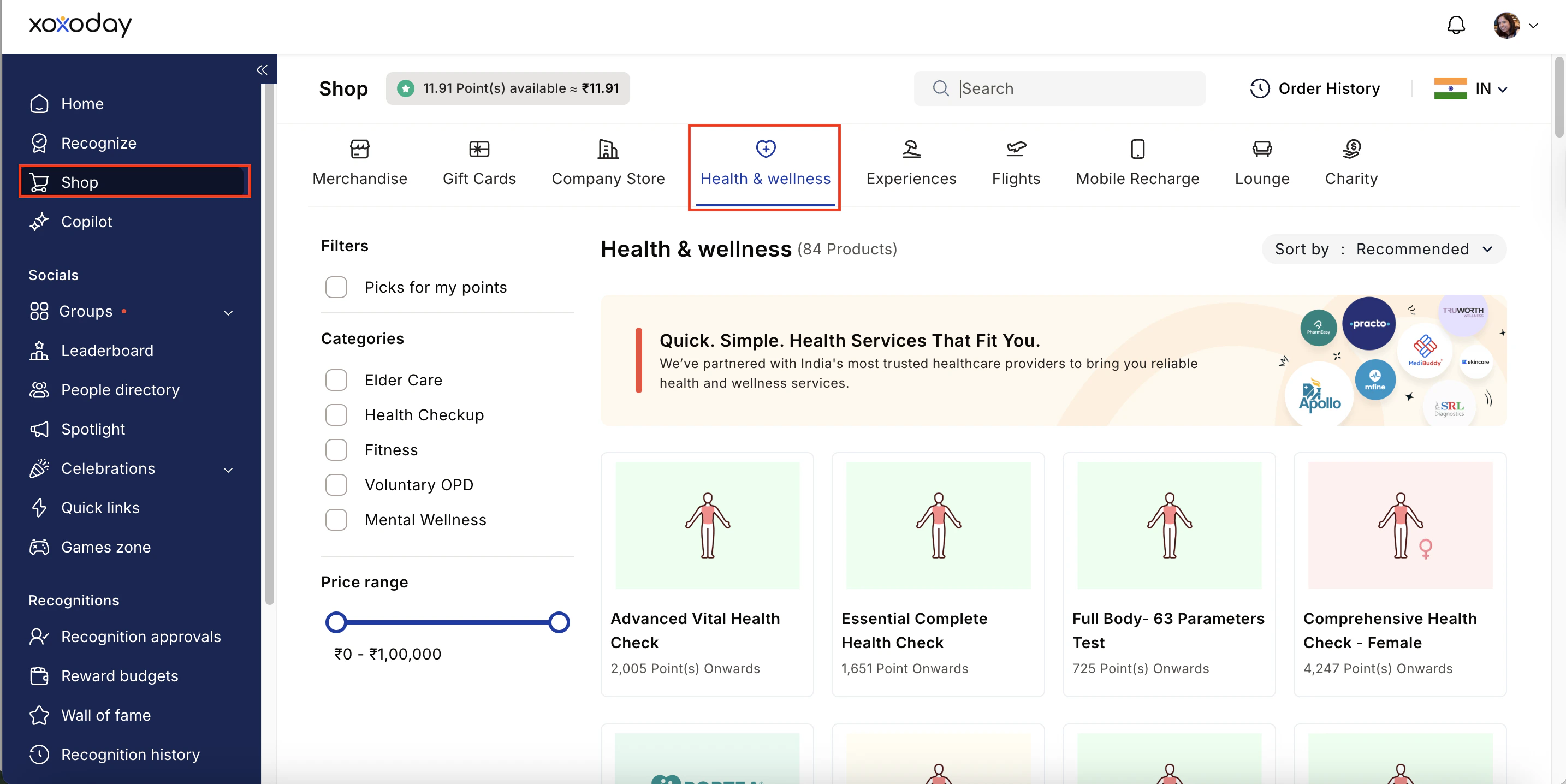 Pick the well-being service you need.
Book your benefit by **c**licking on **Pay.**
## Support
For setup or usage assistance, contact us at **[cs@xoxoday.com](mailto:cs@xoxoday.com)**.
Pick the well-being service you need.
Book your benefit by **c**licking on **Pay.**
## Support
For setup or usage assistance, contact us at **[cs@xoxoday.com](mailto:cs@xoxoday.com)**.