> ## Documentation Index
> Fetch the complete documentation index at: https://help-empuls.xoxoday.com/llms.txt
> Use this file to discover all available pages before exploring further.
# Cost of living index
> Apply per-region multipliers so a recognition point has equivalent purchasing power for employees in different geographies.
Cost-of-living index (COLI) lets you scale the redemption value of reward points by where the employee is based. A point earned in San Francisco can spend differently than the same point earned in Bangalore, and COLI makes the underlying purchasing power match by applying a multiplier per site.
## Video walkthrough
## Before you start
* You must be a **Super Admin**.
* Site entries must already exist under [org structure](/admins/org-structure) — COLI multipliers attach to sites.
* Decide your COLI philosophy before configuring. Common approaches:
* **Equal earning, scaled redemption** — Everyone earns the same points; multipliers adjust what those points buy.
* **Scaled earning, equal redemption** — Earnings already include geography; no COLI needed.
* **Hybrid** — COLI on benefits and gifts only; reward points untouched.
## How COLI works
For each site, you set a multiplier — 1.0 is the baseline, >1.0 multiplies up (higher purchasing power needed), \<1.0 multiplies down.
When an employee redeems, Empuls checks their site, looks up the multiplier, and adjusts how many points are deducted for a given catalog item.
The redemption catalog already filters by country and currency. COLI layers on top so the **point cost** of an item matches its real cost in the employee's region.
## Enable COLI
Navigate to **Admin Hub → Finance → Cost of Living**, or open it directly.
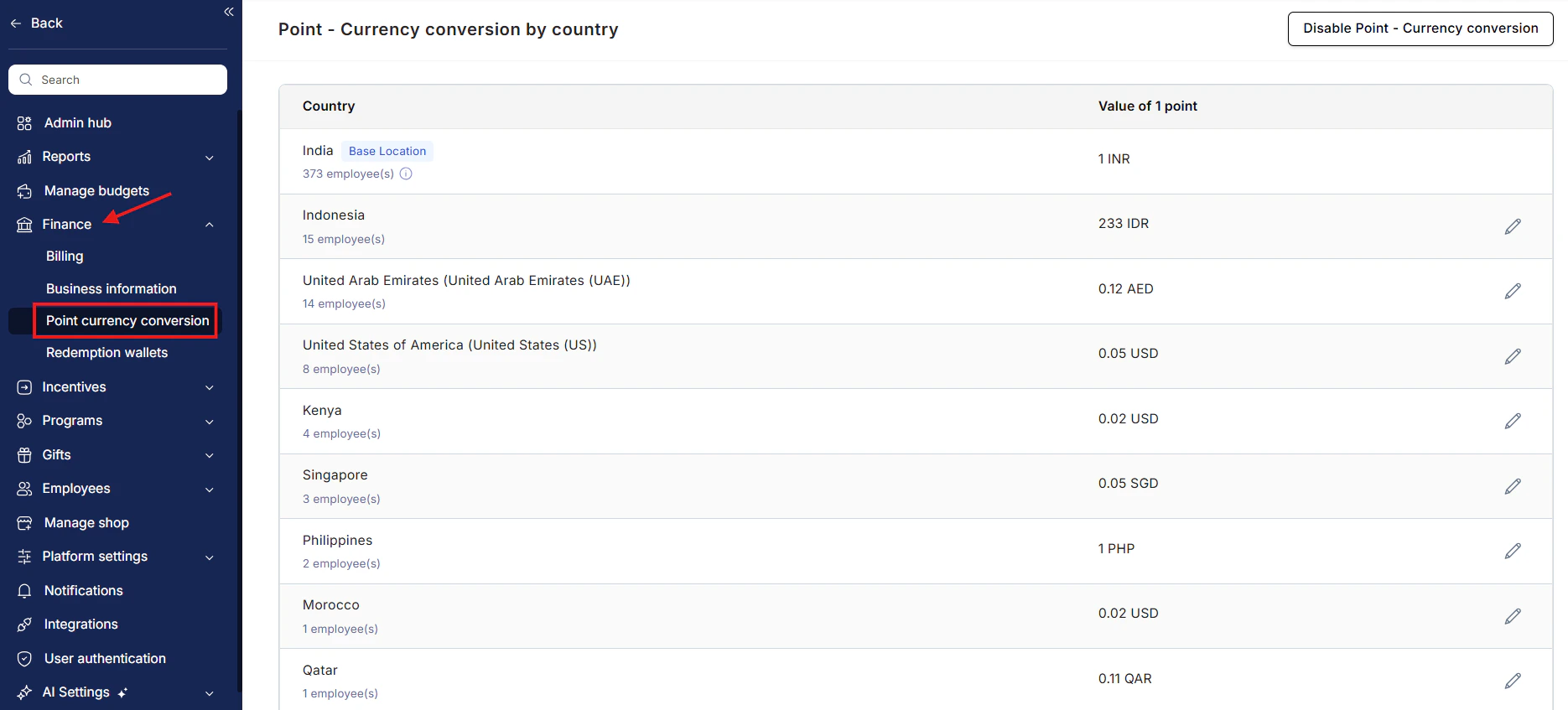 A confirmation banner appears explaining that COLI will affect all future redemptions. Existing point balances are unchanged.
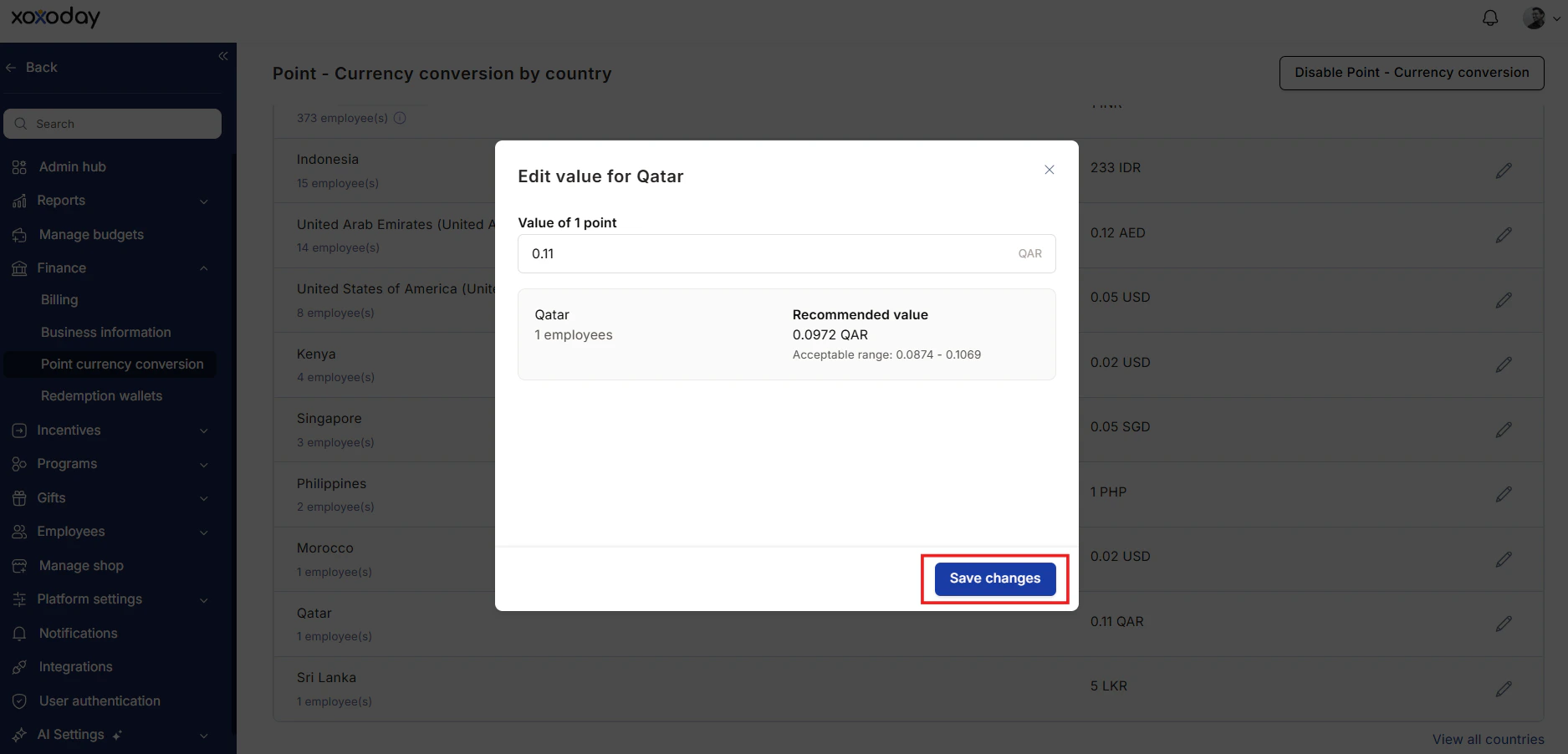
For each site, enter a multiplier. Multipliers must be positive decimals (for example, 0.4, 1.0, 1.6).
The preview pane shows what a sample catalog item would cost an employee at each site with the multipliers applied.
COLI goes live. Employees see the adjusted point cost in the catalog and at checkout.
A confirmation banner appears explaining that COLI will affect all future redemptions. Existing point balances are unchanged.
For each site, enter a multiplier. Multipliers must be positive decimals (for example, 0.4, 1.0, 1.6).
The preview pane shows what a sample catalog item would cost an employee at each site with the multipliers applied.
COLI goes live. Employees see the adjusted point cost in the catalog and at checkout.
 ## Worked example
Suppose a \$50 Amazon gift card costs 5,000 points at baseline (1.0 multiplier).
* **San Francisco** (multiplier 1.6): the same \$50 card costs 8,000 points.
* **Mumbai** (multiplier 0.4): the same \$50 card costs 2,000 points.
* **London** (multiplier 1.2): 6,000 points.
The card's monetary value to Empuls's redemption wallet is the same (\$50) regardless of who redeems — Empuls absorbs the geo difference via the COLI mechanism, not the employee.
## Edit a multiplier
Change a site's multiplier any time. The new value applies to all subsequent redemptions; nothing already redeemed is retroactively adjusted.
## Disable COLI
Toggle COLI off. The catalog reverts to baseline point costs for all sites. Existing point balances are unchanged.
## Limits and gotchas
* COLI requires every employee to have a site assigned. Employees without a site fall back to the baseline multiplier (1.0).
* COLI applies only to the standard redemption catalog. Perks store and Tax Benefits are not adjusted.
* Multipliers should reflect purchasing power, not local currency exchange rates. Use a reputable cost-of-living index when setting values.
* Frequent multiplier changes confuse employees. Set quarterly or annually; communicate changes in advance.
## Related
Define the sites COLI multipliers attach to.
Employee-facing redemption experience.
Wallet that funds adjusted redemptions.
## Worked example
Suppose a \$50 Amazon gift card costs 5,000 points at baseline (1.0 multiplier).
* **San Francisco** (multiplier 1.6): the same \$50 card costs 8,000 points.
* **Mumbai** (multiplier 0.4): the same \$50 card costs 2,000 points.
* **London** (multiplier 1.2): 6,000 points.
The card's monetary value to Empuls's redemption wallet is the same (\$50) regardless of who redeems — Empuls absorbs the geo difference via the COLI mechanism, not the employee.
## Edit a multiplier
Change a site's multiplier any time. The new value applies to all subsequent redemptions; nothing already redeemed is retroactively adjusted.
## Disable COLI
Toggle COLI off. The catalog reverts to baseline point costs for all sites. Existing point balances are unchanged.
## Limits and gotchas
* COLI requires every employee to have a site assigned. Employees without a site fall back to the baseline multiplier (1.0).
* COLI applies only to the standard redemption catalog. Perks store and Tax Benefits are not adjusted.
* Multipliers should reflect purchasing power, not local currency exchange rates. Use a reputable cost-of-living index when setting values.
* Frequent multiplier changes confuse employees. Set quarterly or annually; communicate changes in advance.
## Related
Define the sites COLI multipliers attach to.
Employee-facing redemption experience.
Wallet that funds adjusted redemptions.